TypeScript 7 migration: the errors you will hit and fixes
By Nihar Ranjan Das · Fri Oct 16 2026 · 9 min read · 0 views
View as a Web StorySoftware#typescript#migration#TypeScript 7#tsconfig#tsc
TypeScript 7 migration: the errors you will hit and fixes
What breaks when you upgrade to TypeScript 7?
TypeScript 7 breaks projects that still use options that TypeScript 6 only deprecated. Those options are now removed, and the compiler stops with an error before it checks a single file. The fastest path is to fix them on TypeScript 6 first.
TypeScript 7 is the first stable release of the native TypeScript compiler, a port of the toolchain to Go. InfoQ reported that deprecations from TypeScript 6.0 are now hard errors, and that strict and esnext became the defaults. It also reported full builds that run 8x to 12x faster than version 6, with VS Code dropping from 125.7 seconds to 10.6 seconds.
The speed is real, and it is the reason to do the work. Our own timing on three repos, in the post on whether bun check beats tsc 7, found tsc 7.0.2 about 4.8x faster than 6.0.3 on Zod and about 6.7x faster on this blog.
Three kinds of problem show up in practice. Removed compiler options fail first. Stricter checking then reports new errors in code that used to pass. Finally, tools that depend on the TypeScript API refuse to install or run, because the stable API arrives in 7.1.
Which tsconfig options does TypeScript 7 reject?
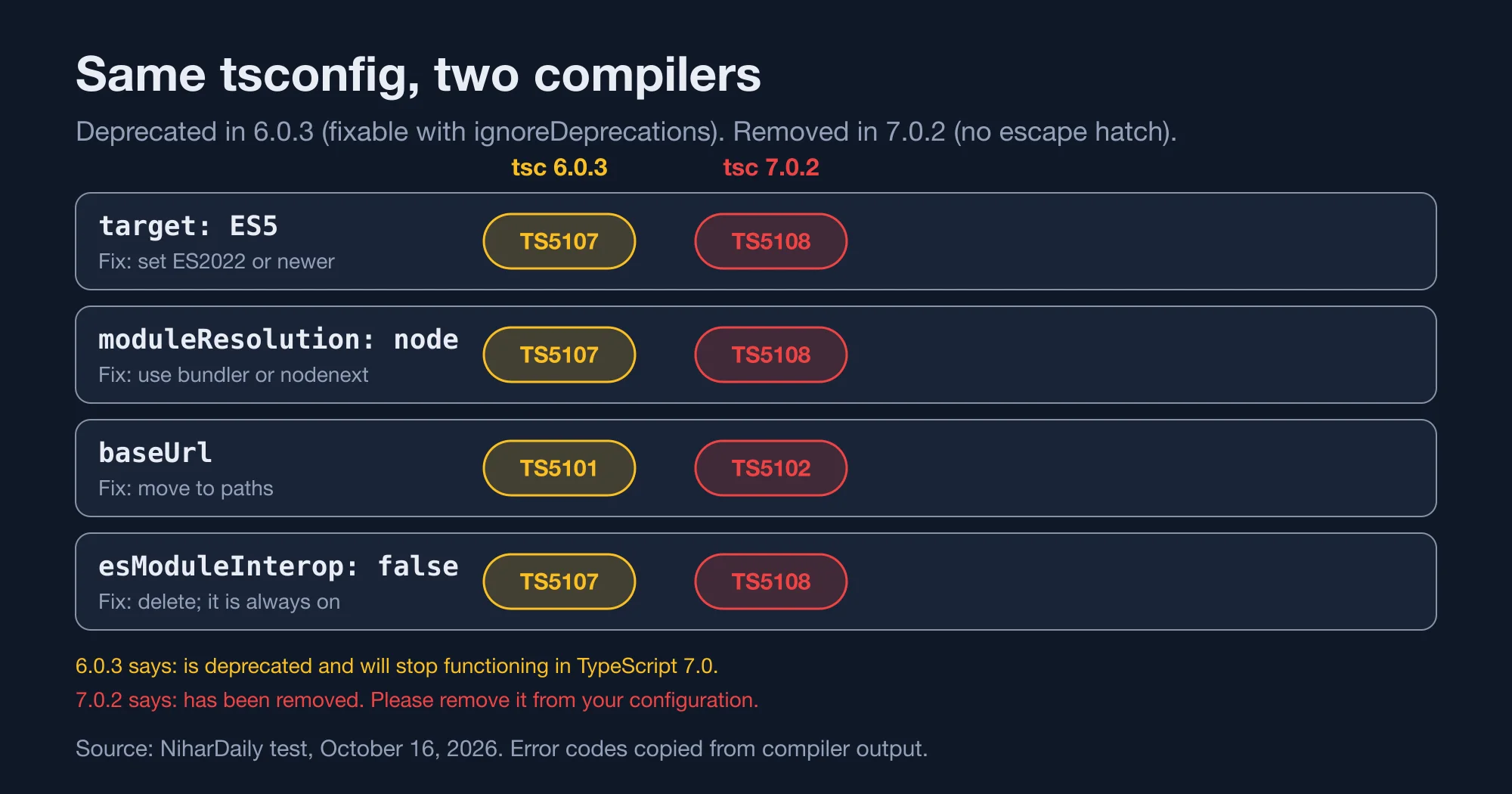
TypeScript 7.0.2 rejects four settings we tested: target: ES5, moduleResolution: node, baseUrl and esModuleInterop: false. Each produced an error with the code TS5108 or TS5102, and each had a one-line fix.
Method: we wrote one tsconfig.json with all four old settings and compiled a three-file project with tsc6 at 6.0.3 and tsc at 7.0.2. We copied the messages exactly. The table shows both results.
| Old setting | tsc 6.0.3 | tsc 7.0.2 | Fix |
|---|---|---|---|
target: ES5 |
TS5107, deprecated | TS5108, removed | Use ES2022 or newer |
moduleResolution: node |
TS5107, deprecated | TS5108, removed | Use bundler or nodenext |
baseUrl |
TS5101, deprecated | TS5102, removed | Move the prefix into paths |
esModuleInterop: false |
TS5107, deprecated | TS5108, removed | Delete it; interop is always on |
Source: NiharDaily test, October 16, 2026. Both compilers ran on the same files.
This is the exact text TypeScript 7.0.2 printed for the baseUrl line, including its own suggestion:
tsconfig.json(6,5): error TS5102: Option 'baseUrl' has been removed. Please remove it from your configuration.
  Use '"paths": {"*": ["./src/*"]}' instead.
The same messages on TypeScript 6.0.3 said the option "is deprecated and will stop functioning in TypeScript 7.0" and offered "ignoreDeprecations": "6.0" as a way to silence them. That is the useful version of the error, because it still compiled your code after you opted out.
Advertisement
Does ignoreDeprecations still work in TypeScript 7?
No. The "ignoreDeprecations": "6.0" flag silences the warning in TypeScript 6.0.3 but has no effect in 7.0.2, where the option is simply gone. We tested it with target: ES5 and the flag set, and version 7 still printed TS5108.
That makes the flag a trap for teams that adopted it as a permanent fix. It bought time on version 6 and nothing more. If your tsconfig.json contains it, search the file for the settings it hides and fix those.
Here is the configuration that compiled cleanly on both 6.0.3 and 7.0.2 in our lab, with the old utils/b bare import still resolving:
{
  "compilerOptions": {
    "target": "ES2022",
    "module": "esnext",
    "moduleResolution": "bundler",
    "paths": { "*": ["./src/*"] },
    "noEmit": true,
    "types": []
  },
  "include": ["src"]
}
Both compilers exited with code 0. The paths entry replaces baseUrl: "./src". It tells the compiler to try the src folder for every bare import, which is what the old option did.
For an application that is bundled, bundler resolution is the natural choice. For a library or a Node.js program that runs without a bundler, use nodenext, and expect to add file extensions to relative imports.
Why does tsc still print version 6 after the upgrade?
Because installing @typescript/typescript6 next to typescript@7.0.2 can point the tsc binary at version 6. In our install, node_modules/.bin/tsc was a link to @typescript/old/bin/tsc, and tsc -v printed Version 6.0.3.
The package metadata still said version 7. Running node -e "console.log(require('typescript/package.json').version)" printed 7.0.2, and the real binary lived at node_modules/typescript/bin/tsc. So a green build from npx tsc could be a build by the old compiler.
This is the install we ran:
npm i typescript@7.0.2 @typescript/typescript6
ls -l node_modules/.bin
tsc    -> ../@typescript/old/bin/tsc
tsc6   -> ../@typescript/typescript6/bin/tsc6
node_modules/.bin/tsc -v          # Version 6.0.3
node_modules/typescript/bin/tsc -v   # Version 7.0.2
@typescript/typescript6 is a compatibility package that re-exports the TypeScript 6.0 API and ships a tsc6 binary. InfoQ's report describes it as the way to run both side by side, and Visual Studio Magazine says tools that use the API may need it until 7.1.
The fix is cheap. Add tsc -v as the first line of your CI type-check job, and fail the job if the version is not the one you expect. Call tsc and tsc6 by explicit script names in package.json so no one depends on binary order.
Does TypeScript 7 report new errors in code that passed before?
Yes. On Hono's test project, TypeScript 6.0.3 reported zero errors and TypeScript 7.0.2 reported four. Two were unused @ts-expect-error directives and two were No overload matches this call.
We cloned Hono, installed its dependencies, and compiled tsconfig.spec.json with both compilers and with bun check. The 7.0.2 and Bun results matched exactly. Version 6.0.3 printed nothing. This blog, by contrast, produced the same four errors on both versions, and Zod produced the same fifteen.
A Mergify engineering post reports the same pattern: their native build flagged six errors that TypeScript 5.9 had missed, mostly unparameterized generics and missing browser-global typings. So new errors are not a fluke of one repo.
Two other defaults surprised us in the lab. With an empty tsconfig, both 6.0.3 and 7.0.2 rejected an untyped function parameter with TS7006: Parameter 'v' implicitly has an 'any' type, so strict checking is on by default in both. Both also rejected process.env with TS2591: Cannot find name 'process' even though @types/node was installed, because the types list is empty by default. The fix was "types": ["node"].
For example, a project that relied on every @types/* package loading automatically will see a wall of Cannot find name errors. Add the packages you need to types once, and the wall disappears.
Which tools block the TypeScript 7 upgrade?
Six of the ten tools we checked declare a TypeScript range that excludes version 7, and the other four declare ranges that allow it. A range is a promise, not a test, so a permissive range does not prove a tool works.
Method: we read each package's peerDependencies from the npm registry on October 16, 2026. We then reproduced the failure for the best-known case by installing typescript@7.0.2, typescript-eslint@8.71.2 and eslint@^9.0.0 in an empty project.
| Package | Version checked | Declared TypeScript range | Allows 7? |
|---|---|---|---|
| typescript-eslint | 8.71.2 | >=4.8.4 <6.1.0 |
No |
| ts-jest | 29.4.15 | >=4.3 <7 |
No |
| @angular/compiler-cli | 22.2.3 | >=6.0 <6.1 |
No |
| svelte-check | 4.7.6 | ^5.0.0 || ^6.0.0 |
No |
| @astrojs/check | 0.9.10 | ^5.0.0 || ^6.0.0 |
No |
| typedoc | 0.28.20 | 5.0.x through 6.0.x |
No |
| vue-tsc | 3.3.13 | >=5.0.0 |
Yes |
| tsup | 9.0.0 | >=4.5.0 |
Yes |
| ts-loader | 9.6.2 | * |
Yes |
| ts-node | 10.9.2 | >=2.7 |
Yes |
Source: npm registry peerDependencies, October 16, 2026.
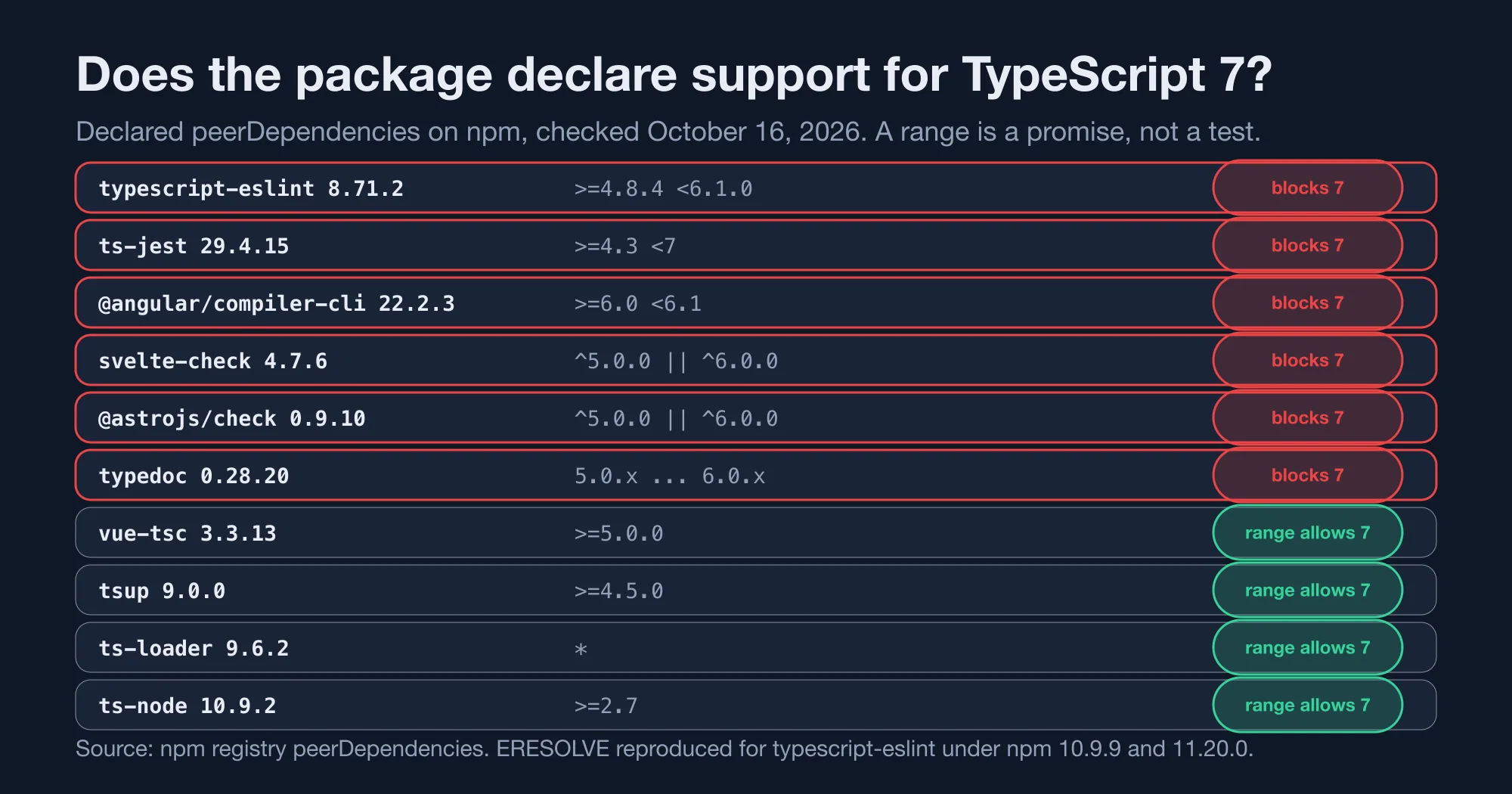
The install failed the way the range predicts. Both npm 10.9.9 and npm 11.20.0 stopped with ERESOLVE unable to resolve dependency tree, and the first conflict line read peer typescript@">=4.8.4 <6.1.0" from typescript-eslint@8.71.2.
The official stable API is the underlying reason. According to InfoQ, a stable programmatic API is missing in 7.0 and is expected in 7.1, which blocks typescript-eslint and the framework tooling for Vue, Svelte, Astro, MDX and Angular. Webpack loaders have no API surface in 7.0 either.
So a split setup is the realistic choice today. Run tsc 7 for type checking, and keep TypeScript 6 installed for the tools that need its API. The @typescript/typescript6 package exists for exactly that job.
How do you migrate step by step?
Upgrade to TypeScript 6 first, fix every deprecation, then switch the type-check step to version 7 while the API tools stay on 6. The order matters because version 6 still lets you silence a warning while you work.
- Pin the toolchain. Install
typescript@6and runtsc -vin CI. This is your baseline. - Fix the deprecations. Remove
ES5targets,node10resolution,baseUrlandesModuleInterop: false. Do not addignoreDeprecations. - Add
typesexplicitly. Listnode,jestorvitesttypes you need. Both versions require it. - Install version 7 beside it. Use
typescript@7.0.2for the compiler and@typescript/typescript6for tools. Check whichtscruns. - Compare outputs. Run both compilers on the same project and diff the error lists. Expect version 7 to find a few more.
- Move only the type check. Switch the CI step that runs
tsc --noEmit. Leave lint, tests and docs on the API package. - Revisit at 7.1. The InfoQ report says the team plans releases every three to four months, and 7.1 focuses on the API.
For a NestJS service, this lines up with the advice in our posts on the NestJS 12 upgrade and on NestJS 12 failing under Jest: change one layer at a time and keep a way back. Jest in particular depends on ts-jest, which our table shows excluding version 7.
Is it worth upgrading now or should you wait?
Upgrade the type-check step now if your tools allow it, and wait for 7.1 if typescript-eslint, ts-jest or a framework checker sits in your pipeline. The speed gain is large, and the split setup keeps risk low.
Consider two teams. A small API with tsup, ts-node and no lint rules can move fully to TypeScript 7 this week, since all three declare open ranges. A large Angular or Svelte app cannot, because the compiler CLI and checker both exclude 7 and will stay on 6 until their maintainers publish updates.
There is also a cost argument. Continuous integration minutes are billed, and cutting a type-check from several seconds to under one is small per run but large across thousands of runs. Editor support has also lagged, and one source we read says the Go language service is still expected in late 2026 or early 2027, so your editor may still use the JavaScript service for now.
The bottom line: fix the four removed options on TypeScript 6 today, add a version check to CI, and keep TypeScript 6 installed for any tool that reads the API until 7.1 arrives.
If a teammate asks why the build is green but the old error persists, ask them to run tsc -v. If you cannot find which package pins the old range, contact the maintainer through its issue tracker and link the peer range you saw.
Advertisement
FAQ
What does TS5108 option has been removed mean?
TS5108 means your `tsconfig.json` uses an option or value that TypeScript 7 no longer supports, such as `target: ES5` or `moduleResolution: node`. Remove it or pick a supported value. TypeScript 6.0.3 showed the same setting as TS5107, a deprecation.
What replaces baseUrl in TypeScript 7?
Use `paths`. TypeScript 7.0.2 told us to replace `baseUrl: "./src"` with `"paths": {"*": ["./src/*"]}`. Our test project then compiled cleanly on both 6.0.3 and 7.0.2 with `moduleResolution` set to `bundler`.
Does ignoreDeprecations 6.0 work in TypeScript 7?
No. It silences deprecation errors in TypeScript 6.0.3, but TypeScript 7.0.2 still reports the removed options with TS5108. Treat the flag as a short-term bridge on version 6 and fix the underlying settings.
Does typescript-eslint work with TypeScript 7?
Not yet in the version we checked. typescript-eslint 8.71.2 declares a peer range of `>=4.8.4 <6.1.0`, and installing it with TypeScript 7.0.2 failed with ERESOLVE on npm 10.9.9 and 11.20.0. The stable API is expected in 7.1.
Why does tsc -v show 6.0.3 after installing TypeScript 7?
The `@typescript/typescript6` package can point `node_modules/.bin/tsc` at the old compiler. In our install, `.bin/tsc` linked to `@typescript/old` and printed 6.0.3. Run `node_modules/typescript/bin/tsc -v` to confirm version 7.
Comments
Loading…
Sign in to join the conversation.
Related posts

Deno Deploy shuts down in 6 months: your move to Workers
Deno Deploy shuts down about six months after October 9, 2026. Here is the dated timeline, a feature map to Cloudflare Workers, and a cost model at three traffic levels.
Fri Oct 16 2026 · 10 min read · 1 views
Does bun check really beat tsc 7? We timed it on 3 repos
Bun 1.4.3 claims bun check is 3x to 6.4x faster than tsc 7. We timed both on a Next.js app, Hono and Zod: 2.6x to 4.4x, with identical errors and two caveats.
Fri Oct 16 2026 · 10 min read · 1 views

pnpm 12 upgrade: what breaks in CI and how to fix it
pnpm 12 is now the npm latest tag. We tested the CI breakers: an ENOEXEC switch failure, a removed flag, and the new workspace settings error, with the fix for each.
Fri Oct 16 2026 · 8 min read · 0 views