Generative AI Data Privacy in Laravel: Redact Before Sending
By Nihar Ranjan Das · Fri Oct 09 2026 · 12 min read · 0 views
View as a Web StoryAISoftware#ai privacy#Laravel#php#pii redaction#data security
Generative AI data privacy in a Laravel app comes down to one rule: the model, your logs and your database should only ever hold text you are willing to leak. A small PHP redactor can enforce that for emails, cards, keys and phone numbers. It cannot enforce it for names and addresses. I measured both, and the gap between them is the part most guides skip.
I wrote a redactor with ten rules and tested it on 2,800 synthetic samples across 14 data types, generated with Faker on Laravel 13.35 and PHP 8.4. Every pattern-shaped type was fully removed. Every free-text type, such as names and street addresses, leaked 200 times out of 200. I also checked where raw prompts end up inside the Laravel AI SDK, and the answer includes your own database.
Generative AI data privacy is the set of controls that stop personal, financial and secret data from reaching, or staying inside, systems that run language models. It covers the request you send, the provider's retention rules and every place your own app stores the prompt.
PII redaction is the removal or replacement of personally identifiable information in text before it is processed or stored. The usual replacement is a placeholder such as [EMAIL_1], which can be swapped back later.
Where does your data leak when you call an AI API?
Data leaks in three places: the request itself, the provider's handling of it and your own storage of it. The first and third are under your control. The second depends on a contract and a setting.
| Place | Who controls it | What to do |
|---|---|---|
| The request to the model | You | Redact before prompt() |
| Provider retention and training | Provider terms and your plan | Read the terms, use zero-retention options where offered |
| Your logs, events and database | You | Store redacted text, not raw text |
I checked the third row in the Laravel AI SDK. The AgentPrompted event carries the prompt string, and the optional conversation tables store each message. Both hold exactly the string you passed to prompt(). I ran a raw prompt and a redacted one through the same agent. The raw one wrote the customer's email into the agent_conversation_messages table, and the redacted one wrote [EMAIL_1].
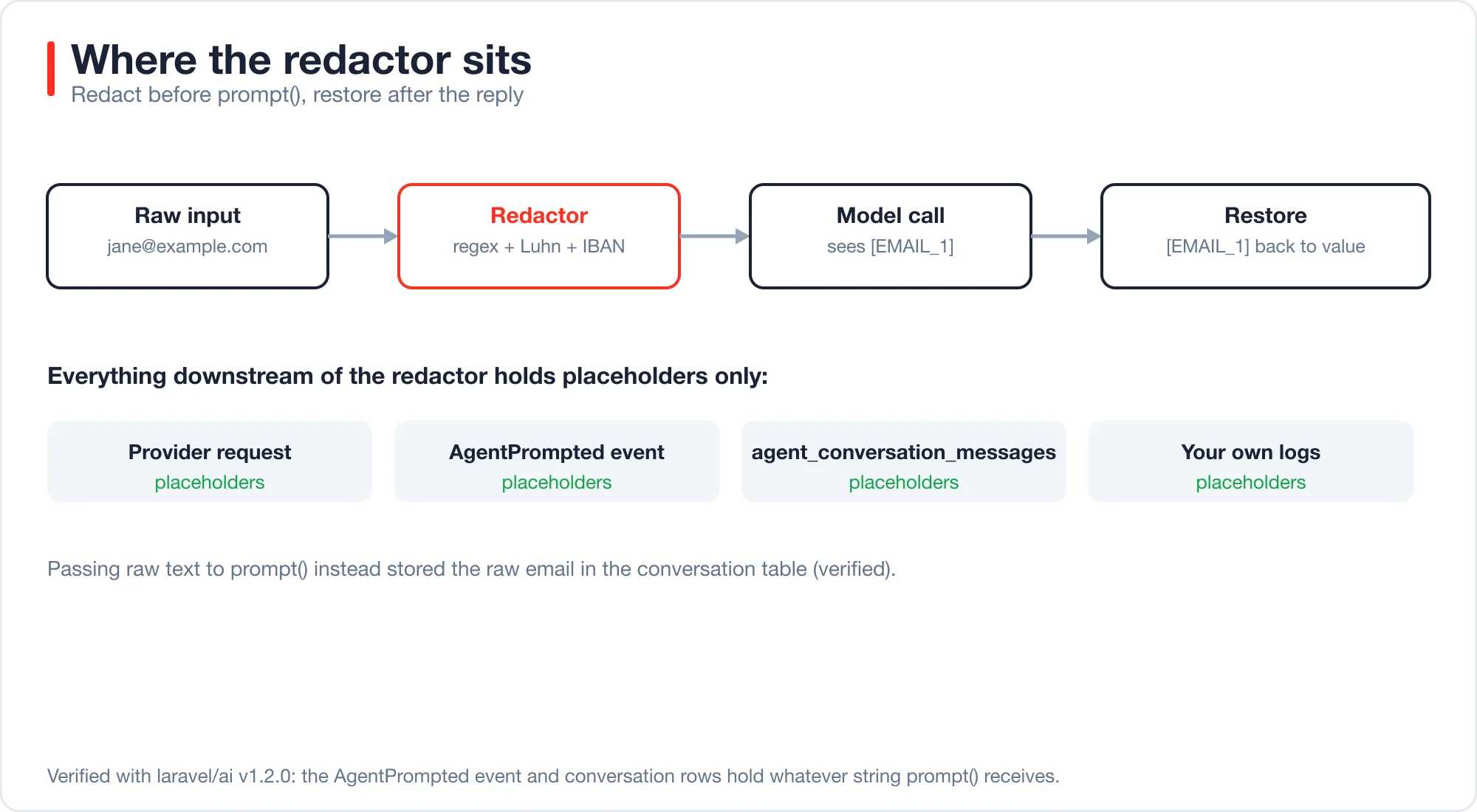
That makes the redactor the single choke point. Anything you redact before the call is clean everywhere downstream, including in a log listener you add next year and forget about.
Provider terms are a separate question. Whether a free tier trains on your data differs by vendor and changes often. The post on whether the free AI API tier trains on your data covers how to check. Redaction helps in either case, because data you never send cannot be retained.
How do you build a redactor in PHP?
Run an ordered list of regular expressions, add checksums where a pattern alone is ambiguous, and replace each match with a numbered placeholder. Keep a map so you can restore the original values in the model's reply.
Advertisement
Order matters. Secrets must run before generic numbers, or a key could be half-eaten by a phone rule. Checksums matter because a long digit string is not always a card. The Luhn algorithm is a checksum that valid payment card numbers satisfy, and it filters out look-alike digit strings such as order ids.
<?php

namespace App\Support;

class Redactor
{
    protected array $map = [];
    protected array $counters = [];

    protected function rules(): array
    {
        return [
            'url_credentials' => '~(?<=://)[^\s:/@]+:[^\s@/]+(?=@)~',
            'jwt' => '~\beyJ[A-Za-z0-9_-]{8,}\.[A-Za-z0-9_-]{8,}\.[A-Za-z0-9_-]{8,}\b~',
            'api_key' => '~\b(?:sk-(?:live|test|proj)?-?[A-Za-z0-9_-]{20,}|AKIA[0-9A-Z]{16}|ghp_[A-Za-z0-9]{36}|xox[baprs]-[A-Za-z0-9-]{10,})\b~',
            'email' => '~[A-Za-z0-9._%+-]+@[A-Za-z0-9-]+(?:\.[A-Za-z0-9-]+)*\.[A-Za-z]{2,}~',
            'iban' => '~\b[A-Z]{2}\d{2}(?: ?[A-Z0-9]{4}){2,7}(?: ?[A-Z0-9]{1,4})?\b~',
            'card' => '~\b\d(?:[ -]?\d){12,18}\b~',
            'ssn' => '~\b\d{3}-\d{2}-\d{4}\b~',
            'ipv4' => '~(?i)(?<!\bversion )(?<!\bv)(?<![\w.])(?:(?:25[0-5]|2[0-4]\d|1?\d?\d)\.){3}(?:25[0-5]|2[0-4]\d|1?\d?\d)(?![\w.])~',
            'phone' => '~(?<![\w.+-])(?:\+\d{1,3}(?:[ .-]?\d{1,4}){2,6}|(?:\(\d{3}\)\s?|\d{3}[ .-])\d{3}[ .-]\d{4})(?![\w-])~',
            'dob' => '~(?i)(?:dob|date of birth|born(?: on)?)\s*[:\-]?\s*\d{1,4}[-/. ]\d{1,2}[-/. ]\d{1,4}~',
        ];
    }

    public function redact(string $text): string
    {
        $this->map = [];
        $this->counters = [];

        foreach ($this->rules() as $name => $regex) {
            $text = preg_replace_callback($regex, function (array $m) use ($name) {
                $value = $m[0];

                if ($name === 'card' && ! $this->luhn(preg_replace('/\D/', '', $value))) {
                    return $value;
                }
                if ($name === 'iban' && ! $this->ibanOk($value)) {
                    return $value;
                }

                $n = $this->counters[$name] = ($this->counters[$name] ?? 0) + 1;
                $placeholder = '['.strtoupper($name).'_'.$n.']';
                $this->map[$placeholder] = $value;

                return $placeholder;
            }, $text);
        }

        return $text;
    }

    public function restore(string $text): string
    {
        return strtr($text, $this->map);
    }

    // luhn() and ibanOk() are the standard checksum routines.
}
The full class has the two checksum methods, which are the usual Luhn sum and the IBAN mod-97 check. The IBAN article on Wikipedia explains the second one.
Wrap the agent call so no caller can forget to redact:
class PrivatePrompt
{
    public static function run(Agent $agent, string $text): string
    {
        $redactor = new Redactor;
        $reply = $agent->prompt($redactor->redact($text))->text;

        return $redactor->restore($reply);
    }
}
I ran this with a scripted model. The model saw Customer [EMAIL_1] disputes a charge on card [CARD_1]. The user received a reply with the real email and card restored. The system prompt must tell the model to keep placeholders unchanged, or it may rephrase [EMAIL_1] into something that cannot be restored.
What did the redactor catch?
It fully removed all 11 pattern-shaped types in every sample I ran. It removed none of the three free-text types. The results below use 200 samples per type from a Faker seed (7) that I did not use while writing the rules.
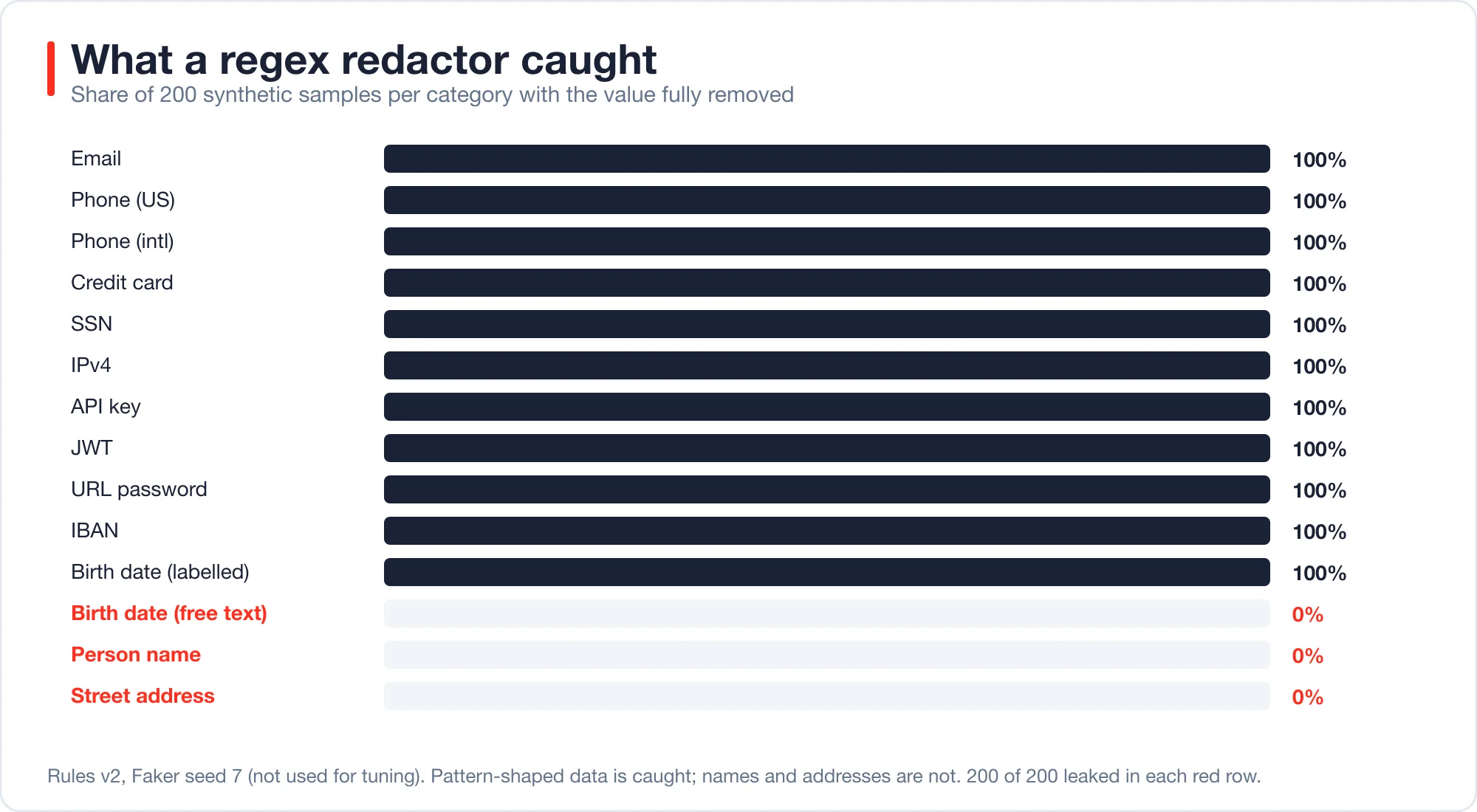
| Data type | Samples | Value still present after redaction |
|---|---|---|
| Email, US phone, international phone, credit card, SSN | 200 each | 0 |
| IPv4, API key, JWT, URL password, IBAN, labelled birth date | 200 each | 0 |
| Birth date in a sentence | 200 | 200 |
| Person name | 200 | 200 |
| Street address and city | 200 | 200 |
Read the zeros carefully. I generated these samples, so they contain the formats I thought of. A 100 percent score means my rules match my own test data. It does not mean 100 percent of the real world. Real tickets have typos, line breaks and formats I never imagined.
The second finding is the useful one. A regex works on data with a shape. A name has no shape. "Jane Doe" and "Jane Street" look the same to a pattern, and so does a street address embedded in a sentence.
What did my first version get wrong?
Version one leaked 20 to 30 percent of international phone numbers and wrongly redacted 5 of 16 harmless strings. Both problems came from rules that were too loose in one place and too narrow in another.
| Metric | Version 1 | Version 2 |
|---|---|---|
| International phones removed (seed 42) | 80 percent | 100 percent |
| International phones removed (seed 7) | 70 percent | 100 percent |
| Look-alike strings wrongly changed, out of 16 | 5 | 1 |
The 16 look-alikes were strings that carry digits but no personal data. Version one changed Order 20261010-4477 and Invoice INV-2026-000123 into [PHONE_1], and it changed the software version 10.2.3.4 into [IPV4_1]. It also turned a Luhn-invalid build id into [PHONE_1]-3456.
The fixes were small. International numbers must start with a plus sign. US numbers must match a strict 3-3-4 shape and must not sit inside a longer hyphenated token. An IPv4 match is skipped after the word "version".
One look-alike still fails in version two: Server 192.168.1.10. A private IP address is a real IPv4 address, so I left that rule alone. You may prefer to skip private ranges, since they identify a machine, not a person.
Version one also had a bug that a test caught by accident: the card rule swallowed the space after a number, so 4111 1111 1111 1111 but became [CARD_1]but. Always read redacted output, not just the miss count.
False positives cost something too. Over-redaction removes information the model needs, such as an order number it should quote. Track both numbers, and tune with a fixed set of look-alikes.
What does a regex redactor miss?
It misses anything obfuscated, split or described in words. I probed it with eight hand-written inputs, and it caught only the two that matched a pattern.
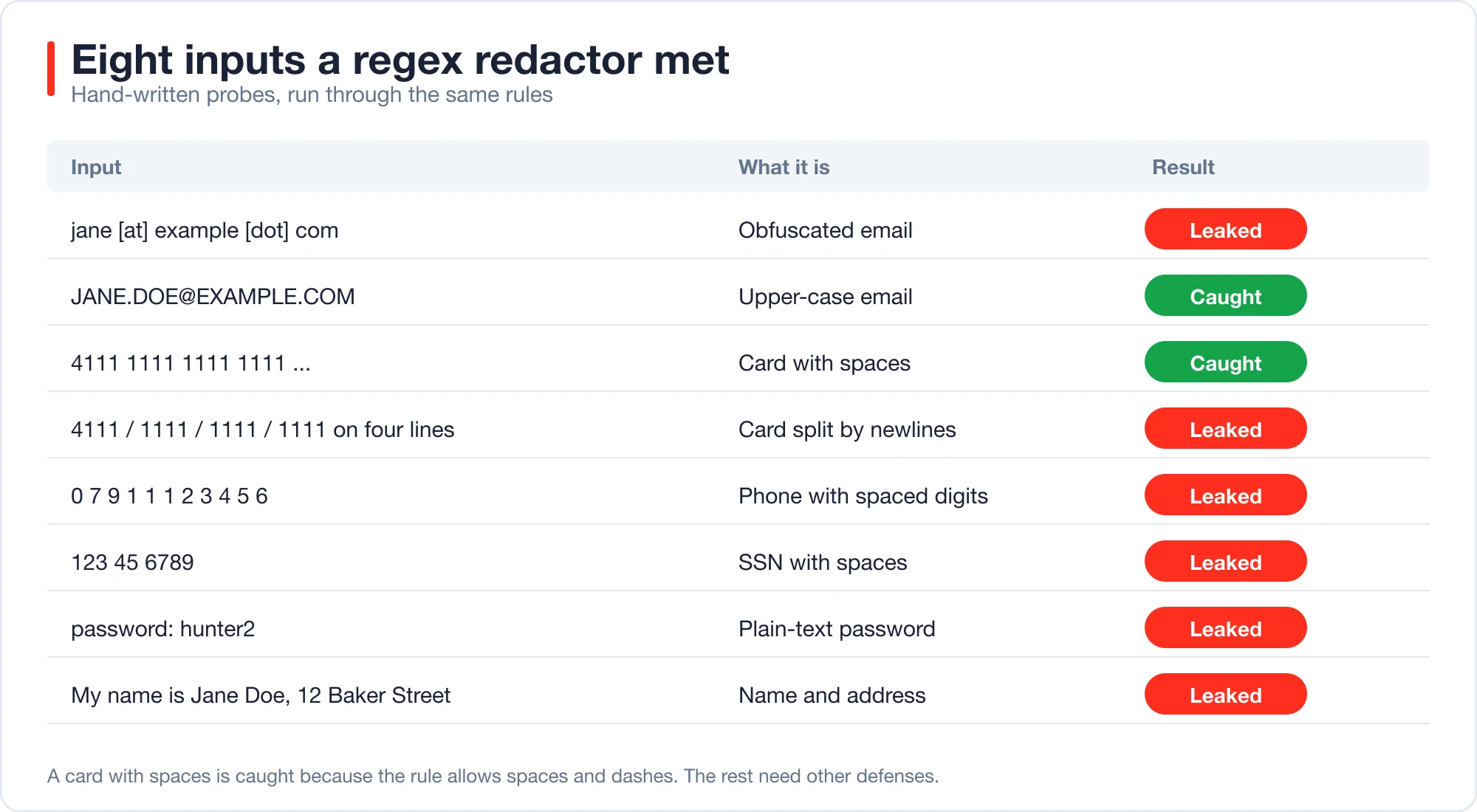
| Probe | Result |
|---|---|
jane [at] example [dot] com |
Leaked |
JANE.DOE@EXAMPLE.COM |
Caught |
4111 1111 1111 1111 in a sentence |
Caught |
| Card digits split over four lines | Leaked |
0 7 9 1 1 1 2 3 4 5 6 |
Leaked |
123 45 6789 as an SSN |
Leaked |
password: hunter2 |
Leaked |
| A name and a street address in a sentence | Leaked |
Some of these are fixable with more rules, such as allowing newlines between card digit groups. Others are not, because they depend on meaning. No pattern knows that hunter2 is a password. Each added rule also adds false positives, so the fix list never ends.
That is why I treat the redactor as a floor. It stops the careless leaks, such as a pasted API key, and it lowers risk. It does not make a prompt safe to send.
How do you handle names and free text?
Avoid sending free text when a structured field would do. Pass an internal id instead of a name, and let your own code look up the name after the model replies. Where free text is unavoidable, add a stronger detector and a human check.
Here are the options, from cheapest to strongest:
- Send fewer fields. A refund-reply agent needs the complaint and the order status, not the customer's address. Build the prompt from named fields, so nothing extra rides along.
- Use ids and restore. Replace
Jane DoewithCUSTOMER_17yourself, because you know who the customer is, and swap it back afterward. This beats guessing from text. - Run a local detector. A named-entity model that runs on your own server can flag names and places. It costs hardware and adds latency, and it still misses some.
- Use a local or zero-retention model. If the data is too sensitive to leave your servers, the SDK's
ollamadriver talks to a model you host. Quality is lower, and the data stays with you. - Review before sending. For rare, high-risk cases, let a person approve the prompt.
Pick by risk. A support bot answering order questions can use options 1 and 2. A tool that summarises medical or legal documents needs option 4 or a contract that fits the data, and it needs legal advice that this post does not give.
What should your logging policy be?
Log redacted prompts or nothing. Raw prompts in logs are the most common privacy failure, because logs are copied, shipped to third parties and kept for years.
In a Laravel app, three things write prompts: your own Log::info calls, event listeners on AgentPrompted or PromptingAgent, and the conversation tables. Check each one.
- Own logs. Log the redacted string, the model name and the token counts. Do not log the reply text if it was restored.
- Listeners. If you add an observability listener, give it the redacted prompt. The event carries what
prompt()received, so redacting first handles it. - Conversation tables. Store the redacted message and keep the restore map in memory only. A restore map in the database is a table of secrets.
- Retention. Set a purge job. A prompt log older than 30 days has no operational use and a large downside.
Error messages are a fourth source. A QueryException message can include bound values, as the post on the AI code debugger for Laravel shows with an email address inside a SQL error. Redact exception text before it goes anywhere.
What about keys and secrets?
Keep provider API keys in environment variables, never in prompts, and never in the text a model can see. The redactor catches common key formats, but prevention is better than detection.
A few habits cover most cases. Store keys in .env and read them through config(). Use a separate key per environment so a leaked development key cannot spend production money. Set a spending limit at the provider. And rotate a key at once if it ever appears in a prompt or a log, even if you think nobody saw it.
If a user can paste text into your app, assume they will paste a key someday. The api_key and jwt rules exist for that case, and they caught every sample I generated.
Do privacy laws apply to this?
Often yes. If you handle personal data of people in the EU, sending it to an AI provider usually makes that provider your processor under the General Data Protection Regulation. Article 28 of the GDPR text on EUR-Lex requires a written contract in that case.
This post is engineering guidance, not legal advice. Rules differ by country and by data type, and they change. If your app handles health, financial or children's data, ask a lawyer before you send anything to a provider.
Data minimisation is a good engineering default anyway. It is also an idea written into the law: send only what the task needs. The redactor, the field allowlist and the retention job all follow from it.
How fast is redaction, and what does it cost?
It is nearly free. Redacting a 500-character text with all rules took about 0.04 milliseconds in my run, measured over 1,000 calls with PHP 8.4 on a laptop. The cost is engineering time, not latency.
The real cost is maintenance. Each new format, such as a new key prefix from a provider, needs a new rule and a test. Keep a fixed corpus of samples and look-alikes in your test suite, and run it on every change. A test like this is enough to start:
public function test_redactor_removes_known_secrets(): void
{
    $text = 'Key sk-live-'.str_repeat('a', 40).' for jane@example.com';

    $out = (new Redactor)->redact($text);

    $this->assertStringNotContainsString('jane@example.com', $out);
    $this->assertStringNotContainsString('sk-live-', $out);
}
If you are new to agents, start with AI agents for Laravel developers, which builds a working one in 42 lines.
What should you check before shipping?
Go through this list. Each item comes from a result above.
- Redact before
prompt(), in one wrapper that every caller uses. - Test recall on your own formats, and test false positives on look-alikes.
- Read redacted output, not only the miss count.
- Replace names with ids you control wherever you can.
- Log only redacted text, and purge logs on a schedule.
- Keep the restore map in memory, never in the database.
- Keep keys in environment variables, one per environment, with a spending cap.
- Read the provider's data terms, and get legal advice for sensitive data.
Advertisement
FAQ
Is it safe to send customer data to an AI API?
Only if you control what you send. Redact emails, cards, keys and phone numbers before the call, and avoid free-text names and addresses where you can. Also read the provider's retention and training terms. Redaction removes data you never send, so it helps under any terms.
How do I remove personal data from a prompt in Laravel?
Run the text through an ordered set of regex rules before calling `prompt()`, replace matches with placeholders such as `[EMAIL_1]`, and restore them in the reply. In my tests this removed every pattern-shaped type. Names and addresses need other defenses.
Can regex detect names and addresses in text?
No. Names and addresses have no fixed shape, so a pattern cannot tell them from ordinary words. All 200 names and 200 addresses in my test leaked. Use ids instead of names, send fewer fields, or add a local entity-recognition model.
Does the Laravel AI SDK store my prompts?
It stores whatever you pass. The `AgentPrompted` event carries the prompt string, and the optional conversation tables save each message. In my test a raw prompt put an email address into the database. Redact before calling `prompt()` so those stores hold placeholders.
How fast is PII redaction in PHP?
Very fast. Ten regex rules with checksums took about 0.04 milliseconds for a 500-character text in my run. Redaction is not a latency problem. The cost is keeping the rules and tests current as new data formats appear.
Comments
Loading…
Sign in to join the conversation.
Related posts
Tool Calling in Laravel: Why Agents Quit After One Retry
Tool calling in Laravel fails in seven specific ways. Measured on the Laravel AI SDK 1.2 loop, with fixes for step budgets, bad arguments and tool names.
Fri Oct 09 2026 · 13 min read · 0 views
AI Agent Orchestration in Laravel: Queues Before Frameworks
AI agent orchestration in Laravel works with queues, batches and the Concurrency facade. Measured timings, failure behavior and when a framework is worth it.
Fri Oct 09 2026 · 11 min read · 0 views

shadcn Chat UI for Laravel: Streaming Setup That Works
Build a shadcn chat UI for Laravel with useChat streaming. Working route and React code, the real wire format, and four failure cases measured on laravel/ai.
Fri Oct 09 2026 · 11 min read · 0 views