Laravel Boost MCP Servers Failed: The Environment Rule
By Nihar Ranjan Das · Thu Oct 15 2026 · 9 min read · 0 views
View as a Web StorySoftware#claude code#mcp#Troubleshooting#Laravel#laravel-boost
Why does Laravel Boost say "MCP servers failed" in Claude Code?
Laravel Boost says the MCP server failed because the command that starts it is missing. Your editor runs php artisan boost:mcp in the project folder. If Laravel does not register that command, the process exits at once, and Claude Code shows a failure such as "2 MCP servers failed". One developer hit this exact message and traced it to the environment, in a write-up from February 2026.
Laravel Boost is a first-party Laravel package that runs a local MCP server, so AI coding tools can read your app's schema, logs and documentation. It is installed as a dev dependency. The Laravel Boost documentation explains the setup for Claude Code, Cursor and other editors.
Our test setup was a fresh Laravel 13.36 project on PHP 8.4 with laravel/boost 2.10.3, the newest release on Packagist when we tested. We changed APP_ENV, APP_DEBUG and BOOST_ENABLED one at a time and counted whether boost:mcp showed up in php artisan list. That count is the whole story. When it is 1, the server starts. When it is 0, your editor reports a failure.
What is the exact rule that registers boost:mcp?
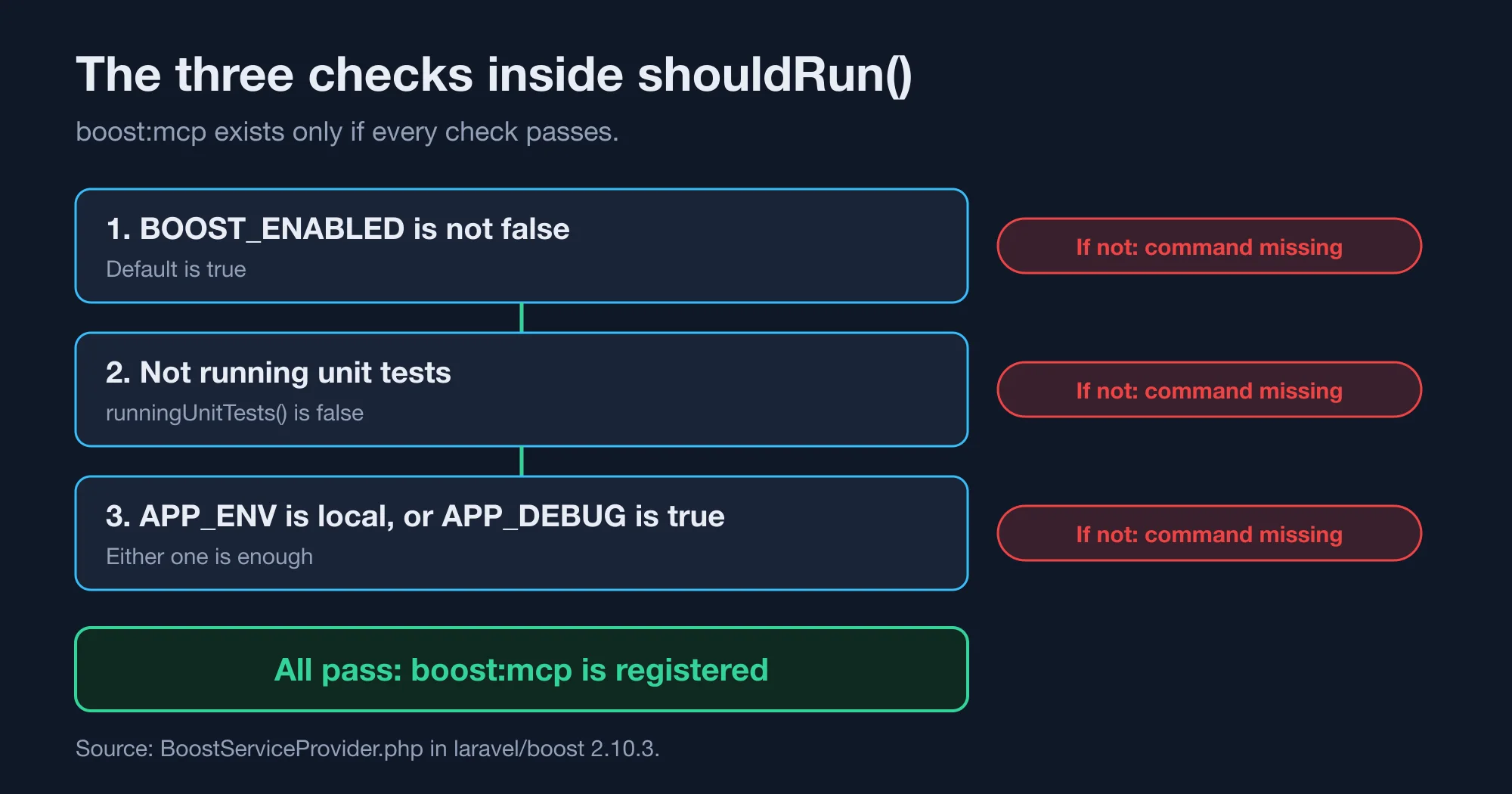
The rule is three checks in the package's service provider, and all of them must pass. We read the method shouldRun() in BoostServiceProvider.php from version 2.10.3. It returns false in three cases:
- The config value
boost.enabledis false. It reads theBOOST_ENABLEDvariable and defaults to true. - The app is running unit tests.
- The environment is not
localandconfig('app.debug')is not true.
The source comment says it directly: "Only enable Boost on local environments or when debug is true." So the second half of the third check is an either-or. A machine with APP_ENV=production and APP_DEBUG=true passes. A machine with APP_ENV=local and APP_DEBUG=false also passes. Only a non-local environment with debug off fails.
The provider also skips everything else when the check fails. It does not bind its managers, register the MCP server, publish its files or register its commands. That is why the symptom is a missing command and not a half-working server.
Which APP_ENV and APP_DEBUG values hide boost:mcp?
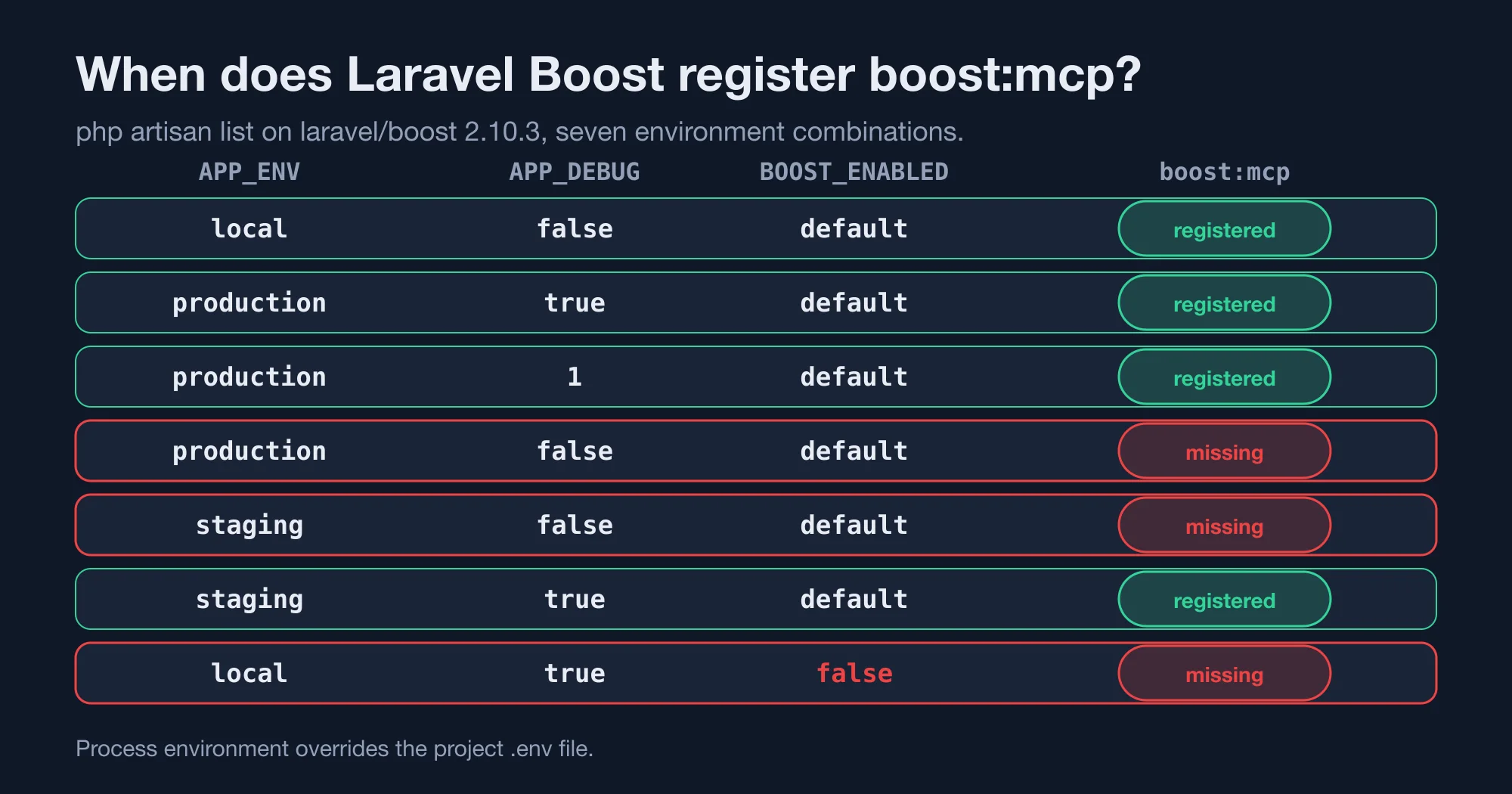
Two values together hide it: a non-local APP_ENV and APP_DEBUG=false. We ran seven combinations. The process environment overrode our project's .env file, which said APP_ENV=local and APP_DEBUG=true. Here are the results:
| APP_ENV | APP_DEBUG | BOOST_ENABLED | boost:mcp registered |
|---|---|---|---|
| local | false | default | Yes |
| production | true | default | Yes |
| production | 1 | default | Yes |
| production | false | default | No |
| staging | false | default | No |
| staging | true | default | Yes |
| local | true | false | No |
Three lessons come out of the table. First, APP_DEBUG=1 works, so you do not need the word true. Second, staging counts as non-local, so a staging-style .env copied to a laptop breaks Boost. Third, BOOST_ENABLED=false beats everything, including a local environment with debug on.
Advertisement
The second lesson explains most reports. Developers copy a .env from a server, from a teammate on a staging branch or from a Docker setup. The file says APP_ENV=staging and APP_DEBUG=false, and the editor shows a failure with no hint why.
How do you confirm the diagnosis in under a minute?
Run one command in the project folder and read the count. Do this before you change anything:
php artisan list | grep boost:mcpIf the line prints, Boost is registered, and your problem is elsewhere, such as the editor's config or the PHP path. If nothing prints, the environment rule is hiding the command. You can also run it directly, and you will see the exact error:
ERROR There are no commands defined in the "boost" namespace.Then check the values Laravel actually uses. Run php artisan tinker --execute='echo app()->environment()." ".var_export(config("app.debug"), true);'. If it prints production false or staging false, you have found the cause.
Remember that the process environment wins over .env. In our test, a variable set in the shell replaced the .env value. If your shell profile, a direnv file or a container exports APP_ENV, the .env file is ignored. Check with env | grep APP_ before you edit the file.
How do you fix Laravel Boost MCP servers failed?
Set the environment to local for development, and keep production out of it. Pick the fix that matches your cause. Each one worked in our matrix:
- Edit
.env. SetAPP_ENV=localandAPP_DEBUG=trueon your development machine. This is the fix that the February write-up used. - Unset the override. Remove an exported
APP_ENVfrom your shell profile ordirenvfile, so.envtakes effect again. - Re-enable Boost. Remove
BOOST_ENABLED=falseif it is set anywhere. - Restart the editor's MCP server. The editor reads the command once, so reload it after each change.
- Register it by hand. For Claude Code, the official docs give this command:
claude mcp add -s local -t stdio laravel-boost php artisan boost:mcp.
For Cursor, open the command palette, choose the MCP settings and switch on the laravel-boost toggle, as the docs describe. The .mcp.json file in your project is rewritten by boost:install and boost:update, so running php artisan boost:install again restores a missing entry.
None of these steps is risky on a laptop. Do not copy them to a server. The next section explains why.
Why does Boost refuse to run outside local environments?
Boost refuses because its tools expose your app's data. We started the real server and asked for its tool list. It returned ten tools: application-info, browser-logs, database-connections, database-query, database-schema, get-absolute-url, last-error, read-log-entries, record-rule and search-docs. The server announced itself as "Laravel Boost" with version 0.0.1.
Here is what each tool does, using the descriptions the server itself returned:
| Tool | What the server says it does |
|---|---|
application-info |
Reports PHP and Laravel versions, the database engine and installed packages |
browser-logs |
Reads the last entries from the browser log, for frontend debugging |
database-connections |
Lists the configured database connection names |
database-query |
Runs a read-only SQL query against the configured database |
database-schema |
Returns tables, columns, indexes and foreign keys |
get-absolute-url |
Turns a path or named route into an absolute URL |
last-error |
Shows details of the last backend error or exception |
read-log-entries |
Reads the last entries from the application log |
record-rule |
Saves a project rule to markdown notes under .ai/rules when you ask |
search-docs |
Searches version-specific Laravel documentation for your packages |
Look at that list from a security view. The database tool is described as read-only SQL, and the others read logs, errors and schema. That is exactly what you want while developing, and exactly what you do not want reachable on a production host. The environment gate is a safety rail, not a bug.
The package's source repository and the current documentation page describe Boost as a development tool, which matches that gate. Here is the practical rule. Never set APP_DEBUG=true on a production server just to make Boost start. Debug mode shows stack traces and configuration to anyone who triggers an error, which is a bigger risk than a missing dev tool. If you need Boost against a remote copy, run a staging copy with fake data and debug on, behind a login, and never on the live site.
Our companion piece on AI Pair Programming in Laravel: A One-Line Rule Beats Boost covers what Boost does well and where a short rule file does more. Use Boost for schema and docs lookups, and keep production credentials out of any environment an agent can reach.
Can a cached config make Boost fail, or work, unexpectedly?
Yes, a cached config can freeze the debug value and change the result. We ran php artisan config:cache while the project was local with debug on. Then we asked for APP_ENV=production with APP_DEBUG=false. Boost still registered, because the cached config kept app.debug as true and ignored the variable. After php artisan config:clear, the same command hid it, as in the table.
The debug flag comes from config, so a stale cache can disagree with your .env file. That can explain two machines with the same .env behaving differently.
If Boost works on one machine and fails on another, compare three things:
- The output of
php artisan config:clear, which removes a stale cache. - The values from the tinker command above, on both machines.
- Any exported
APP_variables in each shell.
Clear the cache first whenever you debug this error, so you test the values you think you are testing.
How do you check that the Boost server really works?
Send a real handshake and a tool list request to the command, and count the tools. This proves the process starts and speaks MCP, which a green toggle in the editor does not always show. Run this in the project folder:
printf '%s\n' \
 '{"jsonrpc":"2.0","id":1,"method":"initialize","params":{"protocolVersion":"2025-06-18","capabilities":{},"clientInfo":{"name":"t","version":"1"}}}' \
 '{"jsonrpc":"2.0","method":"notifications/initialized"}' \
 '{"jsonrpc":"2.0","id":2,"method":"tools/list","params":{}}' \
 | timeout 8 php artisan boost:mcp
In our run, the first line of output was the server info and the second was a list of ten tools. If you see the "no commands defined" error instead, go back to the environment rule. If you see PHP errors, the problem is your PHP install or a missing extension, and our guide Your MCP Server Failed to Start: Five Likely Causes covers those.
We wrapped the command in timeout, so a hung server cannot block your terminal. We used eight seconds.
Boost 2.0 or newer is also the version that Laravel's upgrade guide asks for when you move to Laravel 13. If you upgrade the framework and Boost together, rerun php artisan boost:install afterwards, so the editor config matches the new version. Then repeat the one-minute check above.
Should you worry about Laravel Boost MCP servers failed on a team?
Worry a little, and document it once. This failure costs minutes per developer, but it comes back with every new laptop and every copied .env. A short note in your README ends the repeat questions.
A short note also helps new hires. Many of them install Boost on day one and copy a .env from a shared drive, which is the exact path to this error. Here is what to put in the note:
- Boost needs
APP_ENV=localorAPP_DEBUG=trueon the developer's machine. - Check with
php artisan list | grep boost:mcp. - Never enable debug on a server to use Boost.
- Clear the config cache if two machines disagree.
The bottom line is that this error is a feature working as designed. The rule is simple, the check takes seconds and the fix lives in your own environment. If you want an assistant wired into a Laravel codebase safely, with local-only tools and a rule file that keeps agents out of production, that is work I do for teams.
Advertisement
FAQ
Why does Claude Code say Laravel Boost MCP servers failed?
Claude Code runs `php artisan boost:mcp`, and Laravel did not register that command. Boost registers it only when `BOOST_ENABLED` is not false and the environment is `local` or `APP_DEBUG` is true. Check with `php artisan list | grep boost:mcp`.
Does Laravel Boost work with APP_DEBUG true in production?
Yes, it registers when `APP_DEBUG` is true, even if `APP_ENV` is `production`. We confirmed it with both `true` and `1`. Do not do this on a live server. Debug mode exposes stack traces, and Boost's tools can query your database.
What does "There are no commands defined in the boost namespace" mean?
It means Boost's service provider skipped registration, so Artisan has no `boost:` commands. The cause is a non-local `APP_ENV` with debug off, a `BOOST_ENABLED=false` setting or a test run. Set `APP_ENV=local` or `APP_DEBUG=true`, then retry.
How do I add Laravel Boost to Claude Code manually?
Run `claude mcp add -s local -t stdio laravel-boost php artisan boost:mcp` from the project folder, as the official docs describe. Then reload the MCP servers. Running `php artisan boost:install` also rewrites the `.mcp.json` entry if it went missing.
Can config:cache stop Laravel Boost from working?
It can change the result. `APP_DEBUG` is read from config, so a cached value overrides the environment variable. In our test, a cache made with debug on kept Boost registered under `APP_DEBUG=false`. Run `php artisan config:clear` and test again.
Comments
Loading…
Sign in to join the conversation.
Related posts
Rust 1.99 breaks one thing and quietly changes your CI
Rust 1.99.0 breaking changes, tested against 1.98.1: one new hard error, three new warnings, and a CI default that cuts the cache by 62%.
Thu Oct 15 2026 · 9 min read · 0 views
Rust is dropping 32-bit Windows hosts. Your i686 builds can stay
Rust 1.100 stops installing toolchains on 32-bit Windows, but i686 binaries keep building. Check if you are affected and cross-compile in three ways.
Thu Oct 15 2026 · 9 min read · 0 views
Does your GitHub Actions cache leak secrets? A Miri audit
Rust's Miri saved CI environment variables into target/, which GitHub Actions caches. Run this four-question audit and a cache scanner to check your repo.
Thu Oct 15 2026 · 8 min read · 0 views