Laravel CVE-2026-102279: Which Version Fixes It?
By Nihar Ranjan Das · Sat Oct 10 2026 · 10 min read · 0 views
View as a Web StorySoftware#security#CVE#Laravel#php#composer
Laravel 13.30.0 and Laravel 12.69.0 fix CVE-2026-102279, a cross-site scripting bug in the exception debug page. Those same two versions also contain the fixes for the two other Laravel framework advisories published this year, so updating to either one clears all three. If you run Laravel 11 or older, the advisories list no patch for your branch.
This post gives you the exact fixed version for each advisory, the commands to check a project, and a timeline that explains why the dates you see on different sites disagree. I checked each claim against the GitHub advisories, the NVD records and Composer's own output.
What is CVE-2026-102279?
CVE-2026-102279 is a DOM-based cross-site scripting vulnerability in the debug page that Laravel shows when an exception occurs and APP_DEBUG is on. APP_DEBUG is the environment setting that makes Laravel display detailed error pages with stack traces instead of a generic error.
The NVD record says that attacker-controlled input reaches a Tippy.js tooltip configured with allowHTML set to true, so hovering over the tooltip can run injected script. It was received on September 28, 2026, with a CVSS 3.1 base score of 3.1, rated low. The vector is AV:N/AC:H/PR:N/UI:R/S:U/C:N/I:L/A:N, which reads as network reachable, hard to exploit, no privileges, user interaction required, and a limited integrity impact.
Some aggregator pages show only "CVSS 3.1", which looks like a version label. It is both a label and a score here, because the CVSS version is 3.1 and the base score is also 3.1.
Which Laravel versions fix each 2026 advisory?
Three framework advisories affect Laravel 12 and 13 in 2026, and the newest fixed releases are 13.30.0 and 12.69.0. Here is the full table, built from the GitHub advisory pages and the fixed-version fields.
| Advisory | Flaw | Severity | Fixed in 13.x | Fixed in 12.x. |
|---|---|---|---|---|
| CVE-2026-48019 | CRLF injection in the email rule | High, 8.9 | 13.10.0 | 12.60.0. |
| GHSA-crmm-hgp2-wgrp | Temporary signed URL path confusion | Medium, 4.2 | 13.12.0 | 12.61.1. |
| CVE-2026-102279 | XSS in the debug page | Low, 3.1 | 13.30.0 | 12.69.0. |
The rule is simple. On Laravel 13, be on 13.30.0 or newer. On Laravel 12, be on 12.69.0 or newer. Any version at or above those numbers has all three fixes.
If you run Laravel 11, 10 or 9, check carefully. The Packagist advisory for CVE-2026-48019 lists affected ranges back to 9.0.0, but the GitHub advisories name patched versions only for 12.x and 13.x. In other words, I found no fixed release on those older branches. The practical answer is to move to 12.69.0 or newer.
What does each flaw mean in practice?
The three flaws differ a lot in how likely they are to hurt you, and the high-rated one is not the one most apps should lose sleep over first. Here is each in plain terms.
Advertisement
CRLF injection is an attack where carriage return and line feed characters are smuggled into a value that ends up in a protocol header, letting the attacker add lines the developer never intended. In CVE-2026-48019, the GitHub advisory says the default email validation rule, combined with how Symfony Mailer and Symfony Mime treat certain sequences, may let an unauthenticated attacker influence outbound mail. Think of a contact form or a password reset form that sends mail to an address the user typed. The advisory warns of altered content, delivery to unintended recipients and mail relay abuse, depending on how your mail setup works. The vector marks the attack complexity as high, but the scope as changed, which is why the score reaches 8.9.
The signed URL flaw affects the local filesystem driver. The GitHub advisory says a temporary signed URL can be parsed ambiguously, so a request may resolve to an unintended resource and an expired URL can stay valid. If you use Storage::temporaryUrl() or temporaryUploadUrl() with the local disk to hand out downloads that should expire, this one matters. If your temporary URLs come from S3, it does not apply, since the advisory names the local driver.
The XSS flaw only exists when debug mode is on. A production site with APP_DEBUG=false does not render that page. But many teams forget their staging servers, preview deployments and demo environments, and those are often public. A hover-activated script on an exception page is a modest risk, but it still runs attacker script in the browser of whoever hovers over it, and on a staging admin panel that can be a developer with a live session.
Does Composer protect you from installing an affected version?
By default, yes, if your Composer is recent enough. I ran Composer 2.10.2 against seven pinned laravel/framework versions and it refused to resolve five of them, with a message that the version is "affected by security advisories" and a list of advisory IDs. It also tells you the config keys to override it.
| Pinned version | Default composer update |
Advisories listed. |
|---|---|---|
| 13.9.0 | Blocked | 4 IDs, 3 flaws. |
| 13.11.0 | Blocked | 2. |
| 13.29.0 | Blocked | 1. |
| 13.30.0 | Resolves | 0. |
| 12.60.0 | Blocked | 2. |
| 12.68.0 | Blocked | 1. |
| 12.69.0 | Resolves | 0. |
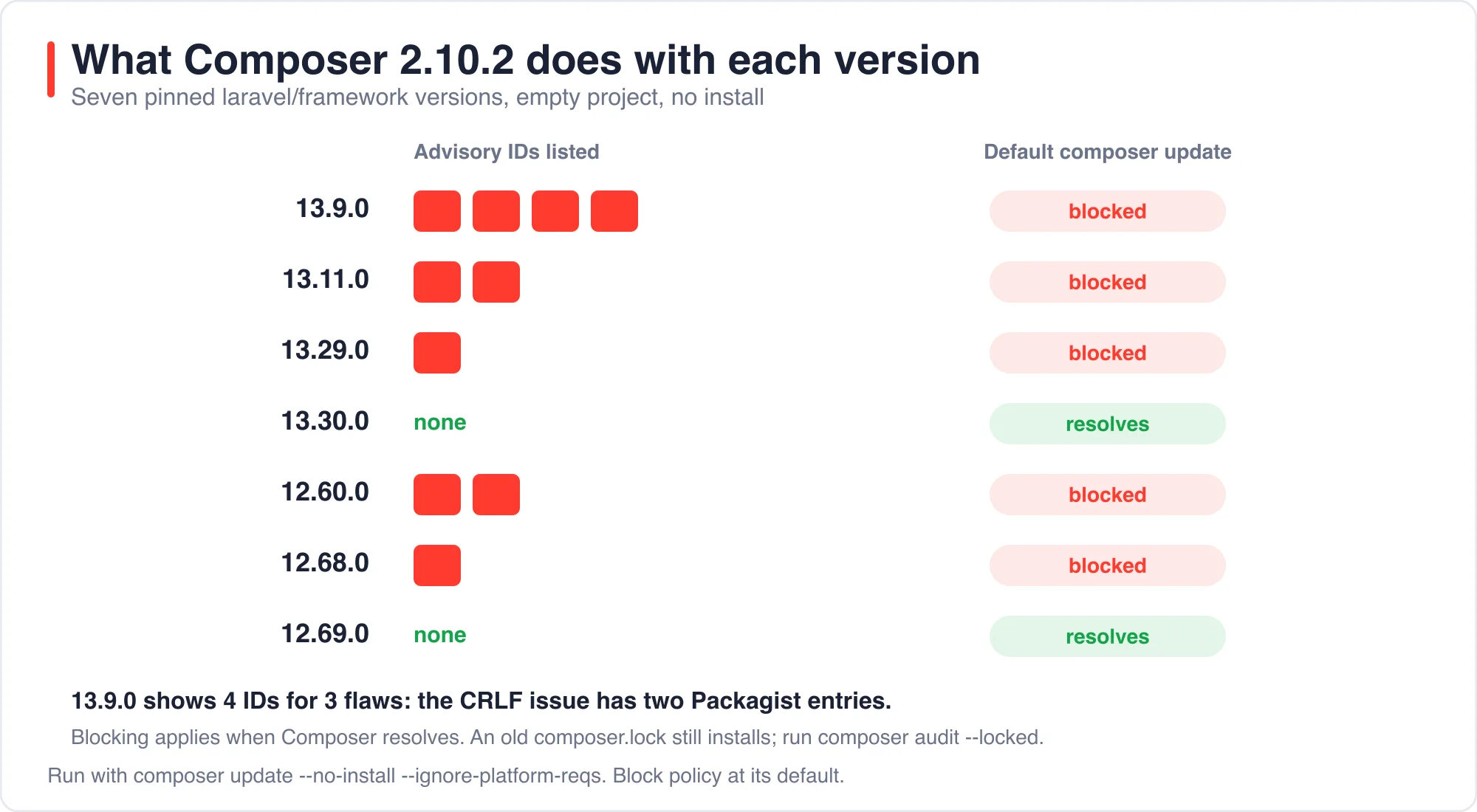
The 13.9.0 row shows four advisory IDs for three flaws, because the CRLF issue has two entries on Packagist: one tied to the CVE, filed May 19, and one tied to the GitHub advisory, filed June 17. Counting IDs overstates how many separate problems you have.
This protection only applies when Composer resolves versions. An existing composer.lock that already pins 13.9.0 keeps working, and composer install will install what the lock says. For that case, run the audit command.
composer audit --locked          # reads composer.lock, exits non-zero if anything is found
composer why-not laravel/framework 13.30.0   # what holds you below the fixed version
composer update laravel/framework --with-dependencies
With the block policy turned off, composer audit --locked on my 13.9.0 lock printed all four entries, each with a severity, a CVE or "NO CVE", the affected range and a link. Add composer audit --locked as a CI step. A non-zero exit fails the job, which turns this from a thing you remember into a thing the pipeline enforces.
How do you check a running site?
Check three things on each environment: the installed framework version, whether debug mode is on, and whether the affected features are in use. Start with Laravel's own summary command.
php artisan about --only=environment   # shows "Debug Mode .. ENABLED" or OFF
composer show laravel/framework        # installed version
In my lab app, php artisan about printed Debug Mode .. ENABLED for the local environment, which is exactly the kind of line you want to see as OFF on every server a stranger can reach. Run it over SSH on staging, not just on production.
Then search for the features the other two advisories touch.
grep -rn "temporaryUrl\|temporaryUploadUrl" app/ routes/ config/
grep -rn "'email'\|\"email\"\|email:" app/Http app/Livewire
The first command finds temporary URL use, which matters only if the disk is local. The second finds email validation rules. Nearly every app has some. Treat a hit as a reason to update, not as proof you were attacked.
What should you do while you cannot upgrade yet?
Turn debug mode off everywhere that is reachable from outside, which removes the XSS flaw entirely. That is the mitigation named in the aggregator pages, and it matches the advisory text, since the issue needs APP_DEBUG=true.
For the email flaw there is no config toggle in the sources I read. A reasonable stopgap, and this is my suggestion rather than anything in the advisory, is to reject any address containing a carriage return or line feed before it reaches the mailer. I have not tested that as a mitigation, so treat it as a temporary guard and not a fix. The patch is the fix.
For temporary signed URLs, switch the sensitive downloads to a cloud disk or shorten what you store behind local temporary URLs until you can upgrade.
Why do the dates disagree between sites?
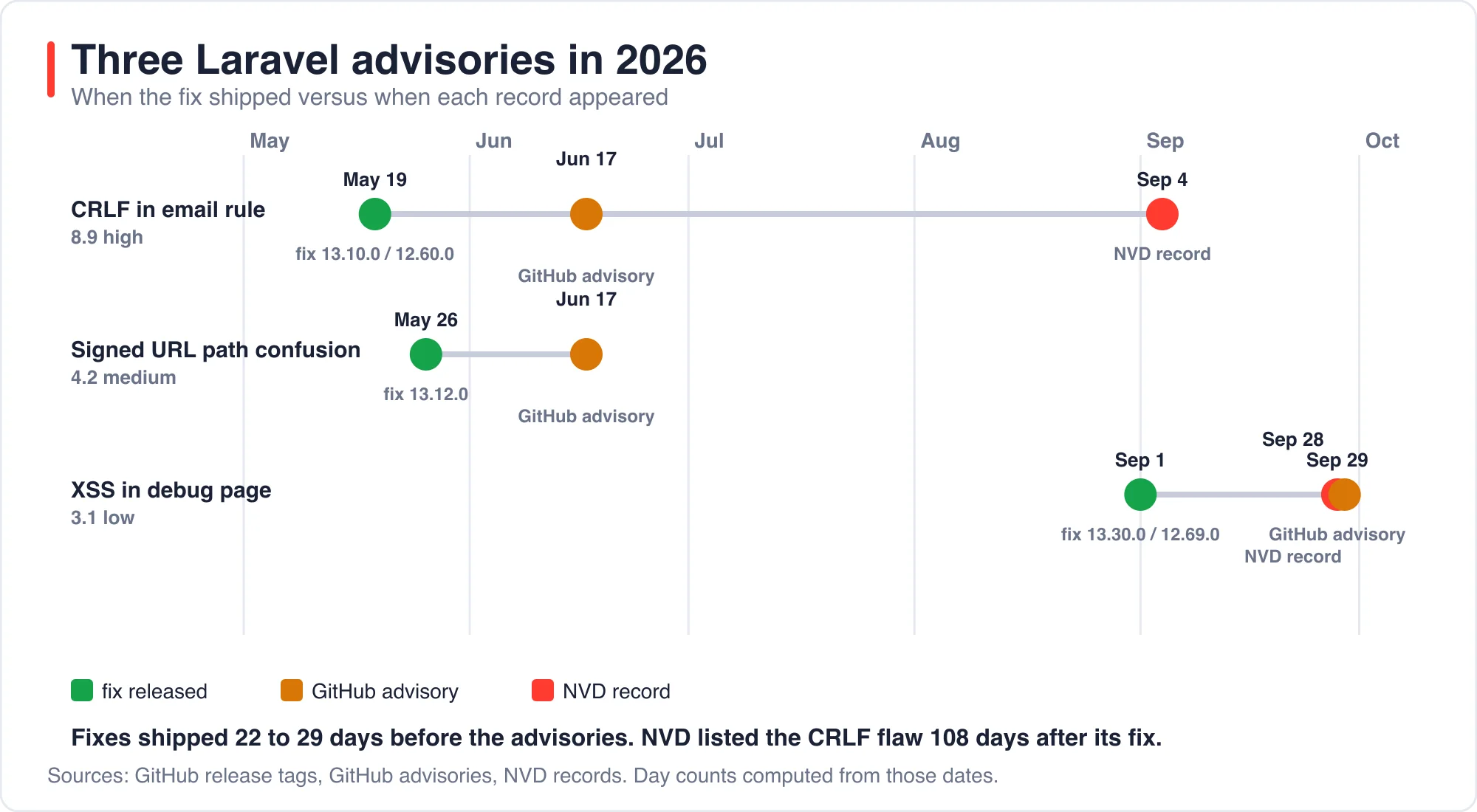
The dates disagree because Laravel shipped the fixes first, GitHub published the advisories weeks later, and NVD records follow their own schedule. I computed the gaps from the release tags and the advisory timestamps.
| Flaw | Fix released | GitHub advisory | NVD record | Gap, fix to advisory. |
|---|---|---|---|---|
| CRLF injection | May 19 | June 17 | September 4 | 29 days. |
| Signed URL | May 26 | June 17 | none | 22 days. |
| XSS debug page | September 1 | September 29 | September 28 | 28 days. |
The CRLF numbers explain the confusion I saw in search results. One site says the CVE was published in September. Another says early June. Both are correct for different records. The fix itself shipped on May 19 in Laravel 13.10.0 and 12.60.0, and NVD listed the CVE on September 4, which is 108 days later.
The practical lesson is that the safe version is older than the headline. If you stayed within a few minor versions of the latest release all year, you picked up the CRLF and signed URL fixes in May and June before anyone wrote about them. Teams that pin a minor version for months get the news weeks after the patch was available.
What does the upgrade path look like from Laravel 11?
The upgrade from Laravel 11 is one major version to 12.69.0 or newer, and it is usually a smaller job than teams expect. Laravel's own upgrade guide for version 12 lists the breaking changes, and my rule of thumb is to read it with the lock file open.
Take it in this order, for example on a staging branch first:
- Run
composer audit --lockedand write down what it reports today. - Raise the constraint with
composer require laravel/framework:^12.69 --with-dependencies. - Fix whatever the test suite shows, then run the suite once.
- Run
composer audit --lockedagain and confirm it exits cleanly. - Plan the move to Laravel 13 separately, since it needs PHP 8.3 or newer.
Staying on 12.69.0 is a fine stopping point, because it contains every fix in this post. Going straight to 13.30.0 saves a second upgrade later, but it also means a PHP version bump, and that is where most of the work hides on older servers.
How did I verify these facts?
The method was simple, and you can repeat it in ten minutes. I pulled each advisory from GitHub's advisory pages and API, which list the affected ranges, the first patched versions and the CVSS vectors. I read the NVD records for the two CVEs to get publication dates and scores. I took release dates from the release tags on the framework repository.
For the Composer behavior I made seven empty directories, each with a composer.json that pinned one laravel/framework version, and ran composer update --no-install --ignore-platform-reqs in each. That resolves without installing anything. Then I ran composer audit --locked on the one I resolved with the block policy switched off. The day counts in the timeline came from simple date subtraction, which is why they match the dates in the tables.
What are the limits of this check?
I did not test the vulnerabilities themselves, and I am not publishing exploit details. I verified versions, dates, severities and Composer behavior from public records and local commands. NVD marks both CVEs as awaiting analysis, so scores can change. The Composer behavior is from version 2.10.2, and older Composer versions do not block by default.
I also did not audit older branches line by line. When I say no fixed release exists for Laravel 11 or older, I mean that none appears in the advisory data I read. Check the current advisory pages before you decide, and check Laravel's support policy for your branch.
About the author: I build Laravel applications and ran the Composer commands on a scratch project in October 2026. The dates and versions were fact-checked against the advisory pages and release tags. If you spot an error, send it through the contact page with a link to your source.
For related security reading, see Chrome CVE-2026-85046: Zero-Day Fix and How to Update. For handling sensitive data in AI features, see Generative AI Data Privacy in Laravel: Redact Before Sending.
The bottom line
Be on Laravel 13.30.0 or 12.69.0 or newer, turn APP_DEBUG off on every reachable server, and put composer audit --locked in CI. The email flaw rated 8.9 is the most serious of the three, and it was fixed in May.
If you are still on Laravel 11 or older, upgrading is the fix, because the advisories name none.
Advertisement
FAQ
Which Laravel version fixes CVE-2026-102279?
Laravel 13.30.0 on the 13.x line and 12.69.0 on the 12.x line, both released September 1, 2026. The flaw is a low-severity XSS on the exception debug page that needs APP_DEBUG set to true. Older branches have no listed patch.
Is CVE-2026-102279 dangerous on a production site?
Rarely. It only exists when APP_DEBUG is true, and it needs a user to hover over a tooltip on the exception page. Set APP_DEBUG to false on every reachable server, and update staging and preview sites, which are often public with debug on.
How do I check my Laravel project for known vulnerabilities?
Run composer audit --locked, which reads composer.lock and exits non-zero when advisories apply. Add it as a CI step. Check the installed version with composer show laravel/framework, and run php artisan about to see whether debug mode is enabled.
Why does Composer refuse to install my Laravel version?
Composer 2.10 blocks versions affected by security advisories by default and lists their advisory IDs. Updating laravel/framework to 13.30.0 or 12.69.0 fixes it. You can override with the policy.advisories config, but that installs the vulnerable version anyway, so only do it temporarily.
Comments
Loading…
Sign in to join the conversation.
Related posts
Laravel LSP in Neovim: Setup and What It Skips
Laravel LSP gives any editor that speaks the Language Server Protocol the same Laravel autocomplete that VS Code users already had. I installed version 0.0.32 and drove it with a protocol client
Sat Oct 10 2026 · 10 min read · 0 views
Laravel Cloud Scale to Zero: What an Idle App Costs
A mostly idle Laravel app on Laravel Cloud's Starter plan bills about $5 a month, and the compute behind four awake hours is roughly 4 cents. Scale to zero removes the cost of idle compute. It does
Sat Oct 10 2026 · 10 min read · 0 views
Laravel AI SDK Tool Approval: Edit Works, Fakes Skip It
The Laravel AI SDK can pause an agent before a sensitive tool runs and wait for a person to approve, reject or edit the call. I ran that human-in-the-loop tool approval API through 16 scenarios and
Sat Oct 10 2026 · 10 min read · 0 views