Laravel LSP in Neovim: Setup and What It Skips
By Nihar Ranjan Das · Sat Oct 10 2026 · 10 min read · 0 views
View as a Web StorySoftware#developer tools#Laravel#laravel-lsp#neovim#editors
Laravel LSP gives any editor that speaks the Language Server Protocol the same Laravel autocomplete that VS Code users already had. I installed version 0.0.32 and drove it with a protocol client against a Laravel 13 app. It answered 17 of 26 completion scenarios and 6 of 8 hover checks, and it returned nothing for the rest. The server started in 0.4 seconds and every answer came back in under a quarter of a second.
This post gives the setup for Neovim, Zed, Sublime Text, Cursor and OpenCode, then lists what the server completes, flags and skips, so you know what to expect before you switch editors.
What is Laravel LSP?
Laravel LSP is a first-party language server from the Laravel team that adds framework-aware completions, hovers, diagnostics, document links, go to definition and code actions to any editor with a Language Server Protocol client. A language server is a background program that an editor talks to over a standard protocol, so one implementation can serve many editors.
The Laravel News report says Taylor Otwell announced it on stage at Laracon US 2026, and the Laravel recap of the event describes it as the existing VS Code extension's features generalized to Neovim, Zed and Sublime Text. The package is laravel/lsp. Packagist lists version 0.0.32, released September 15, 2026, and it requires PHP 8.2 or newer.
Version numbers under 1.0 matter here. This is a young project, and what I report is the state of one release.
How do you install Laravel LSP?
You install it globally with Composer, and the editor starts it from your project root. In my case the command took 35 seconds on a laptop with a warm Composer cache.
composer global require laravel/lsp
laravel-lsp --version      # Laravel LSP v0.0.32
Make sure Composer's global bin directory is on your PATH. On my machine I used a scratch COMPOSER_HOME, and the binary landed in its vendor/bin folder as laravel-lsp. The server speaks over stdio, so there is no port to open and nothing to keep running.
The server needs a PHP binary to read your project's routes, config and views. The phpEnvironment option controls how it finds one, and the default auto tries Herd, Valet, Sail, Lando, DDEV and then local PHP, according to the project README. If your PHP lives in a container, set phpCommand, for example ["./vendor/bin/sail", "php"].
How do you set it up in each editor?
Setup depends on the editor. Three editors have official extensions that do everything for you, and two need a few lines of configuration. This table comes from the README.
| Editor | How to enable it | Effort. |
|---|---|---|
| VS Code | Official Laravel extension | Install only. |
| Cursor | The same VS Code extension, which the README says is compatible | Install only. |
| Zed | Official Laravel Zed extension | Install only. |
| Sublime Text | Official Laravel Sublime extension | Install only. |
| Neovim 0.11 or newer | Custom vim.lsp.config block |
A few lines. |
| OpenCode | Custom entry in opencode.json |
A few lines. |
For Neovim, the README gives this configuration. It needs Neovim 0.11 or newer, because it uses the built-in vim.lsp.config API.
Advertisement
vim.lsp.config("laravel_lsp", {
    cmd = { "laravel-lsp" },
    filetypes = { "php", "blade" },
    root_dir = function(bufnr, on_dir)
        local root = vim.fs.root(bufnr, "artisan")

        if root then
            on_dir(root)
        end
    end,
})

vim.lsp.enable("laravel_lsp")
The root_dir check only starts the server when it finds an artisan file, so it stays off in ordinary PHP projects. The config lists blade as a filetype, so check that your Neovim recognizes .blade.php files as blade.
I did not run Neovim, Zed, Sublime Text or Cursor for this post. I tested the server directly over the protocol, which is what each editor's client talks to. Editor-specific problems, such as a missing Blade filetype, are outside what I measured.
What was the test setup?
The test setup was a Laravel 13.35 app on PHP 8.4.7 with two Eloquent models, Livewire (added for the later probes), five named routes, a config file, a language file, an .env file, a policy and a few Blade views. I wrote a small Node program that launches laravel-lsp with the app as its working directory and sends it the same JSON-RPC messages an editor would: initialize, textDocument/didOpen, then completion, hover and definition requests.
I tested 26 completion scenarios, 8 hover checks and one diagnostics file. The completion scenarios put the cursor inside a quoted string, such as route(', and I tried several spellings of the scenarios that came back empty. The hover and diagnostics checks ran on a file that mixed eight valid references with five deliberately wrong ones. Clients differ in how they trigger completion, so a probe that returns nothing here might behave differently in your editor. That is a limit of this test, and I flag it where it matters.
How fast is Laravel LSP?
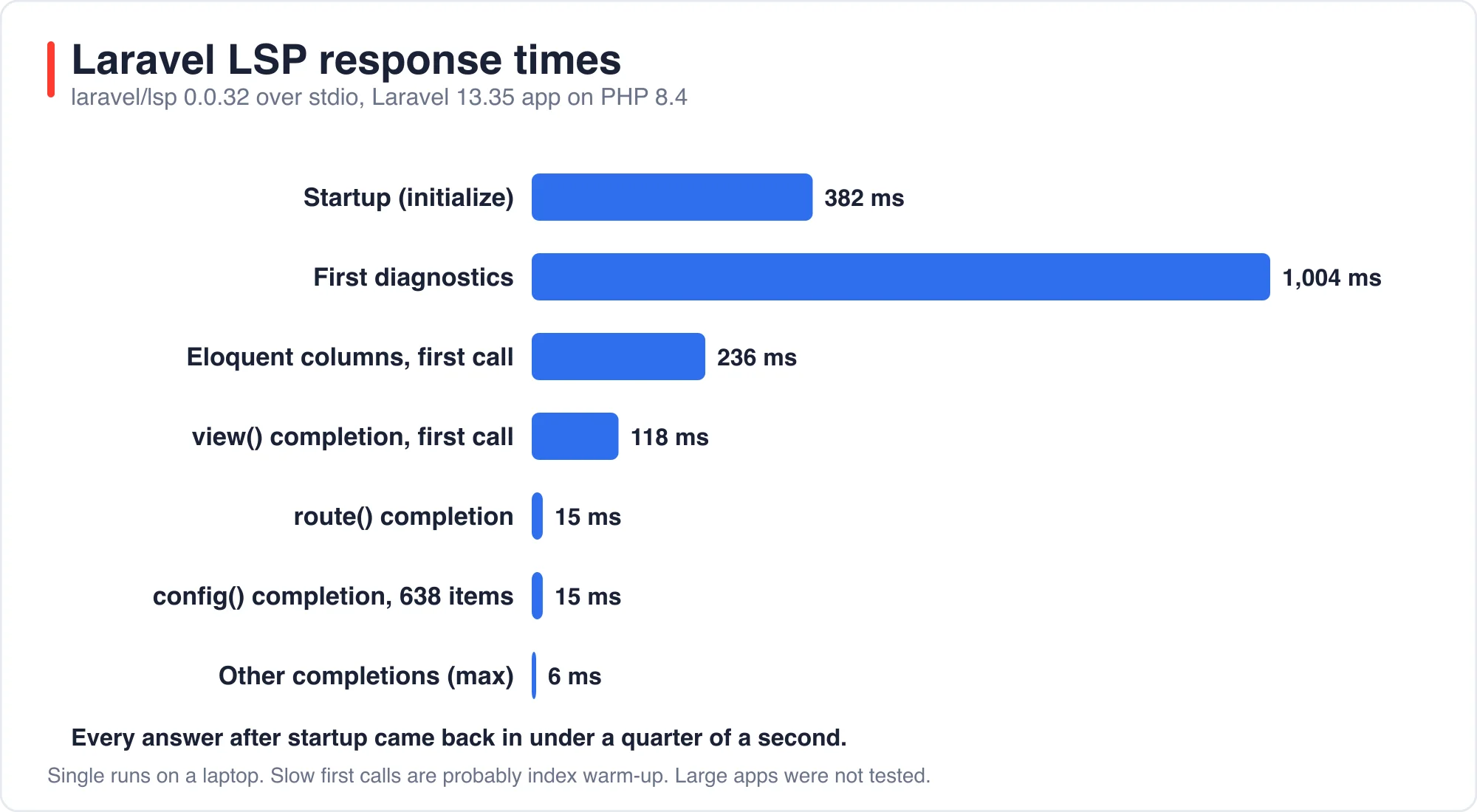
The server finished starting in 382 milliseconds and published its first diagnostics about one second after I opened a file. Completion requests answered in 1 to 15 milliseconds once warm, with two slower first calls.
| Request | Time. |
|---|---|
Startup, initialize response |
382 ms. |
| First diagnostics after opening a file | 1,004 ms. |
route(' completion |
15 ms. |
config(' completion, 638 items |
15 ms. |
view(' completion, 66 items, first call |
118 ms. |
| Eloquent column completion, first call | 236 ms. |
| Other completions | 1 to 6 ms. |
The two slower calls are first-use costs, probably the view index and the model schema being read. Nothing here would make an editor feel slow. Because the server asks PHP to index the project at startup, a very large application may take longer than my small one, and I did not test that.
What does Laravel LSP complete?
It completes the strings that Laravel code is full of: route names, view names, config keys, environment variables, translation keys, middleware aliases, policy abilities and model columns. Here is what came back in my probes, with the number of items returned.
| Probe | Items | Examples. |
|---|---|---|
route(' |
7 | home, articles.index, articles.show. |
view(' |
66 | admin.dashboard, components.card, welcome. |
config(' |
638 | hashing.driver, hashing.bcrypt.rounds. |
env(' |
44 | APP_NAME, APP_ENV, APP_KEY. |
__(' |
150 | auth.failed, pagination.next. |
->middleware(' |
13 | web, api, auth. |
Gate::allows(' |
1 | update. |
Article::where(' |
6 | id, title, body, views. |
Article::query()->orderBy(' |
6 | id, title, body, views. |
Article::create([' |
6 | id, title, body, views. |
'title' => 'req in rules() |
8 to 9 | required_if, required_with_all. |
<x- in Blade |
41 | x-card, x-dynamic-component. |
<livewire: in Blade |
1 | counter. |
config(' and __(' inside Blade |
638, 150 | Same lists as in PHP. |
Two details are nice. View completion includes package views, such as the framework's exception renderer components, not only your own. And the model column list included the real columns of my table, timestamps and all.
What does Laravel LSP skip?
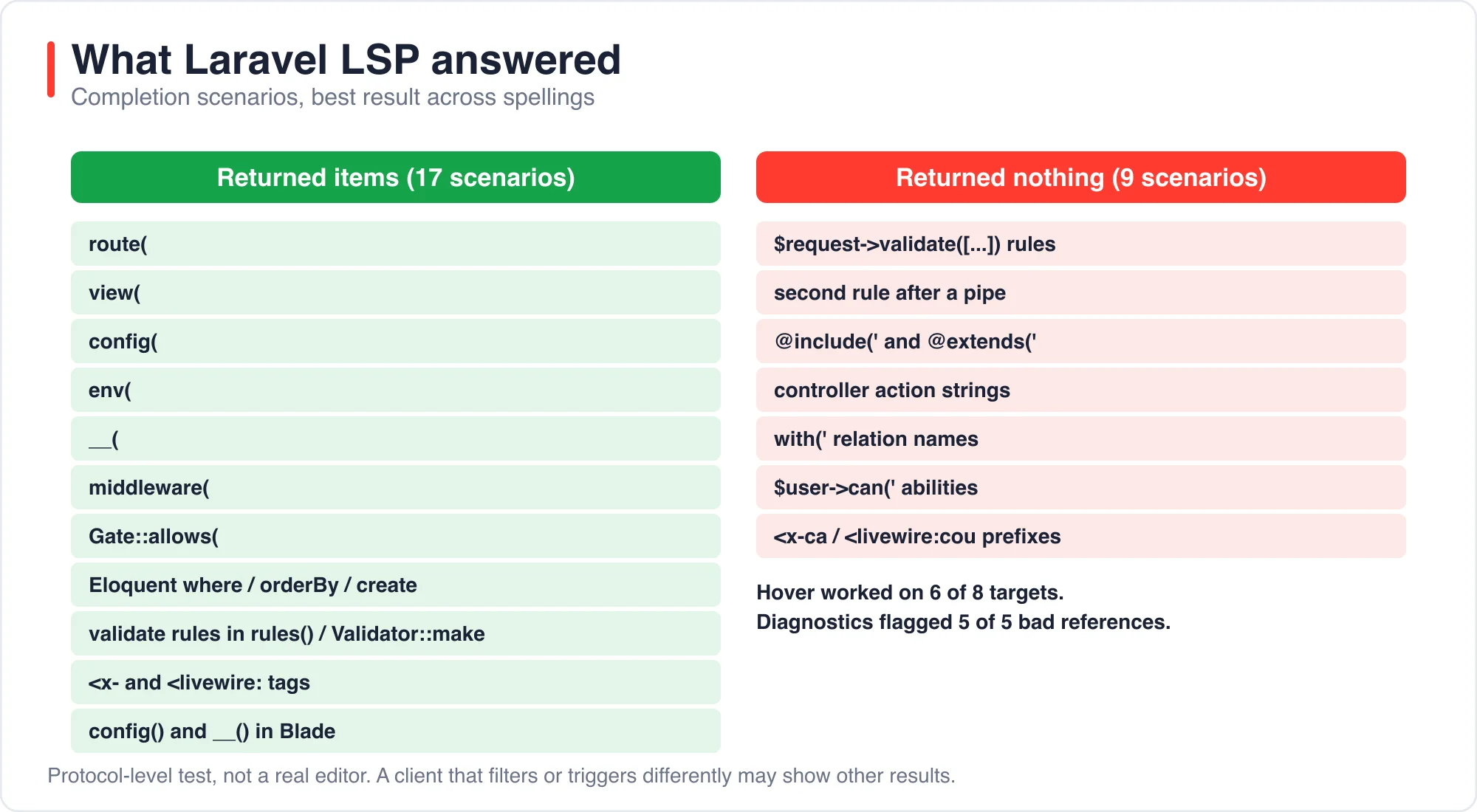
It returned nothing for nine of my 26 completion scenarios. For several of them the README lists the feature as supported, so the gap may be in my probe, in the client trigger, or in this early release.
| Probe | Result. |
|---|---|
$request->validate(['title' => 'req in a controller |
0 items. |
Second rule after a pipe, 'required|ma |
0 items. |
@include(' in Blade, three variants |
0 items. |
@extends(' in Blade |
0 items. |
| Controller action string in a route array, three variants | 0 items. |
User::query()->with(' relation names |
0 items. |
$user->can(' abilities |
0 items. |
<x-ca with a prefix typed |
0 items. |
<livewire:cou with a prefix typed |
0 items. |
Look at the validation rows closely. Rule completion worked inside FormRequest::rules() and Validator::make(), but not inside $request->validate(), which is the form most controllers use. That one will catch people out.
The prefix rows are odd. The server answered <x- and <livewire: with a full list but returned nothing when I typed two more characters. My client does no filtering of its own, and editors usually filter a returned list locally, so a real editor probably shows the right entries. I could not confirm that without running the editors.
Do the diagnostics produce false alarms?
No false alarms in my test, and every deliberately wrong reference was flagged. I opened a file with five wrong references among eight valid ones. The server published exactly five diagnostics, one for each.
| Line content | Message. |
|---|---|
route('articles.nope') |
Route [articles.nope] not found. |
view('admin.missing') |
View [admin.missing] not found. |
config('lab.nope') |
Config [lab.nope] not found. |
env('SERVICE_TOKEN_MISSING') |
Env [SERVICE_TOKEN_MISSING] not found. |
__('messages.nope') |
Translation [messages.nope] not found. |
That is a useful safety net for typos in strings, which static analyzers like PHPStan cannot see. I did not test whether it flags an unknown policy ability.
What do hover and go to definition do?
Hover and go to definition worked for routes, views, config keys, environment variables, translations and middleware, and each jumped to the right file. A route name hovered to ArticleController@show with a link to the file. A view name linked to its Blade file. A config key showed its value and the line in config/lab.php. The auth middleware alias resolved to the framework's Authenticate class.
One behavior deserves a warning. Hovering an environment variable shows its real value from .env. My test file showed abc for a fake token. If you share your screen, record a tutorial or pair on a call, hovering over env('STRIPE_SECRET') would show the secret on screen. Turn that feature off with the envHover option if you stream your editor. The README lists a boolean switch for each hover feature.
What should you set in the configuration?
Most people can leave the defaults, but three options are worth knowing. They are passed through initializationOptions by your editor.
memoryLimitdefaults to"512M". The README says the official editor binaries otherwise default to PHP's 128M limit, so large projects can run out of memory without it.phpCommandtakes an explicit command such as["php"]or a Sail wrapper, and it overrides the automatic detection.- Each feature has its own switch, for example
routeCompletionandenvHover, all on by default.
If completion seems dead in an editor, check these three things first: the binary is on PATH, the editor opened the folder that contains artisan, and the PHP command the server found is the one with your extensions.
Is it worth switching editors for?
Not by itself, but it removes a reason to stay on VS Code. If you already use Neovim, Zed or Sublime Text, the server brings route, view, config, env and translation awareness that you previously got from community plugins or not at all. If you use VS Code or Cursor, you already have it through the extension.
My advice depends on how you work. For string-heavy Laravel code, the diagnostics alone are worth ten minutes of setup. For heavy validation work, expect to type some rule names yourself for now. This is a pre-1.0 server, and gaps like the ones above are the kind of thing early releases close quickly.
What are the limits of this test?
I tested one release, 0.0.32, on one small app, and I drove it with a protocol client instead of real editors. A real editor may trigger completion differently, may filter lists, and may show different results for my nine empty probes. I did not test code actions, Inertia, assets, Mix or storage disk completion, and my lab had no Pest tests for the Pest helper feature.
About the author: I build Laravel applications and ran every probe on a scratch project in October 2026. The numbers were fact-checked against saved server output. If your editor behaves differently on a probe, tell me through the contact page with your editor and laravel-lsp version.
For related editor choices, see Best AI IDE for Laravel: What Each One Costs in 2026 and AI Pair Programming in Laravel: A One-Line Rule Beats Boost.
The bottom line
Laravel LSP is ready to use for route, view, config, env and translation work in any editor, and its diagnostics were clean. Expect gaps in validation completion, Blade directives and controller actions for now, and turn off env hover if you share your screen.
Install it, add the Neovim block if you need it, and test your own five most common patterns before you decide.
Advertisement
FAQ
How do I set up Laravel LSP in Neovim?
Install it with composer global require laravel/lsp, make sure Composer's global bin is on your PATH, and use Neovim 0.11 or newer. Add a vim.lsp.config block that runs laravel-lsp for php and blade files when an artisan file exists, then call vim.lsp.enable.
Which editors does Laravel LSP work in?
Any editor with a Language Server Protocol client. The README lists official extensions for VS Code, Cursor, Zed and Sublime Text, and configuration snippets for Neovim and OpenCode. The server speaks stdio and starts from your project root.
Does Laravel LSP show errors for wrong route or config names?
Yes. In my test it flagged a missing route, view, config key, environment variable and translation key, five of five, with no false alarms on eight valid references. It reports them as diagnostics with the missing name in the message.
Is it safe to use Laravel LSP while screen sharing?
Be careful. Hovering over an env() call shows the real value from your .env file, including secrets such as API keys. Turn it off with the envHover option, which the README lists as a boolean setting, before streaming your editor or recording a tutorial.
Comments
Loading…
Sign in to join the conversation.
Related posts
Laravel Cloud Scale to Zero: What an Idle App Costs
A mostly idle Laravel app on Laravel Cloud's Starter plan bills about $5 a month, and the compute behind four awake hours is roughly 4 cents. Scale to zero removes the cost of idle compute. It does
Sat Oct 10 2026 · 10 min read · 0 views
Laravel CVE-2026-102279: Which Version Fixes It?
Laravel 13.30.0 and Laravel 12.69.0 fix CVE-2026-102279, a cross-site scripting bug in the exception debug page. Those same two versions also contain the fixes for the two other Laravel framework
Sat Oct 10 2026 · 10 min read · 0 views
Laravel AI SDK Tool Approval: Edit Works, Fakes Skip It
The Laravel AI SDK can pause an agent before a sensitive tool runs and wait for a person to approve, reject or edit the call. I ran that human-in-the-loop tool approval API through 16 scenarios and
Sat Oct 10 2026 · 10 min read · 0 views