Laravel Cloud Scale to Zero: What an Idle App Costs
By Nihar Ranjan Das · Sat Oct 10 2026 · 10 min read · 0 views
View as a Web StorySoftware#Laravel#laravel-cloud#hosting#pricing#scale-to-zero
A mostly idle Laravel app on Laravel Cloud's Starter plan bills about $5 a month, and the compute behind four awake hours is roughly 4 cents. Scale to zero removes the cost of idle compute. It does not remove the plan fee, and it does not touch database storage.
This post works out the real pricing from Laravel's published per-second rates, shows where the monthly cap flattens the curve, and explains how a plan fee interacts with the $5 usage credit. It also covers the quiet reasons an app never goes to sleep, which decide whether scale to zero saves you anything at all.
What is scale to zero on Laravel Cloud?
Scale to zero is a Laravel Cloud feature that pauses your app's compute, database and cache when nobody is using them, then wakes them together on the next request. Laravel Cloud is Laravel's managed hosting platform for PHP apps, billed by usage on top of a monthly plan fee.
According to Laravel's announcement from June 1, 2026, the rebuilt Flex compute class wakes the whole stack in under 500 milliseconds, which Laravel says is 20 times faster than the old version. The old implementation took about 10 seconds to wake, and databases and cache had to stay running. Scheduled tasks still fire and queue workers keep processing, because either one wakes the app when it has work.
Scale to zero costs $1 more per month than the legacy Flex options, which keep the 10 second wake-up delay. Laravel says new apps get the new behavior automatically. MySQL gained scale to zero for Flex compute as of July 20, and the Laracon US recap says the idle window can be set from one minute to one hour.
What do the Laravel Cloud plans cost?
The plans cost $5, $20 and $200 a month plus usage, and each paid plan includes $5 of monthly usage credit. The pricing page lists the plans and what each one unlocks.
| Plan | Monthly fee | Max compute | Autoscaling | Managed queues. |
|---|---|---|---|---|
| Starter | $5, first month free | Flex, up to 2 GiB | 1 replica | 1 per environment. |
| Growth | $20 | Flex and Pro, up to 32 GiB | Up to 10 replicas | 10 per environment. |
| Business | $200 | Flex and Pro, up to 32 GiB | Unlimited and scheduled | Unlimited. |
Starter also caps you at 10 custom domains, 1 preview environment and one day of log retention. Growth raises those to 50 domains, unlimited previews and 7 days of logs. Enterprise is custom pricing.
One small inconsistency is worth knowing about. Laravel's launch post says Starter compute goes "up to 1 GB", while the current pricing page says Flex up to 2 GiB. The pricing page is newer, so I used it.
How much does compute cost per awake hour?
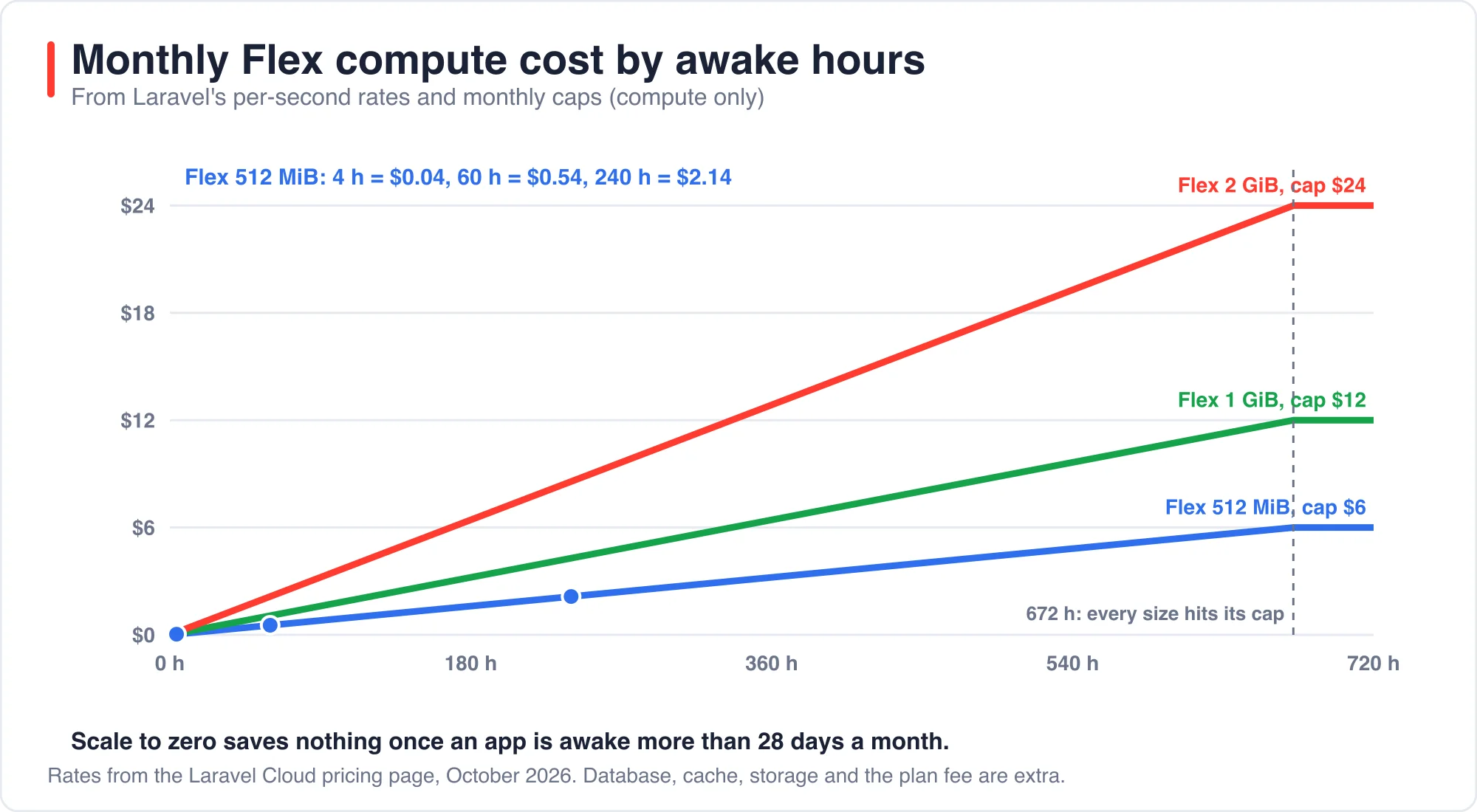
Compute costs between about 0.9 and 3.6 cents per awake hour on the Flex sizes, charged per second. Laravel's pricing page publishes a per-second rate and a monthly cap for each size, so the math is exact. Here is what I computed.
| Flex size | Per second | Per hour | Monthly cap | Cap reached at. |
|---|---|---|---|---|
| 512 MiB | $0.00000248016 | $0.0089 | $6.00 | 672 hours. |
| 1 GiB | $0.00000496032 | $0.0179 | $12.00 | 672 hours. |
| 2 GiB | $0.00000992063 | $0.0357 | $24.00 | 672 hours. |
All three sizes hit their cap at exactly 672 awake hours, which is 28 days. A 30-day month has 720 hours, so an always-on app pays the cap and not the full per-second total. That also means scale to zero saves you nothing once your app is awake more than 28 days a month.
Advertisement
Below that line, the savings are large. A 512 MiB app awake for 4 hours costs $0.04 of compute. At 60 hours it costs $0.54, at 240 hours $2.14, and at 480 hours $4.29. Against the $6 cap that is about one eleventh of the always-on price at 60 hours and about a third at 240 hours.
What do the four pricing page scenarios cost?
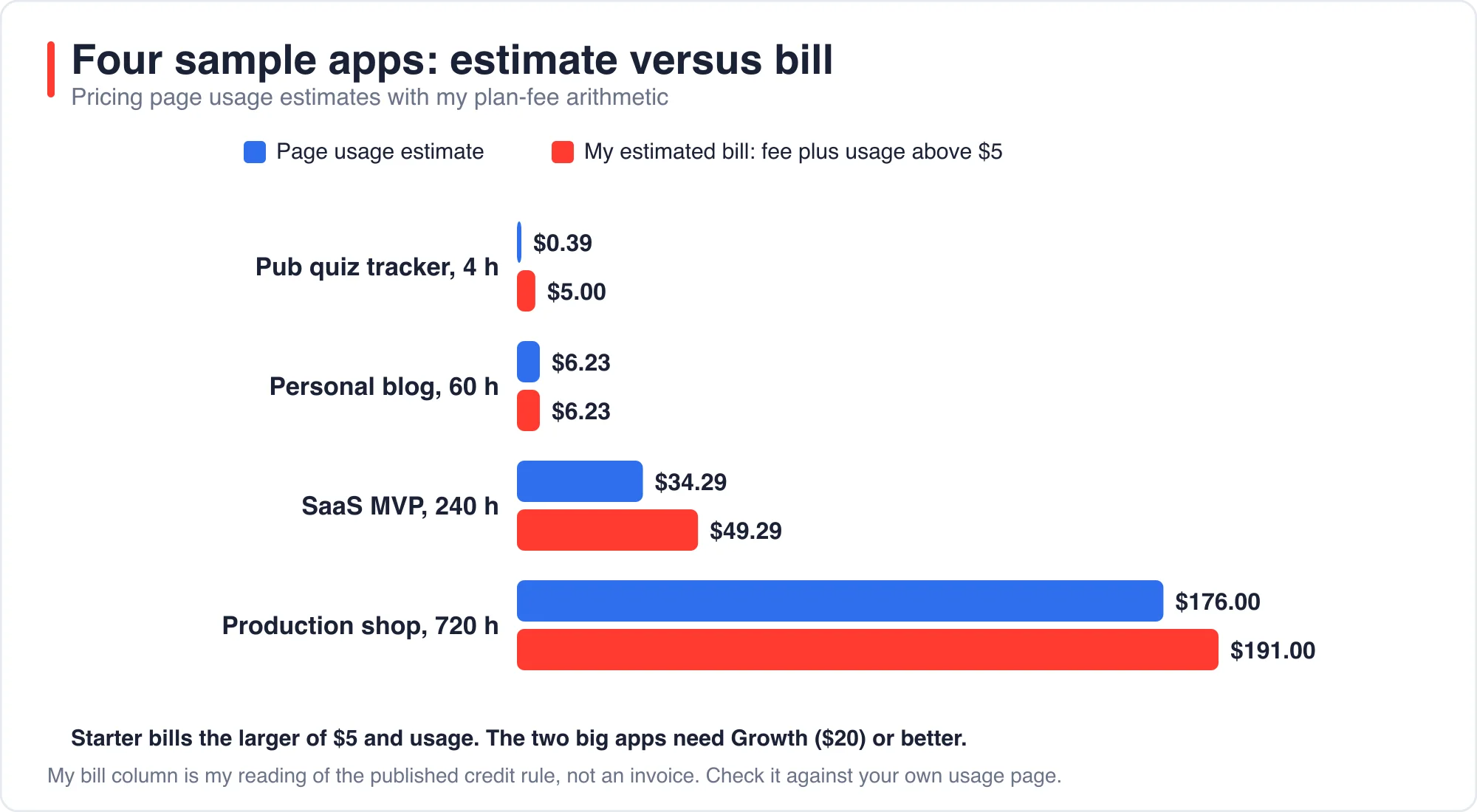
The pricing page estimates $0.39, $6.23, $34.29 and $176.00 a month for four sample apps. Those are usage estimates, and the plan fee comes on top of them. The page does not say whether the figures include the fee, but the first one cannot, since $0.39 is below the $5 Starter price.
| Scenario | Awake hours | Resources | Page estimate. |
|---|---|---|---|
| Pub quiz tracker | 4 | Flex 512, Postgres 0.5 GB | $0.39. |
| Personal blog | 60 | Flex 512, Postgres 5 GB, Valkey 250 MB, 1 worker | $6.23. |
| SaaS MVP | 240 | Flex 2 GiB, MySQL 20 GB, Valkey 1 GB, 2 workers | $34.29. |
| Production shop | 720 | Pro 4 GiB, 40 GB, Valkey 2.5 GB, 2 Pro workers | $176.00. |
My arithmetic below is a reading of the published rules, not a quote from an invoice, so check it against your own bill. Laravel says every paid plan includes $5 of monthly credit drawn from a single pool covering compute, database, cache, storage, bandwidth and queue operations. If the pool works as described, a bill is the plan fee plus any usage above $5.
| Scenario | Plan it needs | My estimated bill. |
|---|---|---|
| Pub quiz tracker | Starter | $5.00. |
| Personal blog | Starter | $6.23. |
| SaaS MVP | Probably Growth, for worker clusters | $49.29. |
| Production shop | Growth, for Pro compute | $191.00. |
Two things stand out. First, on Starter the bill is the larger of $5 and your usage, because the credit absorbs the first $5 of usage. A tiny app costs exactly $5 and a $6 app costs $6. Second, the larger two scenarios need Growth or better, since the page lists worker clusters and Pro compute as Growth features. I am inferring that the SaaS scenario's workers count as worker clusters, so it may fit Starter if they are managed queue workers. The page shows only the usage side of those numbers, so the $20 fee is an extra the estimator does not display.
What keeps a Laravel app awake?
Anything that sends a request or fires a job keeps the app awake, and that includes things you set up yourself, such as monitors and cron pings. Scale to zero only helps if the app is quiet in the real sense. Laravel's announcement says scheduled tasks and queue workers wake the app when they need handling, so these are the usual suspects.
- The scheduler. Laravel's scheduler is normally triggered every minute. If you have a task registered with
everyMinute(), the app wakes sixty times an hour. Runphp artisan schedule:listand look at the frequencies. - Uptime monitors. For example, a ping every five minutes is a request every five minutes. Whether each one resets the idle window depends on your configured window, which can be from one minute to one hour.
- Queue workers with steady traffic. Managed queues scale their workers to zero when the queue is empty, per the Laracon recap, but a job every few minutes keeps waking them.
- Bots and crawlers. A public site gets hit constantly. Check your access logs for a week before you trust a 4 hour estimate. Consider a documentation site that a search crawler visits every few hours: it will be awake far more than the owner thinks.
I have not measured wake behavior on a live Cloud app, so I cannot tell you how many minutes of idle a ping resets. The safe move is to measure your own awake hours on the usage page, which Laravel says shows a to-the-hour breakdown by app and resource. Then compare with the compute curve above.
When should you pick Starter, and when Growth?
Pick Starter for anything small enough to live inside Flex at 2 GiB, one replica and one managed queue. Move to Growth when you hit a hard feature wall, not when traffic grows a little. The walls from the pricing page are these:
- You need more than 2 GiB of RAM per instance or Pro compute.
- You need more than one replica for autoscaling.
- You need worker clusters or more than one managed queue per environment.
- You need more than 10 custom domains or more than one preview environment.
- You need more than one day of logs.
The $15 difference between Starter and Growth is real money for a hobby project and trivial for a business with customers. For a side project, the bill math above says that you will probably pay $5 or $6 on Starter, and the spending limit turns that into a hard ceiling. Laravel's two pages describe the limit slightly differently. The launch post says it stops new resource provisioning at the cap. It alerts at 50, 80, 90 and 100 percent of the threshold. The pricing page FAQ says compute pauses automatically and lists alerts at 50, 80 and 100 percent. Read the billing settings for the current behavior.
Does the region matter for pricing or for privacy?
The pricing page lets you choose a region, including EU Central in Frankfurt, EU West in Ireland and EU West in London. I did not see a price difference in the numbers I extracted, but the page has a region picker, so check it for your choice. For privacy, where your database lives matters if you serve people in the EU. The European Commission's data protection overview is a good starting point. This is a note on location, not legal advice.
How did I work out these numbers?
The methodology is plain arithmetic on published rates, so you can redo it for your own app in a few minutes. I took the per-second rate for each Flex size from the pricing page and multiplied by 3,600 to get an hourly rate. Then I multiplied by your expected awake hours and compared the result with the monthly cap, keeping whichever was lower.
Here is a worked example for a hobby site on Flex 1 GiB that is awake 90 hours a month. The rate is $0.00000496032 per second, which is $0.0179 an hour, so 90 hours costs $1.61. Add a Postgres database and a small cache, and say the whole stack uses $4.00 of usage. The $5 credit absorbs all of it, so the bill is the $5 Starter fee.
A busier example is the blog scenario on the pricing page, which Laravel estimates at $6.23 of usage. After the $5 credit, $1.23 is billed on top of the fee, which lands at $6.23 in total. That coincidence, where the bill equals the usage once usage passes $5, is why I describe Starter as the larger of $5 and your usage.
Use your own usage page for the real inputs. Laravel says it breaks costs down by app and resource to the hour, which is better data than any estimator.
What are the limits of this analysis?
I did not deploy to Laravel Cloud for this post, so no bill here comes from a real account. The per-second rates, caps and plan features come from Laravel's pricing page and posts as I read them in October 2026. The plan-fee arithmetic is mine. Rates change, and the page has been restructured at least once this year, so check it before you commit.
About the author: I build Laravel applications and checked every number in this post against Laravel's published pages and my own arithmetic. If a figure has moved since October 2026, tell me through the contact page and include the link where you saw the new number.
For related reading on background work, see AI Agent Orchestration in Laravel: Queues Before Frameworks. For another cost-driven decision, see Best AI IDE for Laravel: What Each One Costs in 2026.
The bottom line
A quiet Laravel app costs $5 a month on Starter, a busy hobby app costs about its usage, and always-on Flex compute tops out at the cap. Scale to zero helps most between a few hours and about 240 hours awake a month.
Before you move, list your scheduled tasks, your monitors and your queue patterns. They decide your awake hours, and the awake hours decide the bill.
Advertisement
FAQ
How much does an idle Laravel Cloud app cost?
About $5 a month on the Starter plan, because the $5 fee includes $5 of usage credit. Compute for a 512 MiB Flex app awake four hours is about $0.04. Database storage is billed while the app sleeps, but the credit usually absorbs it.
How fast does Laravel Cloud wake from scale to zero?
Laravel says the rebuilt Flex compute wakes the whole stack, compute, database and cache, in under 500 milliseconds, about 20 times faster than before. The legacy Flex option keeps a wake-up delay of about 10 seconds and costs $1 less per month.
What keeps a Laravel Cloud app from scaling to zero?
Anything that sends a request or fires a job: an every-minute scheduled task, an uptime monitor, bots and crawlers, or a steady queue. Laravel says scheduled tasks and queue workers wake the app. Check the usage page for real awake hours.
When do I need the Growth plan instead of Starter?
When you need Pro compute or more than 2 GiB of RAM, autoscaling beyond one replica, worker clusters, more than one managed queue, more than 10 custom domains, more than one preview environment, or more than one day of logs.
Comments
Loading…
Sign in to join the conversation.
Related posts

Laravel LSP in Neovim: Setup and What It Skips
Laravel LSP gives any editor that speaks the Language Server Protocol the same Laravel autocomplete that VS Code users already had. I installed version 0.0.32 and drove it with a protocol client
Sat Oct 10 2026 · 10 min read · 0 views
Laravel CVE-2026-102279: Which Version Fixes It?
Laravel 13.30.0 and Laravel 12.69.0 fix CVE-2026-102279, a cross-site scripting bug in the exception debug page. Those same two versions also contain the fixes for the two other Laravel framework
Sat Oct 10 2026 · 10 min read · 0 views

Laravel AI SDK Tool Approval: Edit Works, Fakes Skip It
The Laravel AI SDK can pause an agent before a sensitive tool runs and wait for a person to approve, reject or edit the call. I ran that human-in-the-loop tool approval API through 16 scenarios and
Sat Oct 10 2026 · 10 min read · 0 views