Laravel tenant scopes leaked in 5 of 7 paths. RLS closed all of them
By Nihar Ranjan Das · Sat Oct 24 2026 · 10 min read · 0 views
View as a Web StorySoftware#postgresql#Laravel#saas#multi-tenancy#row level security
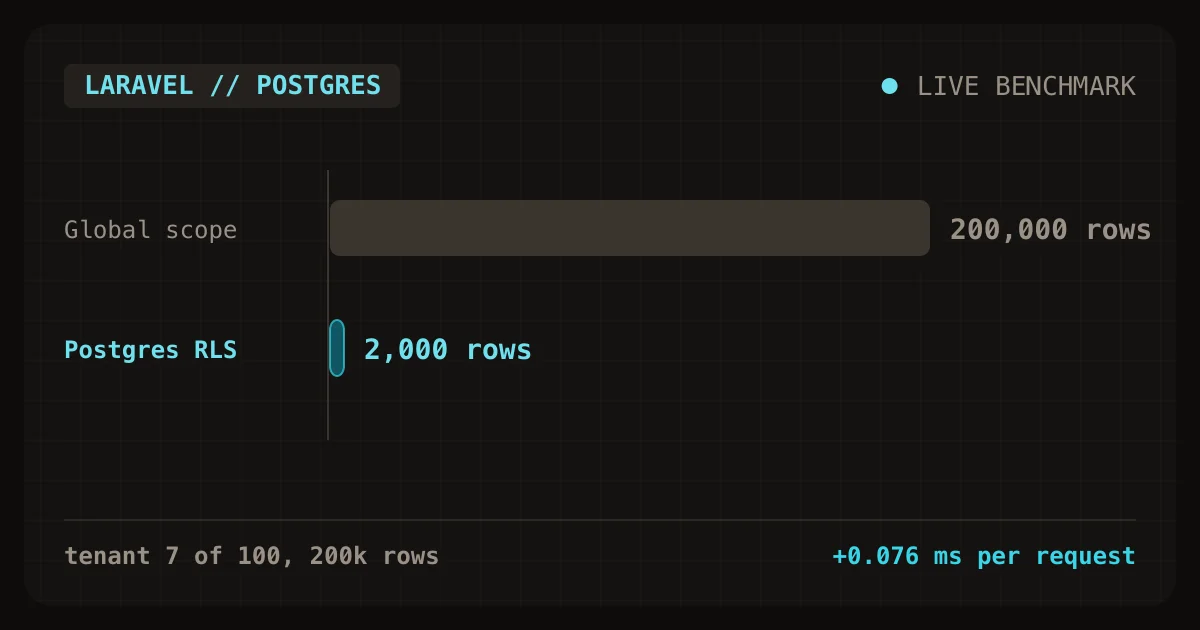
Laravel tenant scopes built on a tenant_id global scope do not isolate tenants. In a lab with 200,000 invoice rows across 100 tenants, the scope leaked all 200,000 rows in 5 of 7 common query paths. Postgres Row Level Security (RLS) returned only the caller's 2,000 rows in every path, and it cost 0.076 ms per request.
The fix is a database role without ownership of the table, one policy, and a transaction-local setting. This post shows the exact SQL, the Laravel wiring, the measurements, and the places RLS still fails. It is the first post in a series on billing and tenant isolation for a solo Laravel and PostgreSQL SaaS.
What is tenant isolation in a shared-schema Laravel app?
Tenant isolation means one customer's request can never read or write another customer's rows. In a shared-schema design, every tenant's rows live in the same tables and a tenant_id column tells them apart. This is the cheapest design for a solo developer, because there is one migration path and one connection pool.
The usual Laravel answer is an Eloquent global scope. A global scope is an Eloquent hook that adds where tenant_id = ? to every query built from a model. It works well for the happy path. The trouble is that it lives in application code, and application code has many ways around it.
How I tested the leaks
The methodology was a scripted lab that I built and ran myself. It used Laravel 13.38 on PHP 8.4.7 with PostgreSQL 18.1 on a laptop. One invoices table held 200,000 rows spread over 100 tenants, so each tenant owned 2,000 rows. A btree index on tenant_id was in place. I acted as tenant 7 and counted how many rows each query path could see.
The test setup was deliberately ordinary, such as a team would write in a first week. The scope is the textbook version: a class implementing Scope that adds where invoices.tenant_id = <current tenant> when a tenant is set. The RLS run used a second connection with a plain login role named app_user.
Which query paths leaked with only a global scope?
Five of seven paths returned all 200,000 rows to tenant 7. Only the plain Eloquent query and a find by primary key stayed inside the tenant. The table below shows each path and what tenant 7 could see.
| Query path | Rows visible (scope only) | Rows visible (RLS) |
|---|---|---|
Eloquent Invoice::count() |
2,000 | 2,000 |
DB::table('invoices')->count() |
200,000 | 2,000 |
DB::select('select count(*) ...') |
200,000 | 2,000 |
Invoice::withoutGlobalScopes() |
200,000 | 2,000 |
| Queued job with no tenant context | 200,000 | 0 |
| Self-join through the query builder | 200,000 | 2,000 |
Invoice::find() on another tenant's id |
0 | 0 |
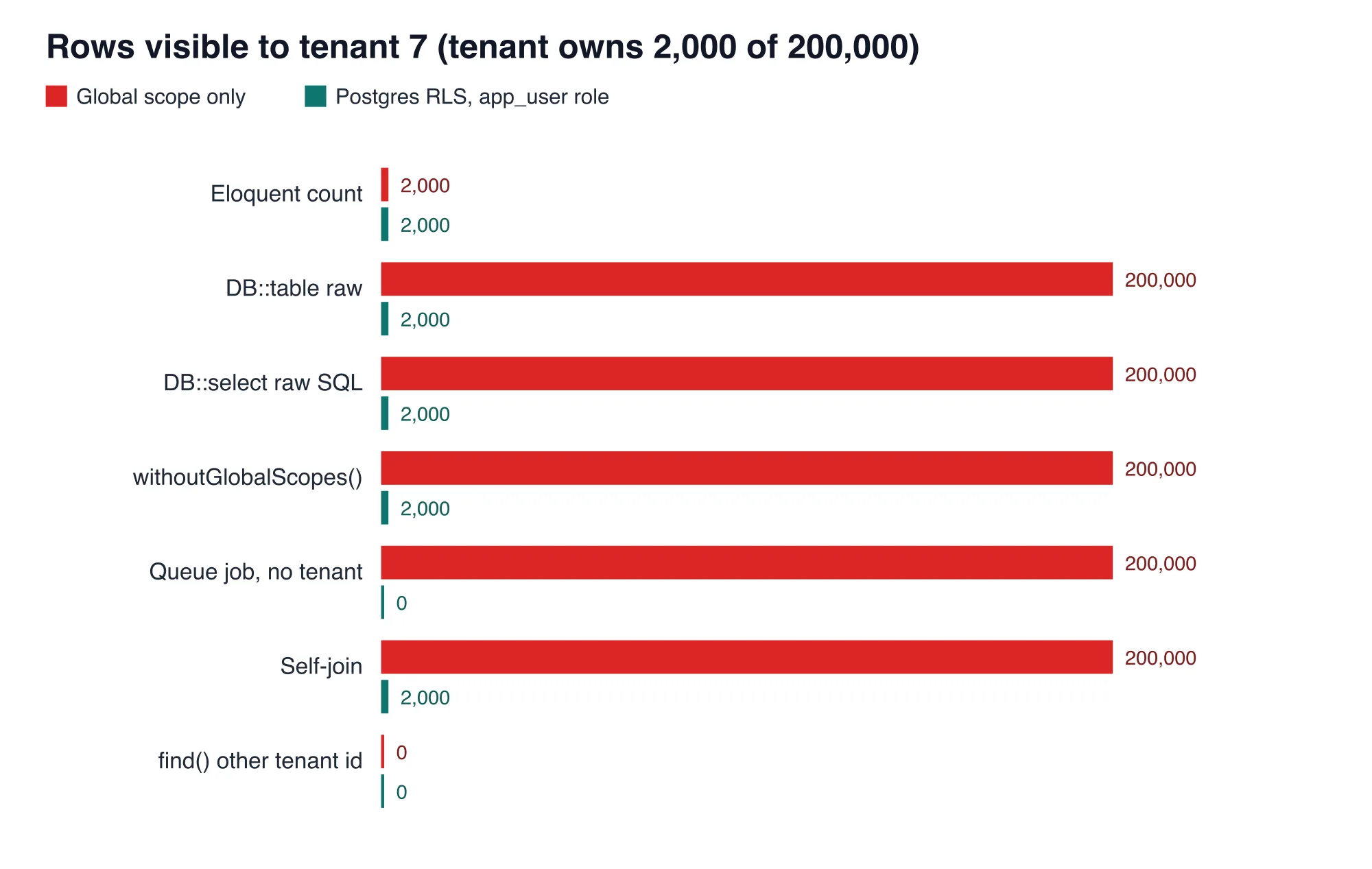
The bottom line from the chart is simple. The scope protects the code paths that remember to use it, and nothing else. Every leaking path is something a real codebase contains within a year: a reporting query, a hand-written join, an admin tool, or a background job.
Why does each path leak?
Each leak has a different cause, but all five share one root: the filter is a convention rather than a rule. Knowing the cause helps you recognise the same hole in your own code.
Advertisement
Raw queries and the query builder
DB::table() and DB::select() never touch an Eloquent model, so no global scope runs. A developer writing a quick revenue report reaches for them because they are faster to write. The query then reads the whole table.
withoutGlobalScopes
Laravel's withoutGlobalScopes() exists for good reasons, such as an admin screen. It is also the first thing a developer tries when a scoped query returns fewer rows than expected. One call removes the only protection.
Queued jobs with no tenant context
A queued job runs in a worker process, not in the web request that dispatched it. Unless the job restores the tenant, the scope sees no tenant and, in the textbook version, adds no filter at all. The scope fails open, so the job read all 200,000 rows. This is the leak most teams find last.
Joins that bypass the model
A join built with the query builder reads each joined table directly. The scope only guards the model it is attached to, so a join against a second table is unguarded. In the lab, a self-join returned every row.
How does Postgres Row Level Security close all five?
Row Level Security is a PostgreSQL feature that attaches a filter to a table, enforced by the database for every query from a non-exempt role. The PostgreSQL documentation on row security policies describes it as a per-table policy that is applied before any user query conditions. Because the database applies it, raw SQL, joins, and jobs are all covered.
The policy used in the lab follows the CREATE POLICY syntax and fits in a few lines:
alter table invoices enable row level security;
alter table invoices force row level security;

create policy tenant_iso on invoices
  using (tenant_id = nullif(current_setting('app.tenant_id', true), '')::int)
  with check (tenant_id = nullif(current_setting('app.tenant_id', true), '')::int);
The using clause filters reads, updates, and deletes. The with check clause blocks inserts and updates that would write a row into another tenant. When no tenant is set, current_setting(..., true) returns null, the comparison is never true, and the query sees zero rows. The policy fails closed, which is the opposite of the global scope.
I ran the same seven paths as app_user. The raw count, the withoutGlobalScopes equivalent, and the self-join all returned 2,000 rows. The job with no tenant returned 0 rows. A direct insert of a row for tenant 8 while acting as tenant 7 failed with SQLSTATE[42501]: Insufficient privilege: new row violates row-level security policy.
How do you wire RLS into Laravel?
You need three pieces: a restricted role, a connection that uses it, and a helper that sets the tenant inside a transaction. The role must not own the tables, and it must not have the BYPASSRLS attribute. Superusers and roles with BYPASSRLS always skip row security, and table owners skip it too unless you run force row level security.
Create the role and grant it data access only:
create role app_user login password '...';
grant select, insert, update, delete on all tables in schema public to app_user;
grant usage on all sequences in schema public to app_user;
Add a second connection in config/database.php that logs in as app_user, and keep the default connection as the owner for migrations. Your web and queue code then use the restricted connection:
// app/Support/Tenant.php
namespace App\Support;

use Illuminate\Support\Facades\DB;

class Tenant
{
    public static function run(int $tenantId, \Closure $work): mixed
    {
        return DB::connection('app')->transaction(function () use ($tenantId, $work) {
            DB::connection('app')->statement(
                "select set_config('app.tenant_id', ?, true)",
                [(string) $tenantId]
            );

            return $work();
        });
    }
}
The third argument, true, makes the setting local to the current transaction. Wrap each web request in Tenant::run() from a middleware, and wrap each job's handle() the same way. A job should carry the tenant id as a plain property and restore it before touching the database.
// app/Http/Middleware/SetTenant.php
public function handle($request, Closure $next)
{
    return Tenant::run($request->user()->tenant_id, fn () => $next($request));
}
Keep the Eloquent scope as well. The scope still lets the planner use the tenant_id index with an explicit predicate, and it gives developers a clear error when they forget the context. RLS is the safety net, not a replacement.
Why use a transaction-local setting and not a session setting?
A session-level setting survives after the request ends, and the next request on the same connection inherits it. In the lab I set app.tenant_id to 7 with the session flag, then ran a query as a later request with no tenant set. It saw 2,000 rows that belonged to tenant 7.
This matters because connections are reused. Laravel Octane, PHP-FPM persistent connections, and PgBouncer in transaction mode all hand one database connection to many requests. The PostgreSQL documentation for set_config states that the third argument chooses between transaction-local and session scope. Use the transaction-local form every time.
What does RLS cost per request?
RLS plus the set_config call added about 0.076 ms per request in the lab. A single point lookup took 0.081 ms with no transaction, 0.148 ms inside a plain transaction, and 0.224 ms inside a transaction with set_config and RLS active. The difference between the last two rows is the real price of isolation.
| Setup (20,000 lookups by id and tenant) | Time per query |
|---|---|
| Plain query, owner role | 0.081 ms |
| Inside a transaction, owner role | 0.148 ms |
Transaction, set_config, RLS, app_user |
0.224 ms |
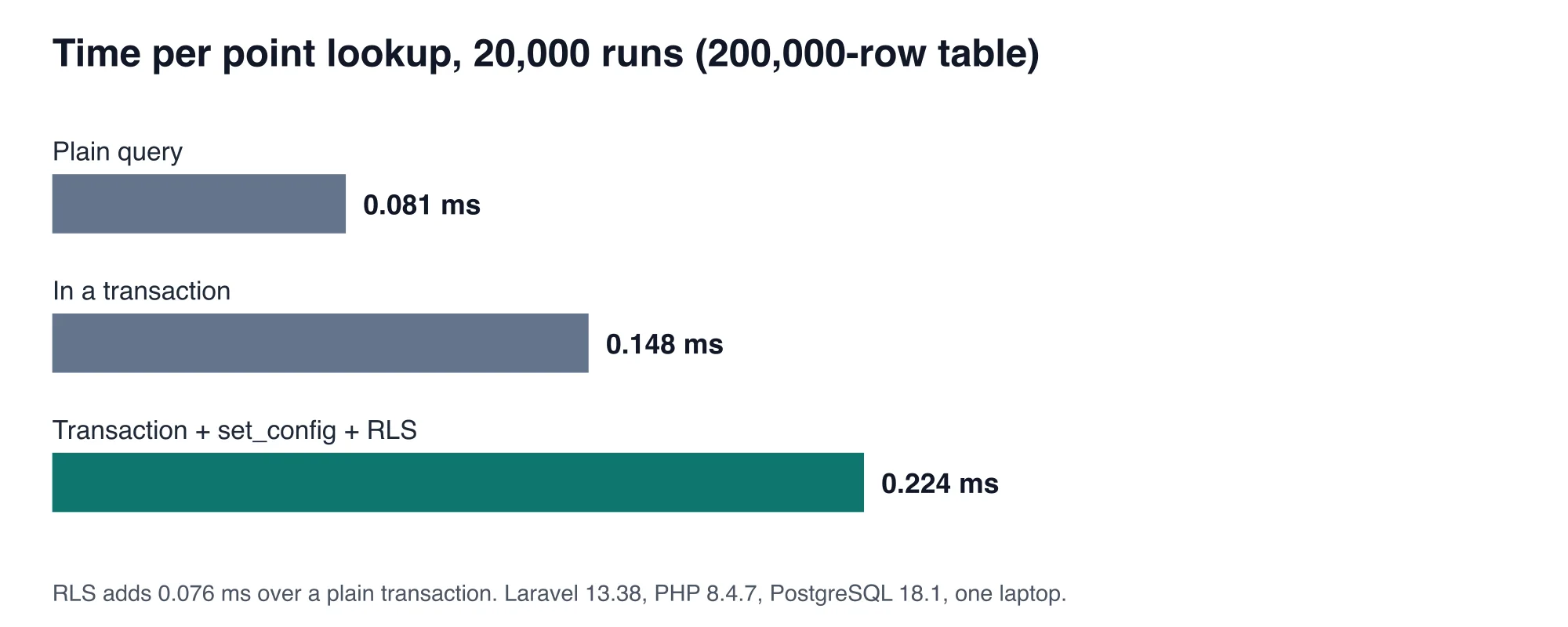
Most of the first jump comes from wrapping a single statement in a transaction, which you may already pay for on write paths. A page that runs 10 queries pays the transaction and set_config cost once, not ten times. At 0.076 ms for the policy, the cost is far below the network round trip to a managed database.
The query plan shows why the cost stays small. With the tenant set, EXPLAIN on a primary-key lookup used Index Scan using invoices_pkey with the tenant check as a filter. The policy did not force a sequential scan. Keep your tenant_id index, and put it first in composite indexes that you use for tenant-wide lists.
Where does RLS still fail?
RLS fails when the connecting role is exempt, when a policy is missing on a new table, and when code deliberately crosses tenants. Four checks catch most of it.
- Check the role. Run
select rolname, rolbypassrls, rolsuper from pg_roles where rolname = 'app_user';. Both flags must be false. For example, the lab role showedfin both columns. - Check every new table. A table created in a migration has no policy and no RLS until you add both. Add a test that lists tables with a
tenant_idcolumn and fails ifrelrowsecurityis false. - Plan cross-tenant work. Billing jobs, admin screens, and analytics need to read many tenants. Give them a separate role or a separate connection, and keep it out of web requests.
- Keep migrations on the owner. The owner role runs
migrate. If the app role ran migrations, it would own the tables and skip the policies.
A fifth risk is a policy that is slow. A policy that calls a function on every row can defeat the index. Keep the policy to a column compared with a setting, as above.
How do you test that isolation holds?
Write one test that runs raw SQL as the restricted role and asserts the counts. This test is cheap and it fails loudly when someone adds a table without a policy or changes the role.
it('returns nothing when no tenant is set', function () {
    $count = DB::connection('app')->selectOne('select count(*) c from invoices')->c;
    expect($count)->toBe(0);
});

it('shows only the current tenant', function () {
    Tenant::run(7, function () {
        $count = DB::connection('app')->selectOne('select count(*) c from invoices')->c;
        expect($count)->toBe(2000);
    });
});
Run these on the restricted connection, not the default one. If they ran on the owner role, they would pass for the wrong reason.
Should you add RLS to your Laravel SaaS?
Add RLS if you store more than one customer's data in shared tables and a leak would be a breach, which describes almost every B2B SaaS. The cost is 0.076 ms per request, one policy per table, and a restricted role. The benefit is that a forgotten scope becomes an empty result rather than a data leak.
Skip it only if you already isolate tenants by database, or if your product has a single tenant. For everything else, keep the global scope for ergonomics and add RLS as the rule the database enforces.
The measurements here come from one laptop and one table shape, so treat the absolute milliseconds as a guide and rerun the script on your own schema. The leak counts do not depend on the hardware. They follow from where the filter lives.
Advertisement
FAQ
Does Laravel's global scope stop tenant data leaks?
No. A global scope only applies to Eloquent queries on the model it is attached to. In the lab it leaked all 200,000 rows through raw queries, `withoutGlobalScopes()`, queued jobs, and joins. Add Postgres Row Level Security so the database enforces the filter for every query.
How do I use Postgres Row Level Security with Laravel?
Create a login role that does not own the tables, enable and force RLS, and add a policy comparing `tenant_id` to `current_setting('app.tenant_id', true)`. In Laravel, call `set_config` with the transaction-local flag inside a transaction on every request and every queued job.
Does Row Level Security slow down PostgreSQL?
Only slightly when the policy is a simple column comparison. In the lab, RLS with `set_config` added 0.076 ms per request on a 200,000-row table, and primary-key lookups still used the index. Policies that call functions on each row can be slower.
Why use SET LOCAL instead of SET for the tenant id?
A session-level setting stays on the connection after the request ends. The next request on that connection inherits it, and in the lab it saw tenant 7's 2,000 rows without setting a tenant. The transaction-local form resets at commit, so reused connections stay clean.
Does RLS work with PgBouncer?
Yes, if you set the tenant inside a transaction with the local flag. PgBouncer in transaction mode may give each transaction a different server connection, so a session-level setting cannot be trusted. The transaction-local setting travels with the transaction.
Comments
Loading…
Sign in to join the conversation.
Related posts
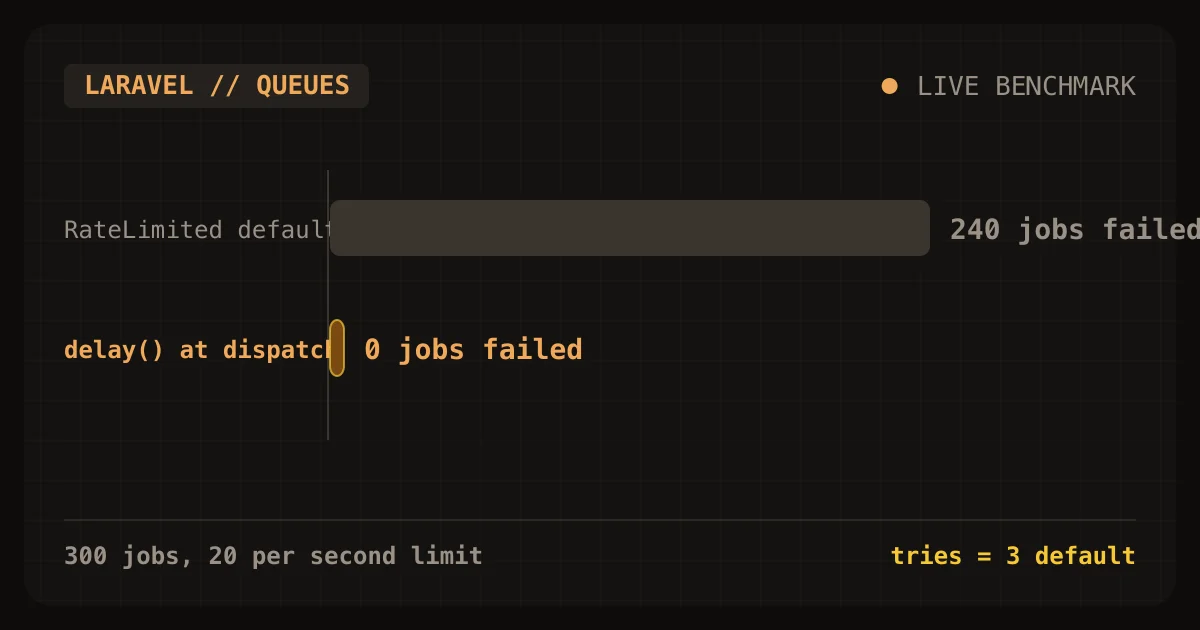
Laravel's RateLimited job middleware failed 240 of 300 jobs
Laravel's RateLimited job middleware protected a small tenant from a noisy one, and it also failed 240 of the noisy tenant's 300 jobs. In my lab, a limit of 20 jobs per second kept the small tenant's
Sat Oct 24 2026 · 9 min read · 0 views
Cashier locks customers out on day 0 of the retry window
Laravel Cashier locks customers out on day 0 of Stripe's retry window. The first failed renewal moves a subscription to pastdue, and Cashier's valid() returns false from that moment. Stripe's
Sat Oct 24 2026 · 9 min read · 0 views
Cashier upgrades bill late and can lock customers out
Laravel Cashier's default swap() and updateQuantity() calls do not charge a customer for an upgrade today. They send prorationbehavior=createprorations, so Stripe adds the charge to the next renewal
Sat Oct 24 2026 · 9 min read · 0 views