Laravel's RateLimited job middleware failed 240 of 300 jobs
By Nihar Ranjan Das · Sat Oct 24 2026 · 9 min read · 0 views
View as a Web StorySoftware#postgresql#Laravel#queues#rate-limiting#saas#multi-tenancy
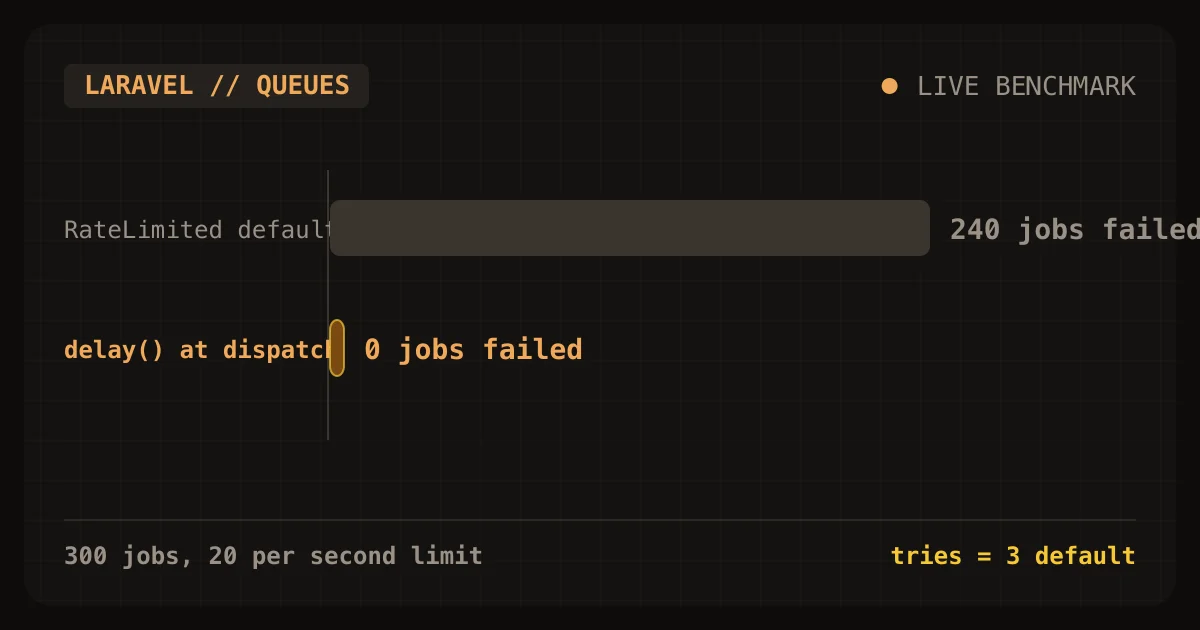
Laravel's RateLimited job middleware protected a small tenant from a noisy one, and it also failed 240 of the noisy tenant's 300 jobs. In my lab, a limit of 20 jobs per second kept the small tenant's 10 jobs at 0.51 seconds instead of 4.27. Under the default tries = 3, most of the limited tenant's jobs used up their attempts while waiting and landed in failed_jobs.
The fix that worked best was not middleware. Spreading the jobs with delay() at dispatch finished all 300 jobs in 14.11 seconds, failed none, and kept the small tenant at 0.40 seconds. This post shows the queue measurements, the Postgres timeouts that stop one tenant from holding the database, and a closing audit checklist for the whole series. It is the sixth and last post in a series on billing and tenant isolation for a solo Laravel and PostgreSQL SaaS.
What is a noisy neighbor in a shared Laravel app?
A noisy neighbor is a tenant whose heavy use slows every other tenant on shared infrastructure. In a shared Laravel app the shared parts are the queue workers, the database connections, and the locks inside Postgres. An earlier post on how a noisy tenant made everyone wait built a fair queue in a toy worker pool. This post tests the Laravel and Postgres tools you actually have.
Each tool has a sharp edge, for example a limiter that quietly discards work. Queue limits can fail jobs. Database limits can cancel real work. Both are worth having, but only if you know what each one does when it fires.
How I tested the limits
The methodology was a scripted lab on one laptop with Laravel 13.38, Redis 8.4.0 as the queue, and PostgreSQL 18.1. Four queue:work processes handled jobs that each slept 50 ms. Tenant A dispatched 300 jobs, then tenant B dispatched 10. I measured how long B's 10 jobs took and what happened to A's 300.
For Postgres I used plain psql sessions that hold locks and run long queries, with and without timeouts. As a fact-check, I compared each Laravel and Postgres statement with the linked documentation on October 24, 2026. The numbers come from a single run of each case, except the queue failure count, which I ran twice and got 237 and 240. Absolute times depend on the hardware. The pattern does not.
What do the four queue strategies do to a small tenant?
Rate limiting is a rule that caps how much work one tenant can start per unit of time. A delay is a dispatch option that holds a job back for a number of seconds. Both change when a job runs, and neither changes how long it takes.
A single FIFO queue made the small tenant wait 4.27 seconds for 10 jobs, while all three limiting strategies cut that to well under a second. They differ in what they do to the noisy tenant.
| Strategy | B's 10 jobs finish in | A's 300 jobs |
|---|---|---|
| Single FIFO queue | 4.27 s | 300 done in 4.19 s |
RateLimited at 20 per second, default tries = 3 |
0.51 s | 60 done, 240 failed |
RateLimited with retryUntil, unlimited tries |
0.64 s | 300 done in 55.72 s |
delay() at dispatch, 20 jobs per second |
0.40 s | 300 done in 14.11 s |
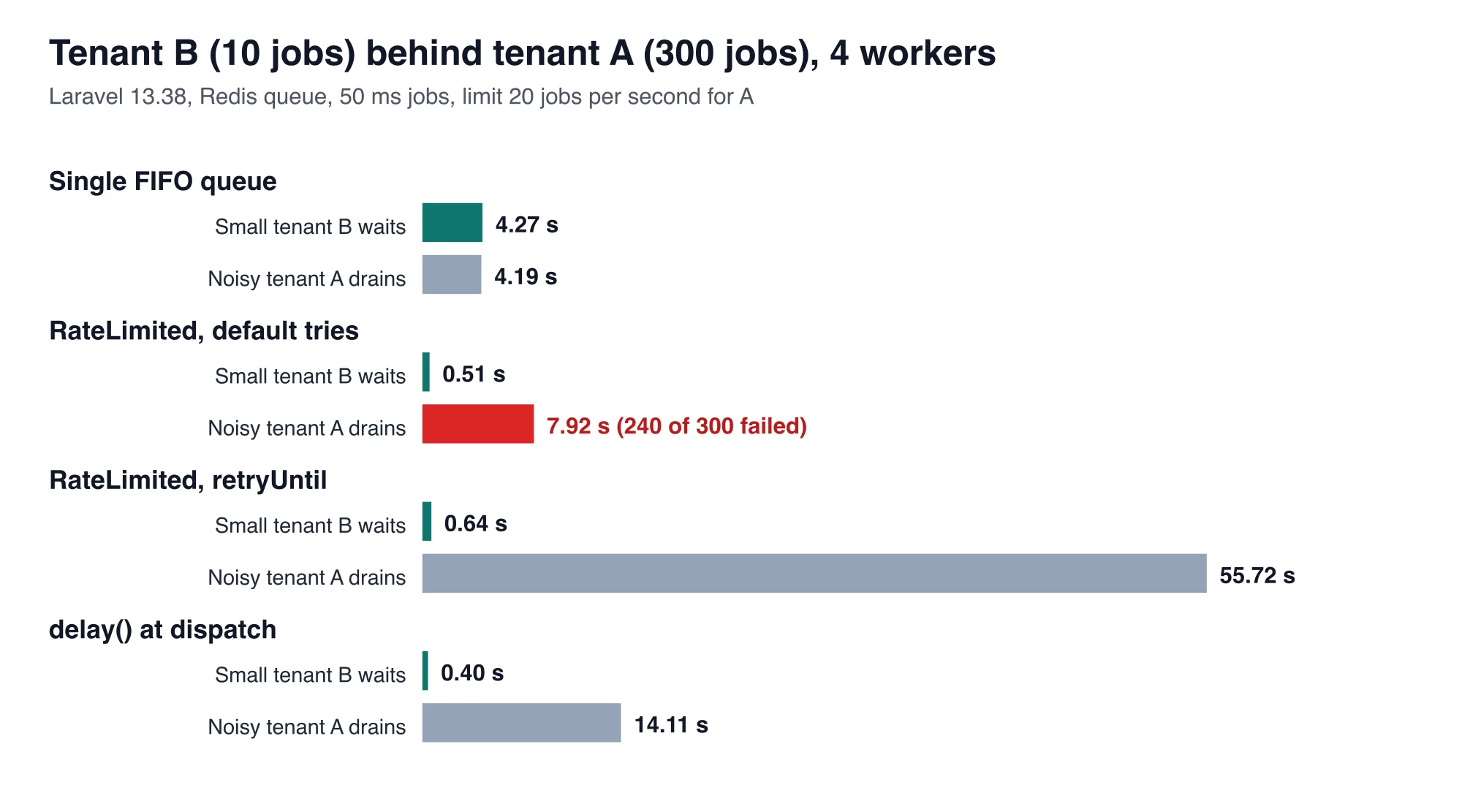
The bottom line is that the small tenant is protected by any limit, so the choice is about what happens to the limited tenant's work. Failing 240 jobs is substantial data loss unless you deliberately planned for it. Taking 55 seconds for work that should theoretically take 15 is an unnecessary performance leak. Only the dispatch-time delay gave both a clean result and a fair total time.
Advertisement
Why does RateLimited fail jobs?
A released job still counts as an attempt. The Laravel queue documentation on rate limiting says that releasing a rate limited job back onto the queue will still increment the job's total number of attempts. It tells you to tune tries and maxExceptions, or to use retryUntil.
Here is what happens at 20 jobs per second. The limiter lets 20 of the 300 jobs through. The other 280 are released to try again about a second later, and each release uses one attempt. After three passes through the limiter, a job has no attempts left and goes to failed_jobs. In the lab, only 60 jobs made it through in three seconds.
This is the failure that looks like success. The noisy tenant's dashboard shows a queue that drains quickly, and the failures sit in a table nobody watches. Always check failed_jobs whenever you introduce a limiter.
Which fix should you use?
Spread the jobs at dispatch when you know the rate, and use retryUntil when you do not. The table compares the three ways to keep a limited tenant's jobs alive.
| Fix | A's jobs | Cost |
|---|---|---|
delay() at dispatch |
300 done in 14.11 s, 0 failed | You compute the delay when you dispatch |
retryUntil() with $tries = 0 |
300 done in 55.72 s, 0 failed | Slow, and jobs keep waking up |
(new RateLimited('x'))->dontRelease() |
Excess jobs fail at once | Fastest feedback, but the work is lost |
The dispatch-time version is two lines:
foreach ($jobs as $i => $job) {
    dispatch($job)->delay(intdiv($i, 20));   // 20 jobs per second for this tenant
}
The retryUntil version takes a method on the job and a tries of zero:
public int $tries = 0;

public function retryUntil(): \DateTimeInterface
{
    return now()->addMinutes(5);
}
It was 3.9 times slower than the ideal 15 seconds in the lab. I did not isolate why. A likely cause is that released jobs all wake together each second and compete for the same limiter window, but I did not test that. If you use retryUntil, measure your own drain time.
How do you stop one tenant from holding the database?
A statement timeout is a Postgres setting that cancels any statement running longer than a chosen time. Set timeouts inside the same per-request transaction that sets the tenant. The first post in this series wrapped each request in a transaction that runs set_config('app.tenant_id', ..., true) for row level security. That transaction is also the place for limits, because SET LOCAL lasts only until the transaction ends. The PostgreSQL documentation for SET says its effects last only till the end of the current transaction, whether committed or not.
DB::connection('app')->transaction(function () use ($tenantId, $work) {
    DB::connection('app')->statement("select set_config('app.tenant_id', ?, true)", [(string) $tenantId]);
    DB::connection('app')->statement("set local statement_timeout = '5s'");
    DB::connection('app')->statement("set local lock_timeout = '1s'");

    return $work();
});
The Postgres documentation warns against setting statement_timeout globally in postgresql.conf, because it would affect all sessions, including migrations and your own reports. The per-transaction form avoids that.
What do the Postgres timeouts do?
Each timeout turned a long block into a fast, clean failure in the lab. The table shows the measured times.
| Situation | Without a limit | With a limit |
|---|---|---|
| Runaway query over 300 million generated rows | 32.57 s to finish | Stopped at 2.64 s by statement_timeout = '2s' |
| Second tenant waits on a row locked for 6 s | Blocked 5.02 s | Failed after 0.68 s with lock_timeout = '500ms' |
| Lock holder goes silent inside an open transaction | Waiter blocked 7.06 s | Waiter blocked 1.03 s with idle_in_transaction_session_timeout = '2s' |
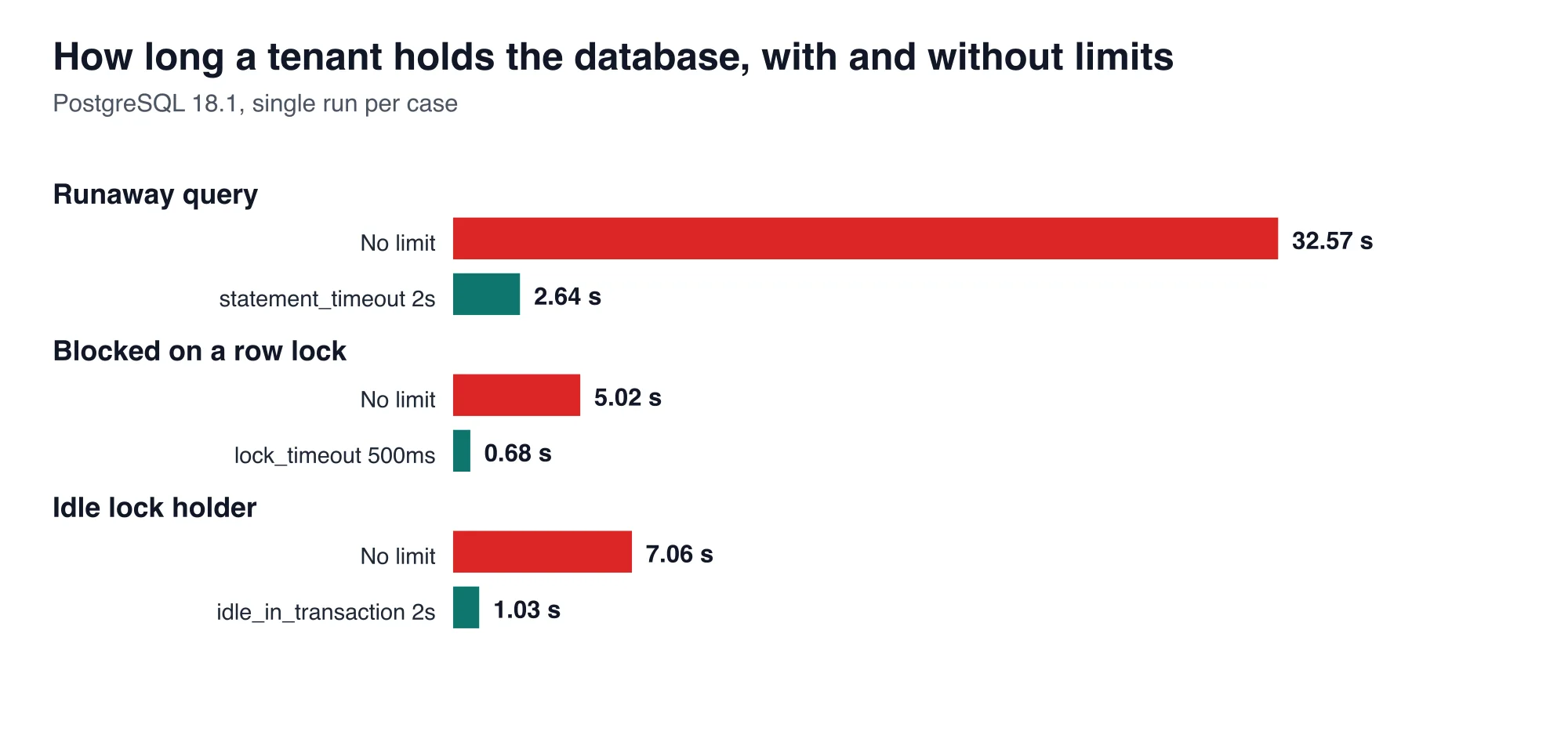
The statement timeout produced ERROR: canceling statement due to statement timeout, and the lock timeout produced canceling statement due to lock timeout. Your Laravel code sees both as a QueryException. Catch them, return a 503 or a retry hint, and log the tenant id. The 2.64 seconds includes starting psql, so the cancel itself is faster than the number suggests.
The idle timeout works differently. The PostgreSQL documentation for idle_in_transaction_session_timeout says it terminates any session idle within an open transaction for longer than the set time, so idle sessions do not hold locks for an unreasonable time. It is a session setting, so apply it to the application role:
alter role app_user set idle_in_transaction_session_timeout = '15s';Should limits depend on the plan?
Yes, and the pricing post in this series gives you the natural place to do it. A free plan can get a 2-second statement timeout and 5 jobs per second. A paid plan can get 10 seconds and 50 jobs per second. Store the numbers on the tenant or the plan, and read them where you build the transaction and where you dispatch jobs.
For web requests, Laravel's own limiter keys on the tenant in a few lines:
RateLimiter::for('api', fn (Request $r) =>
    Limit::perMinute($r->user()->tenant->plan_limit)->by($r->user()->tenant_id));
I did not measure this limiter in the lab. It is the standard Laravel tool and it returns a 429 response, so tell customers the limits in your docs.
What is the audit checklist for billing and tenant isolation?
Use this checklist to review a Laravel and PostgreSQL SaaS. Each line comes from a measurement in this series, so each one has a failing example behind it.
| Area | Check | What failed in the lab |
|---|---|---|
| Isolation | Row Level Security is on for every table with a tenant_id, using a non-owner role |
A global scope leaked 200,000 rows in 5 of 7 query paths |
| Isolation | The tenant is set with set_config(..., true) inside a transaction |
A session-level setting leaked tenant 7's rows to the next request |
| Webhooks | An inbox table with a unique event id, in the same transaction as the work | A naive handler wrote 100 ledger rows for 20 invoices |
| Webhooks | An ordering guard on subscription events | A stale active event overwrote canceled |
| Pricing | The plan matches your cost curve | Flat pricing lost money on 193 of 1,000 customers at a unit cost of $0.04 |
| Metering | A fixed identifier on every meter event |
Cashier's default sent a new identifier on a retry |
| Plan changes | Upgrades use alwaysInvoice() and errorIfPaymentFails() |
The default billed at renewal and could lock the customer out |
| Failed payments | An access ladder, with paused blocked |
valid() was false from day 0 and true for paused |
| Queues | Per-tenant limits with tries or retryUntil set, and failed_jobs monitored |
RateLimited failed 240 of 300 jobs |
| Database | statement_timeout, lock_timeout and an idle timeout |
One tenant held a lock for 5 to 7 seconds |
| Tests | Tests for each row above, run on the restricted role | Tests on the owner role pass for the wrong reason |
Work through the table from the top. The isolation rows protect against a breach, the webhook and plan rows protect revenue, and the queue and database rows protect uptime. A solo founder can realistically finish the whole list within a few working days, and every individual fix is small.
What are the limits of these measurements?
The queue lab used one machine, four workers, and 50 ms jobs. Real jobs vary in length, and a longer job would change how many sit in the queue at once. The 237 and 240 failure counts show the run-to-run spread for the default case. The Postgres numbers are single runs, so treat them as the size of the effect, not a benchmark.
The lab did not test Laravel Horizon or its per-queue balancing, which changes how workers are shared. If you run Horizon, rerun the queue test on your configuration. The Postgres behavior is stable across versions, and the Laravel behavior is documented, so the findings should carry over.
Advertisement
FAQ
Why does Laravel's RateLimited middleware fail my jobs?
A job released back onto the queue by the middleware still uses one attempt. With the default `tries = 3`, a job that is released three times lands in `failed_jobs`. In the lab, 240 of 300 jobs failed. Set `retryUntil`, raise `tries`, or delay jobs at dispatch.
How do I rate limit a tenant's queued jobs in Laravel?
Define a limiter with `RateLimiter::for()` keyed by tenant, add `RateLimited` to the job's `middleware()`, and set `tries` or `retryUntil` so released jobs survive. Alternatively, dispatch with `delay(intdiv($i, $perSecond))`, which finished 300 jobs in 14.11 seconds with no failures.
How do I set a per-tenant query timeout in PostgreSQL?
Run `set local statement_timeout = '5s'` inside the transaction that serves the tenant's request. `SET LOCAL` ends with the transaction, so it does not leak to other tenants on a pooled connection. In the lab, a 2-second limit stopped a 32.57-second query.
What does lock_timeout do?
It aborts a statement that waits too long for a lock. In the lab, an update blocked behind a 6-second row lock waited 5.02 seconds without a limit and failed after 0.68 seconds with `lock_timeout = '500ms'`, returning `canceling statement due to lock timeout`.
How do I stop idle transactions from holding locks?
Set `idle_in_transaction_session_timeout` on the application role, for example `alter role app_user set idle_in_transaction_session_timeout = '15s'`. Postgres then ends sessions that sit idle inside an open transaction. In the lab, a 2-second limit cut a 7.06-second block to 1.03.
Comments
Loading…
Sign in to join the conversation.
Related posts
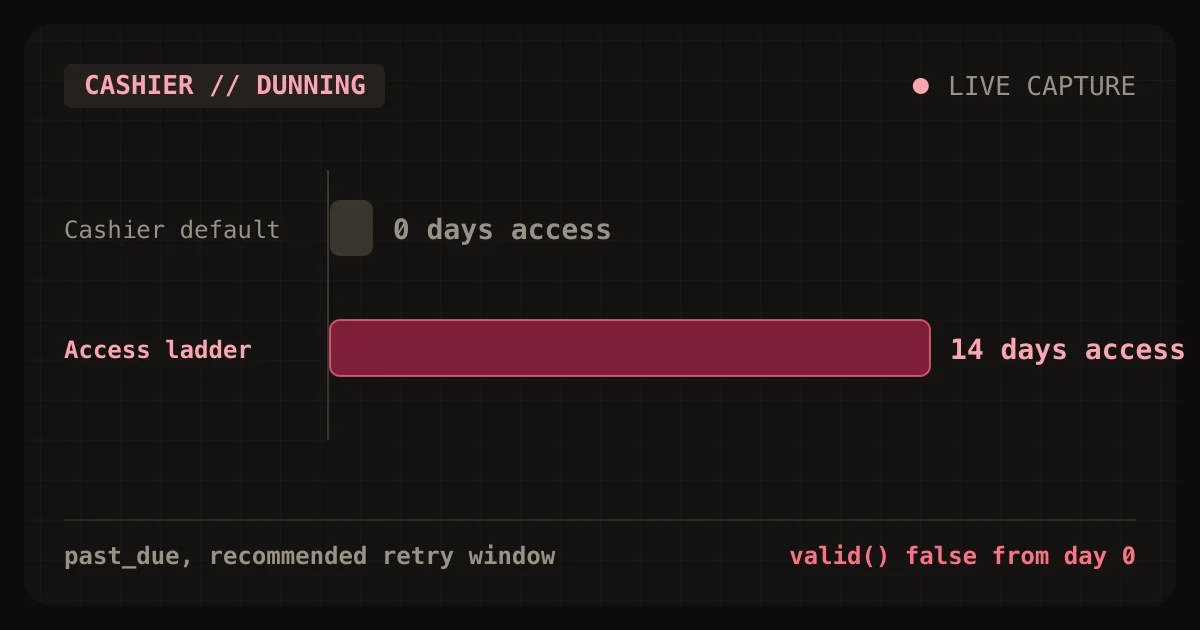
Cashier locks customers out on day 0 of the retry window
Laravel Cashier locks customers out on day 0 of Stripe's retry window. The first failed renewal moves a subscription to pastdue, and Cashier's valid() returns false from that moment. Stripe's
Sat Oct 24 2026 · 9 min read · 0 views
Cashier upgrades bill late and can lock customers out
Laravel Cashier's default swap() and updateQuantity() calls do not charge a customer for an upgrade today. They send prorationbehavior=createprorations, so Stripe adds the charge to the next renewal
Sat Oct 24 2026 · 9 min read · 0 views
Seat vs usage vs flat pricing for a Laravel SaaS, modeled
For a solo Laravel SaaS where customers differ a lot in how much they use, a hybrid plan is the safest default: a base fee that includes some usage, then a metered rate above it. In a 1,000-customer
Sat Oct 24 2026 · 9 min read · 0 views