Seat vs usage vs flat pricing for a Laravel SaaS, modeled
By Nihar Ranjan Das · Sat Oct 24 2026 · 9 min read · 0 views
View as a Web StorySoftware#stripe#usage-based billing#Laravel#pricing#saas#cashier
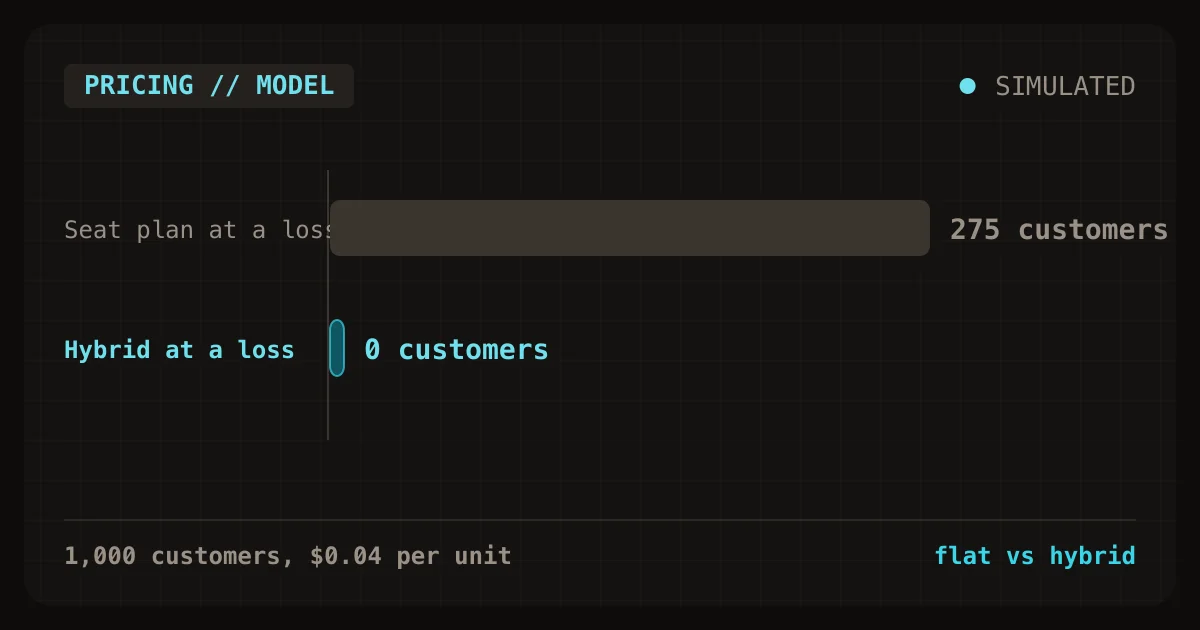
For a solo Laravel SaaS where customers differ a lot in how much they use, a hybrid plan is the safest default: a base fee that includes some usage, then a metered rate above it. In a 1,000-customer model, flat pricing lost money on 77 customers and seat pricing on 106, while usage and hybrid pricing lost money on none. Usage pricing paid for that safety with invoices that jumped by more than half in 1,410 of 5,000 month-to-month changes.
This post gives the model, the invoice math for each plan type, and the Laravel Cashier code for each. It also shows a metering bug that sits in Cashier's defaults. It is the third post in a series on billing and tenant isolation for a solo Laravel and PostgreSQL SaaS, and it reads fine on its own.
What are the three pricing models and the hybrid?
Flat pricing is a plan that charges every customer the same fee per month. Seat-based pricing is a plan that charges per user, so the invoice grows with team size. Usage-based pricing is a plan that charges per unit consumed, such as API calls, documents, or tokens. A hybrid plan is a plan that combines a base fee that includes an allowance with a metered rate above it.
Each pricing model answers a fundamentally different question. Flat pricing answers "what is the product worth?" Seat pricing answers "how big is the customer?" Usage pricing answers "how much did the customer use?" The appropriate choice depends on which of those factors determines your infrastructure costs and your customer's perceived value.
How I modeled the four plans
The methodology was a seeded simulation, not market data. I built a cohort of 1,000 customers and six months of usage each. Seats follow an exponential tail with a mean of 3.0. Monthly usage has a median of 445 units and a mean of 883, because a few customers use far more than the rest. Each month multiplies that usage by a random factor with a standard deviation of 0.35 in log terms.
I then priced each model so that all four earn exactly $50,000 a month across the cohort. That makes the comparison fair: any difference comes from who pays, not how much.
| Model | Price that earns $50,000 a month |
|---|---|
| Flat | $50.00 per customer |
| Seat | $16.66 per seat |
| Usage | $0.0566 per unit |
| Hybrid | $19 base with 500 units included, then $0.0578 per unit |
The unit cost to you is the assumption that matters most, so I ran three cases: $0.004, $0.02, and $0.04 per unit. The first suits a plain CRUD app. The last suits a product that calls a paid AI model on each action. The script is about 50 lines of Python with a fixed seed, so you can swap in your own cohort.
Which plan loses money on your heaviest customers?
Flat and seat plans lose money on heavy users as soon as unit cost is real, while usage and hybrid plans lose on none. At $0.02 per unit, the flat plan had 77 customers whose usage cost more than their $50 fee. The seat plan had 106. At $0.04 per unit, those counts rose to 193 and 275.
| Unit cost | Flat: customers at a loss | Seat: customers at a loss | Usage | Hybrid |
|---|---|---|---|---|
| $0.004 | 0 | 0 | 0 | 0 |
| $0.02 | 77 | 106 | 0 | 0 |
| $0.04 | 193 | 275 | 0 | 0 |
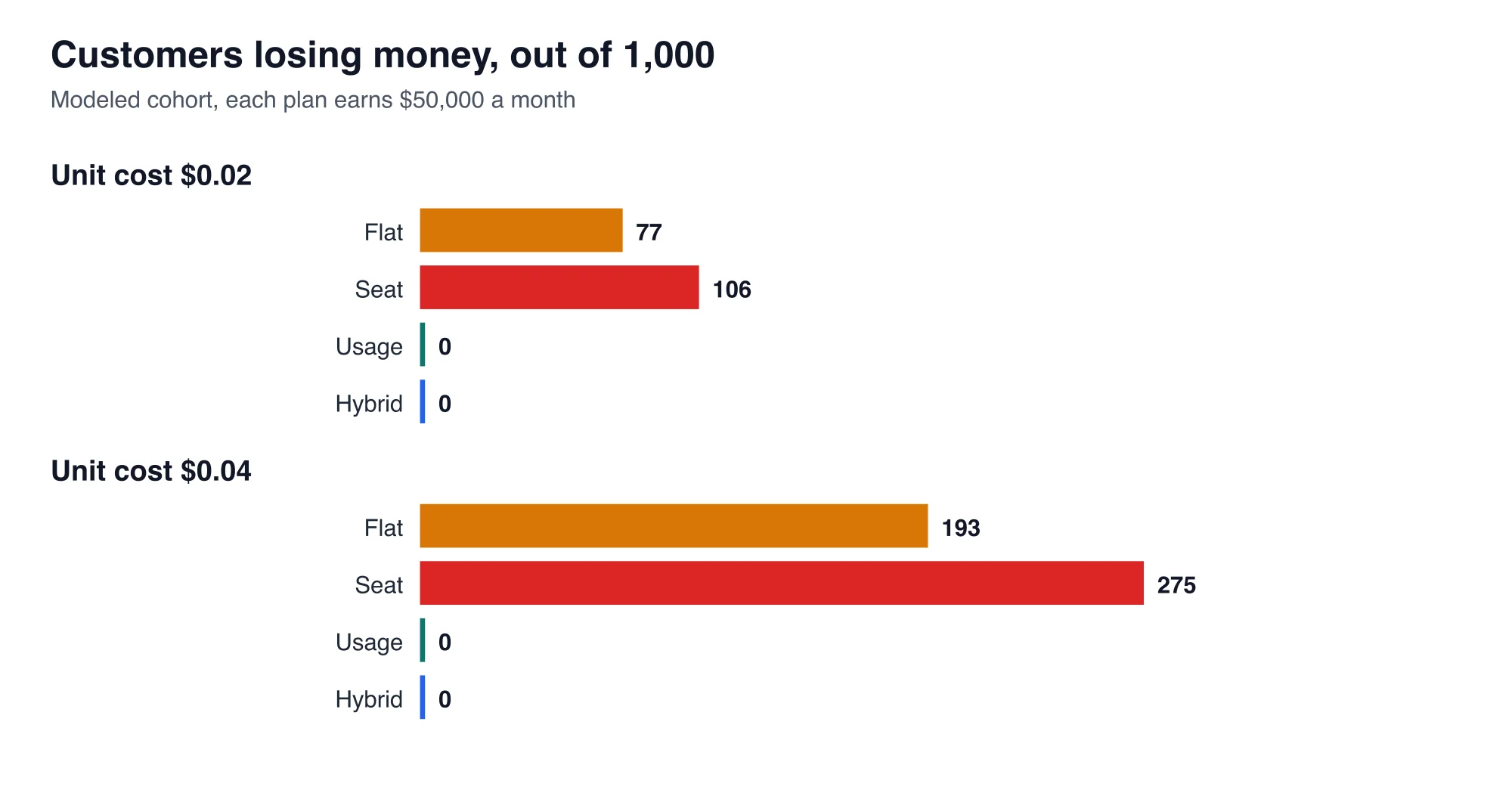
The bottom line is that flat and seat plans are safe only when a unit of usage is nearly free. Seat pricing does worse than flat here because seats and usage are only loosely linked. A five-seat team that barely logs in pays more than a one-seat power user who runs everything.
Advertisement
The usage and hybrid zeros are partly built in. Both charge more per unit than the unit costs, so no customer can lose money. That is the point of the model, but it also means the zeros are a property of the design, not a discovery. What the model does reveal is the price you pay for that safety.
What does usage pricing cost you in volatility?
Usage pricing makes invoices unpredictable, for the customer and for your revenue forecast. In the model, 1,410 of 5,000 month-to-month invoice changes moved by more than half under pure usage. Under the hybrid plan, 759 did. Flat and seat plans had none, because their invoices do not depend on usage.
Revenue also concentrates. Under flat pricing, the top 100 customers paid $5,000 of the $50,000. Under seat pricing, they paid $14,978. Under hybrid, they paid $22,394, and under pure usage $22,914. A solo founder who loses two large usage customers loses a visible share of monthly revenue.
| Model | Median invoice | 95th percentile invoice | Top 100 customers pay | Month-to-month changes over half |
|---|---|---|---|---|
| Flat | $50.00 | $50.00 | $5,000 | 0 of 5,000 |
| Seat | $33.32 | $133.29 | $14,978 | 0 of 5,000 |
| Usage | $23.93 | $196.22 | $22,914 | 1,410 of 5,000 |
| Hybrid | $19.00 | $190.35 | $22,394 | 759 of 5,000 |
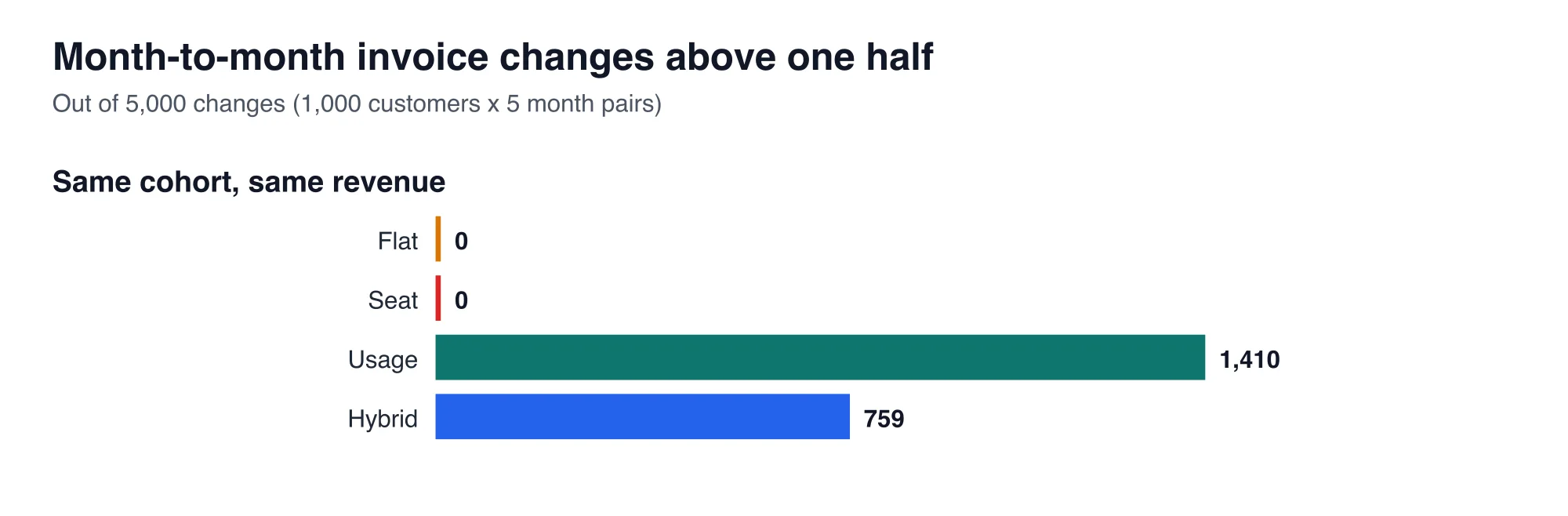
Hybrid pricing lands between the two. Its base fee gives the customer a predictable floor. Its median invoice is lower than flat pricing, which helps conversion for small accounts, and it still charges the heavy tail. Approximately half of the invoice volatility that pure usage produces is eliminated by the included allowance.
How do you build each plan with Laravel Cashier?
Cashier supports flat and seat plans with ordinary subscription calls, and it supports metered plans through meter events. Laravel Cashier is the official Laravel package for Stripe subscriptions. Everything below was run against version 16.9.0.
A flat plan is a subscription with one price and no quantity:
$user->newSubscription('default', 'price_flat_50')->create($paymentMethod);A seat plan is the same call with a quantity, changed later with updateQuantity(). The Cashier documentation on subscription quantities shows both the call and how to skip proration with noProrate().
$user->newSubscription('default', 'price_seat')->quantity(5)->create($paymentMethod);

$user->subscription('default')->updateQuantity(8);        // prorates by default
$user->subscription('default')->noProrate()->updateQuantity(8);
A metered plan attaches a metered price, then reports usage as meter events. A hybrid plan is two prices on one subscription: a flat base price and a metered overage price.
$user->newSubscription('default')
    ->price('price_base_19')
    ->meteredPrice('price_overage_metered')
    ->create($paymentMethod);

$user->reportMeterEvent('api_calls', 250);
The Stripe usage-based billing overview explains how meters, prices, and the invoice fit together. The tiered allowance, such as 500 included units, is configured on the Stripe price, not in Laravel.
How many Stripe calls does metering cost?
Reporting every action as its own meter event costs one HTTP call per action. I pointed Cashier at a fake Stripe server that records requests. Reporting 1,000 actions for one customer made 1,000 calls to /v2/billing/meter_events, which took 0.28 ms each on loopback. Reporting one aggregated event with a value of 1,000 made one call.
The loopback time is not what you will see. A real call crosses the internet, and I did not measure real Stripe latency. The call count is the part that carries over: a customer who triggers 50 actions a day creates 50 calls a day, and a thousand such customers create 50,000. Buffer usage in your own database or cache, and send one summed event per customer per hour or per day.
What goes wrong when a metering job retries?
Cashier's default creates a new random identifier for every meter event, so a retried job reports the usage twice. In the lab, a job reported 250 units and then crashed, and the queue retried it. Cashier's default sent two calls with two different identifiers. Passing a fixed identifier sent two calls with one identifier.
| Identifier | Calls sent | Distinct identifiers |
|---|---|---|
| Cashier default | 2 | 2 |
| Fixed per customer and hour | 2 | 1 |
Stripe's usage recording documentation says every meter event has an identifier you can specify, so that usage is not reported more than once because of latency or other issues. Build it from facts that repeat on retry, such as the customer id and the hour:
$user->reportMeterEvent('api_calls', $sum, [
    'identifier' => "usage:{$user->stripe_id}:{$hour->format('YmdH')}",
]);
This is the same exactly-once discipline as the webhook inbox table from the previous post, applied to the outgoing direction. Without it, every queue retry is a small overcharge, and customers notice overcharges.
How should an indie SaaS choose?
Choose by what your costs scale with, and by how much your customers dislike surprises. Four rules cover most cases.
- Unit cost is near zero and customers are similar in size. Use flat pricing. It is the simplest to build and the easiest to explain.
- Value and cost both grow with team size. Use seat pricing. Check that heavy users are not concentrated in small teams, as they were in the model.
- Each action costs you real money, such as a paid model call. Use a hybrid plan or pure usage. Flat and seat plans lost money on 193 to 275 of 1,000 customers at a unit cost of $0.04.
- Your customers are small businesses that budget monthly. Prefer the hybrid plan. The base fee gives them a predictable bill, and the allowance halves invoice swings compared with pure usage.
For choosing the processor that collects the money, the earlier post on payment processors by actual margin compares Stripe, LemonSqueezy, and Gumroad. The pricing model and the processor are separate decisions. Make the pricing choice first, because it determines whether you need meter events at all.
What should you check before launching a metered plan?
Check four things before charging a customer for usage.
- Show usage in the app. A customer who cannot see a running total will dispute the invoice.
- Set a cap or alert. Email customers at 80 percent of the allowance and again at the limit, so overage never arrives unannounced.
- Make reporting idempotent. Use a fixed identifier as shown above.
- Reconcile monthly. Compare your own usage table to the meter totals in the Stripe dashboard, and investigate any gap.
These checks require approximately one working day. They also turn the volatility from the model into something customers can plan around.
What are the limits of this model?
The model is one invented cohort, so its absolute counts are illustrative rather than predictions. The figures 77, 106, 193, and 275 depend on my usage distribution and my unit costs. A product with a flatter usage distribution would show fewer loss-making customers on flat pricing. The direction of each result follows from how each plan connects price to usage, and that direction holds for any cohort with a heavy tail.
The Cashier measurements used synthetic events and a fake Stripe server, so they prove call counts and identifier behavior, not Stripe's response times. Rerun the script on your own usage export before changing a live price.
Advertisement
FAQ
Should a Laravel SaaS use flat, seat, or usage pricing?
Use flat pricing when unit cost is near zero, seat pricing when value grows with team size, and a hybrid plan when each action costs real money. In a 1,000-customer model at a unit cost of $0.02, flat pricing lost money on 77 customers and hybrid on none.
How do I bill by usage with Laravel Cashier?
Attach a metered price to the subscription with `meteredPrice()`, then call `reportMeterEvent('meter_name', $quantity)` on the user. Cashier 16.9.0 sends one HTTP call per report to Stripe's meter events endpoint, so sum usage locally and report once per customer per hour or day.
Why did my Cashier usage get double counted?
Cashier generates a new random identifier for every meter event by default. A queued job that retries after a crash therefore reports the same usage twice with two identifiers. Pass your own `identifier` option built from the customer id and the time window.
What is a hybrid pricing plan?
A hybrid plan charges a base fee that includes an allowance, then a metered rate above it. In the model, a $19 base with 500 included units cut large invoice swings from 1,410 to 759 of 5,000 monthly changes compared with pure usage pricing.
Does seat pricing protect margin?
Only if usage grows with seats. In the model, seat pricing lost money on 106 of 1,000 customers at a unit cost of $0.02, more than flat pricing, because small teams with heavy usage paid little. Check how usage varies by team size before choosing seats.
Comments
Loading…
Sign in to join the conversation.
Related posts
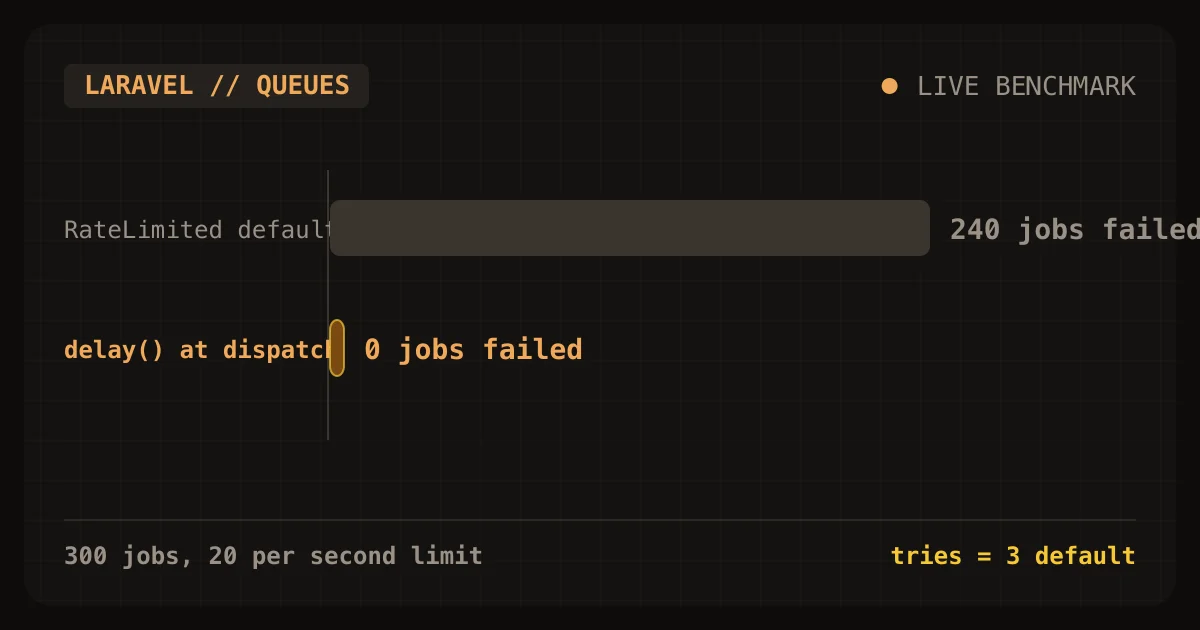
Laravel's RateLimited job middleware failed 240 of 300 jobs
Laravel's RateLimited job middleware protected a small tenant from a noisy one, and it also failed 240 of the noisy tenant's 300 jobs. In my lab, a limit of 20 jobs per second kept the small tenant's
Sat Oct 24 2026 · 9 min read · 0 views
Cashier locks customers out on day 0 of the retry window
Laravel Cashier locks customers out on day 0 of Stripe's retry window. The first failed renewal moves a subscription to pastdue, and Cashier's valid() returns false from that moment. Stripe's
Sat Oct 24 2026 · 9 min read · 0 views
Cashier upgrades bill late and can lock customers out
Laravel Cashier's default swap() and updateQuantity() calls do not charge a customer for an upgrade today. They send prorationbehavior=createprorations, so Stripe adds the charge to the next renewal
Sat Oct 24 2026 · 9 min read · 0 views