PostgreSQL vs MongoDB: Which One to Pick in 2026
By Nihar Ranjan Das · Fri Oct 09 2026 · 7 min read · 0 views
View as a Web StorySoftware#postgresql#mongodb#jsonb#nosql#database-comparison
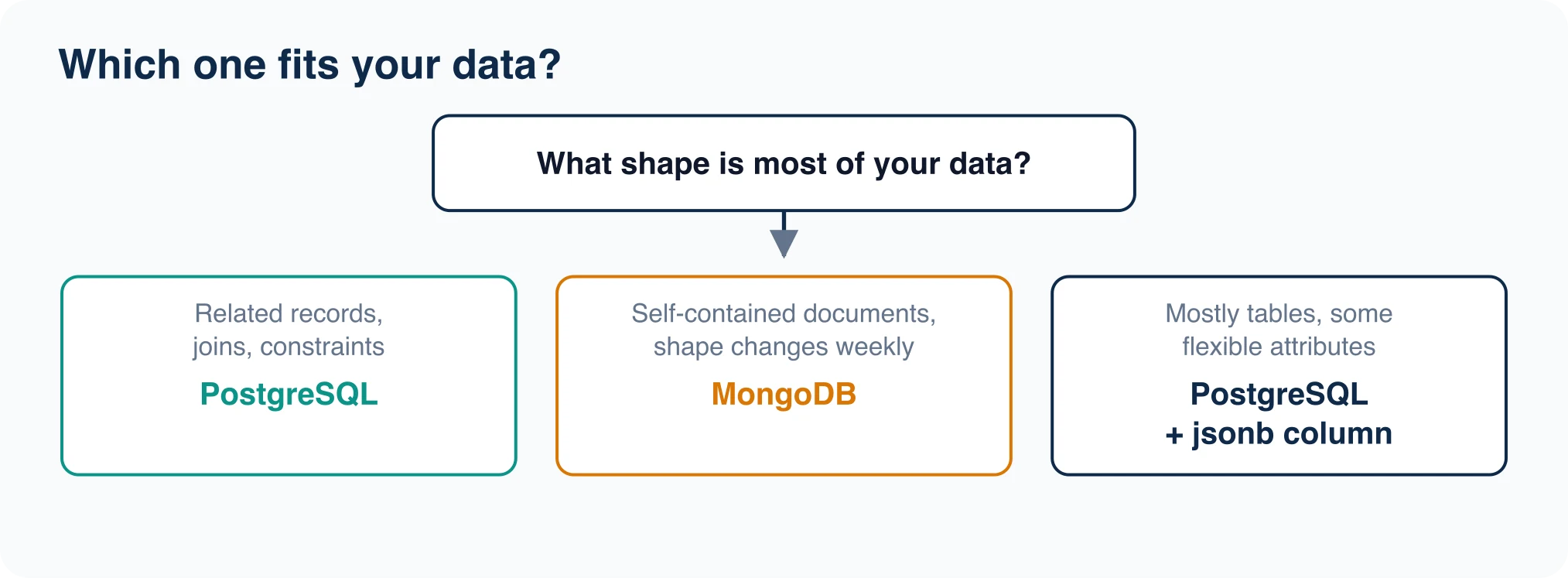
Pick PostgreSQL if your data has relationships you query across, and pick MongoDB if your data is a set of self-contained documents that change shape often. The old rule that "PostgreSQL cannot do documents" stopped being true years ago, so the real question is how much of your workload is document-shaped. We tested the PostgreSQL side of that question with 200,000 JSON documents and give the numbers below.
We did not run MongoDB itself in this test, because it was not installed on our machine and we would rather say so than quote someone else's benchmark as ours. Everything about MongoDB below comes from its own pricing and license pages, cited where used.
PostgreSQL vs MongoDB at a glance
PostgreSQL stores rows in typed tables and links them with joins. MongoDB stores JSON-like documents in collections and links them by embedding or by reference. Both support transactions, indexes, replication and managed cloud hosting.
| Question | PostgreSQL | MongoDB |
|---|---|---|
| Data model | Tables with typed columns, plus jsonb for documents |
Collections of BSON documents |
| Schema | Enforced by the database | Optional, validated by rules you add |
| Joins | Native, with a cost-based planner | $lookup stage in aggregation |
| Query language | SQL | MongoDB Query API and aggregation pipeline |
| License | PostgreSQL License, permissive | Server Side Public License (SSPL) |
| Free hosted tier | Through providers such as Neon and Supabase | Atlas M0, 512 MB |
The license row surprises many teams. MongoDB moved from AGPL to the SSPL in 2018 with version 4.0.4, and the Open Source Initiative does not treat the SSPL as open source. For most application developers this changes nothing. For a company that wants to resell MongoDB as a service, it changes everything. See MongoDB's SSPL FAQ for the exact condition.
When PostgreSQL is the better choice
Choose PostgreSQL in these cases.
- Your data is relational. Customers, orders, invoices and line items reference each other. A join in SQL is one line, and the database checks the references with foreign keys.
- You need strong constraints. Types,
CHECKrules and unique indexes reject bad data at the door, not in application code. - You report on the data. Aggregates, window functions and CTEs are routine in SQL, and our companion test showed PostgreSQL running a million-row join in about 53 ms on a laptop. See the numbers in our PostgreSQL vs MySQL benchmark.
- You want one database for several jobs. Extensions add geospatial queries, fuzzy text search and vector search, so you avoid running three systems.
When MongoDB is the better choice
Choose MongoDB in these cases.
- Each record is a self-contained document. A product catalog with wildly different attributes per product, or a content record read as one unit, fits one document well.
- The shape changes constantly. Early prototypes and event feeds add fields weekly. A document store lets you write the new shape immediately.
- You scale writes by sharding. MongoDB shards collections across servers as a built-in feature, and Atlas dedicated tiers run up to 4 TB of storage and 768 GB of RAM on the M700 tier according to the Atlas pricing page.
- Your team already thinks in documents. Familiarity is a legitimate reason. A team that ships fast on MongoDB should not migrate for fashion.
The test: PostgreSQL as a document store
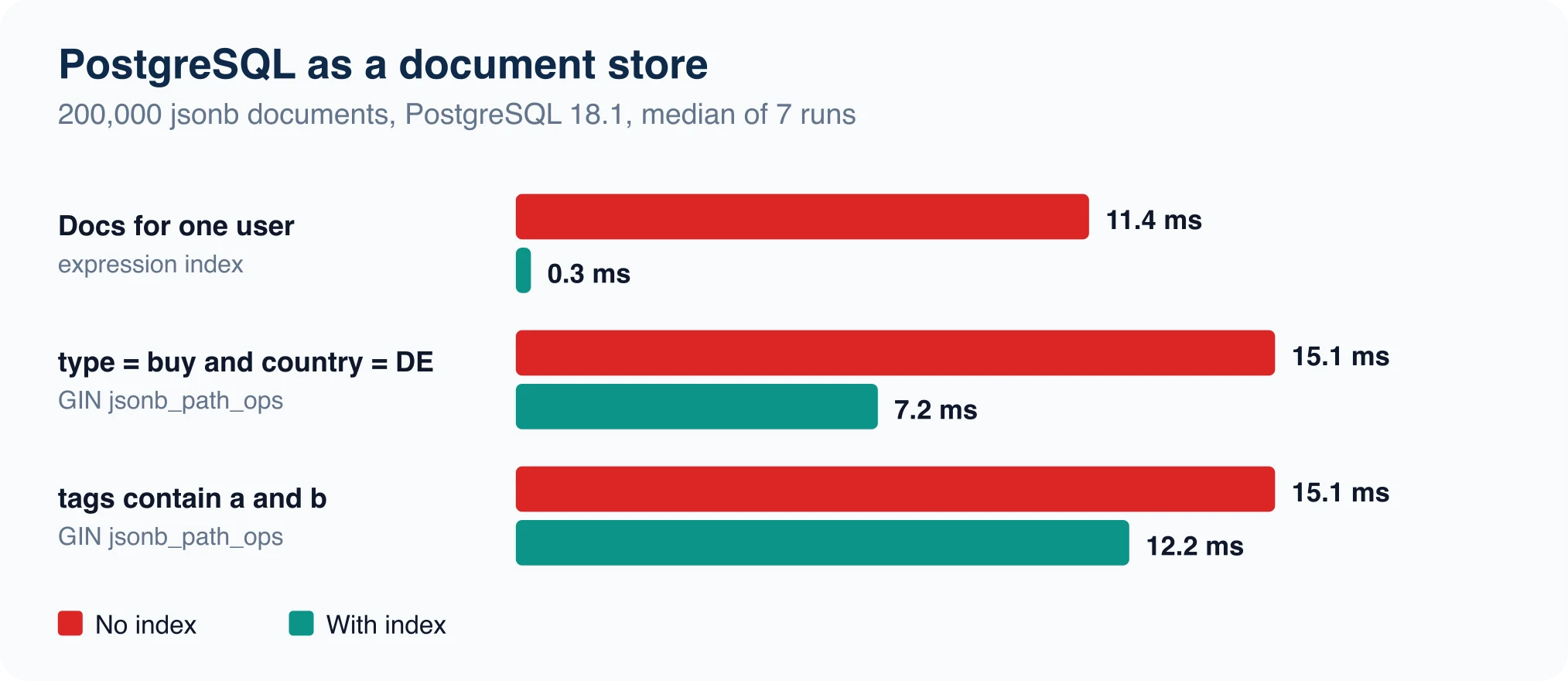
We loaded 200,000 synthetic event documents into one jsonb column on PostgreSQL 18.1 on an 8-core laptop. Each document looked like this:
{"user": 4242, "type": "buy", "tags": ["a","c","f"],
 "geo": {"country": "DE", "city": "c17"}, "n": 512}
We ran three queries seven times each and took the median, after subtracting client startup time.
| Query | No index | With index |
|---|---|---|
Count documents for one user |
11.4 ms | 0.3 ms (expression index) |
Documents where type is buy and country is DE |
15.1 ms | 7.2 ms (GIN jsonb_path_ops) |
Documents whose tags contain a and b |
15.1 ms | 12.2 ms (GIN jsonb_path_ops) |
Three things are worth taking from this.
Advertisement
Indexing a single field is the big win. An expression index on doc->>'user' turned an 11 ms scan into a 0.3 ms lookup. That is the same pattern as a MongoDB single-field index, written as CREATE INDEX ev_user ON ev ((doc->>'user')).
GIN helped less than expected here. The nested-containment query halved, and the tags query improved by only 3 ms. A query that matches many rows gains little from an index, because the database still reads and counts them. Test your own selectivity before you add a 5 MB index.
Size stayed small. The table with its indexes was 46 MB for 200,000 documents, of which the GIN index was 5.4 MB. At a few hundred thousand documents you will not notice the cost.
The jsonb documentation explains the two GIN operator classes, and jsonb_path_ops is smaller but supports fewer operators. Pick it when you mostly use @>.
Reading and updating whole documents
Document stores are loved for one pattern: fetch a document by ID, change a field, write it back. We timed that pattern on the same 200,000 documents.
| Operation (PostgreSQL 18.1) | Result |
|---|---|
| Fetch one document by primary key | Under 1 ms, below our measurement noise |
Count documents grouped by geo.country (full scan) |
32.5 ms |
Update one field in 20,000 documents with jsonb_set |
0.46 s |
| Add a new field to 49,984 matching documents with ` |
Two points follow. First, PostgreSQL rewrites the whole row when any part of a jsonb value changes, because every update creates a new row version. Updating a field in a 200-byte document is cheap, but updating one counter inside a 2 MB document many times per second is not, so keep hot counters in their own column. Second, the raw JSON lines file for these documents was 18.8 MB, while the table took 39 MB before indexes, since each row carries a header and an id column. Plan for roughly double the raw size, and verify with pg_total_relation_size() on your own data.
If you want to repeat the test, generate documents with a short script, load them with COPY into a one-column text table, then cast to jsonb with INSERT ... SELECT l::jsonb. That is the same bulk-load path we measured in our database migration process post.
A hybrid that avoids the choice
You do not have to choose one model for everything. The pattern many PostgreSQL teams use is a typed table for the fields they always query, and one jsonb column for the rest.
CREATE TABLE products (
  id          bigint GENERATED ALWAYS AS IDENTITY PRIMARY KEY,
  sku         text NOT NULL UNIQUE,
  price_cents integer NOT NULL CHECK (price_cents >= 0),
  attrs       jsonb NOT NULL DEFAULT '{}'
);
CREATE INDEX products_attrs ON products USING gin (attrs jsonb_path_ops);
Price and SKU get type checks and unique constraints. Color, size, battery life and the hundred other attributes that differ per product stay flexible. You keep joins to orders and customers, and you keep schema freedom where you need it.
Cost, hosting and the open alternative
Hosted MongoDB and hosted PostgreSQL both start free and climb with usage. According to the vendors' own pricing pages:
- MongoDB Atlas lists a free M0 at 512 MB, Flex from $0.011 per hour (up to $30 per month) with 5 GB, and Dedicated M10 at $0.08 per hour, about $56.94 per month.
- Neon lists a free plan with 1 GB per project, and a Launch plan billed at $0.106 per compute-unit hour plus $0.35 per GB-month.
- Supabase lists a free plan with a 500 MB database, and Pro from $25 per month with 8 GB per project.
There is also a middle path. FerretDB 2.x is an Apache 2.0 proxy that speaks the MongoDB wire protocol and stores data in PostgreSQL through Microsoft's DocumentDB extension. It lets MongoDB drivers talk to PostgreSQL, but compatibility is not complete: change streams and some aggregation operators are gaps. Test your workload before relying on it.
Migrating either way
Moving from MongoDB to PostgreSQL is mostly a modeling decision. Decide which fields become columns and which stay in jsonb, load in bulk, then verify counts and sums. Our data migration strategy guide covers the verification fingerprint, and the database migration process post lists the phases.
Advertisement
FAQ
Is MongoDB faster than PostgreSQL?
Neither is faster in general. Single-document reads and writes are fast in both, and a join-heavy report is faster in PostgreSQL. Our jsonb test took 0.3 ms for an indexed lookup on 200,000 documents. Measure your own access pattern.
Can PostgreSQL replace MongoDB?
For many workloads, yes. `jsonb` with GIN or expression indexes covers document storage and queries. You give up MongoDB's built-in sharding and its query language, and you gain SQL, joins and constraints.
Is MongoDB open source?
MongoDB's server code is source-available under the SSPL. The Open Source Initiative does not recognize the SSPL as an open-source license. Self-hosting for your own application is allowed, and offering MongoDB as a service has extra conditions.
Does MongoDB use SQL?
No. It uses the MongoDB Query API and an aggregation pipeline written as JSON stages. Some tools translate SQL to those queries, but the database itself does not run SQL.
Which is better for a startup?
PostgreSQL is the safer default because constraints catch bugs early and one database handles relational, document and search jobs. Choose MongoDB if your product is built around flexible documents and your team knows it well.
Comments
Loading…
Sign in to join the conversation.
Related posts
Relational Databases: Top 10 Ranked and How They Work
Oracle still leads the October 2026 DB-Engines list of relational databases, but PostgreSQL is the only top-four system that gained ground this year. PostgreSQL scored 688.75, up 45.56 points from
Fri Oct 09 2026 · 9 min read · 1 views
What Is PostgreSQL? A Plain-English Guide With Real Tests
PostgreSQL is a free, open-source relational database that stores data in tables and answers questions written in SQL. It began in 1986 as the POSTGRES project at the University of California,
Fri Oct 09 2026 · 8 min read · 0 views
Serverless Databases Compared: What They Cost in 2026
A serverless database costs the least when your app sits idle, and the most when it runs all day. That single fact decides most purchases. A hobby app can run free on Neon, Turso or Cloudflare D1. An
Fri Oct 09 2026 · 9 min read · 0 views