Upgrading Laravel 12 to 13: Which Changes Actually Bite
By Nihar Ranjan Das · Thu Oct 15 2026 · 10 min read · 0 views
View as a Web StorySoftware#security#Laravel#php#upgrade guide#laravel 13
Should you upgrade from Laravel 12 to Laravel 13 now?
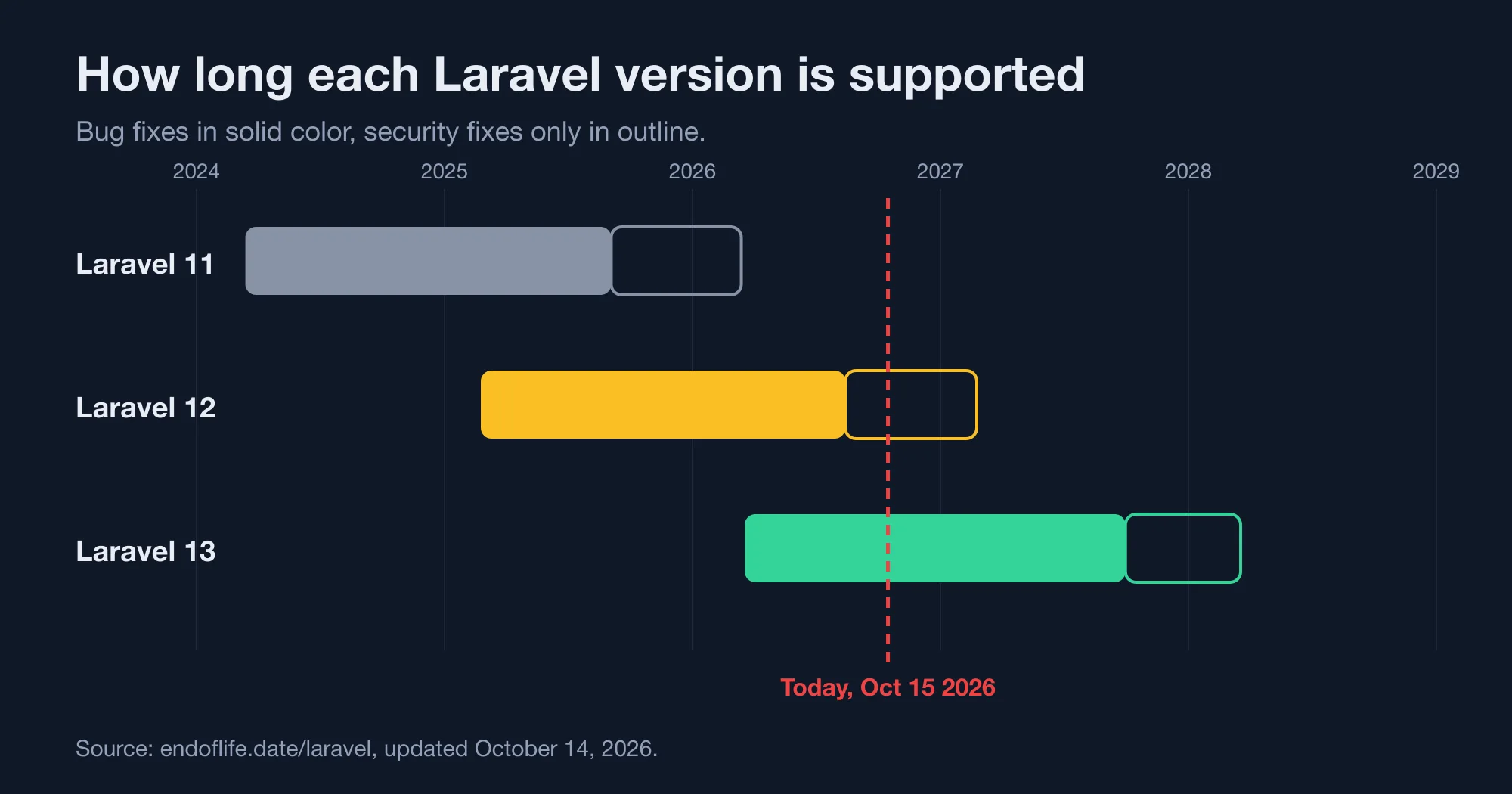
Yes, plan the upgrade now, but you do not need to rush it. Laravel 12 lost bug-fix support on August 13, 2026, so any bug you hit will not be fixed in 12. Security patches continue until February 24, 2027, according to endoflife.date, which lists 13.36.0 as the latest release as of October 14, 2026.
Laravel is the most widely used PHP web framework. Version 13 shipped on March 17, 2026, and requires PHP 8.3 or newer, as Laravel News reported at launch. Its headline features include optional PHP attribute syntax for models and jobs, and a first-party AI SDK. The official upgrade guide estimates ten minutes for a typical app.
The table below shows the support dates for the three most recent versions. Use it to decide how much time you have.
| Version | Released | Bug fixes end | Security fixes end | PHP versions |
|---|---|---|---|---|
| 13 | March 17, 2026 | September 30, 2027 | March 17, 2028 | 8.3 to 8.5 |
| 12 | February 24, 2025 | August 13, 2026 (ended) | February 24, 2027 | 8.2 to 8.5 |
| 11 | March 12, 2024 | September 3, 2025 (ended) | March 12, 2026 (ended) | 8.2 to 8.4 |
Laravel 11 apps are already past security support, so they are the urgent case. If you run 11, read our guide to Laravel CVE-2026-102279: Which Version Fixes It? and plan a jump to 13, not 12. A 12 install would give you only four months of security support.
What does Composer change when you upgrade to Laravel 13?
Composer raises several major versions at once, and on a clean app it resolves without conflicts. We started from a fresh Laravel 12.70.0 skeleton with the laravel/helpers package added. One command moved everything:
composer require "laravel/framework:^13.0" "laravel/tinker:^3.0" "phpunit/phpunit:^12.0" -WThe output listed these upgrades, and php artisan --version then printed "Laravel Framework 13.36.0":
| Package | Before | After |
|---|---|---|
laravel/framework |
12.70.0 | 13.36.0 |
laravel/tinker |
2.11.1 | 3.0.2 |
guzzlehttp/guzzle |
7.15.5 | 8.2.0 |
guzzlehttp/psr7 |
2.13.1 | 3.1.0 |
brick/math |
0.14.8 | 1.0.0 |
phpunit/phpunit code coverage |
11.0.12 | 12.5.8 |
The Guzzle jump deserves a look. Guzzle 8 is a new major version, and Laravel's HTTP client sits on top of it. If you call Guzzle directly or use a package that does, test those calls. The upgrade guide also tells you to move laravel/boost to ^2.0 and Pest to ^4.0 if you use them.
Our test app was small, so a real project may hit version conflicts that we did not. Run composer why-not laravel/framework 13.0 first. It names every package that blocks the upgrade, and it is the cheapest check you can do.
Which Laravel 13 changes actually bite a running app?
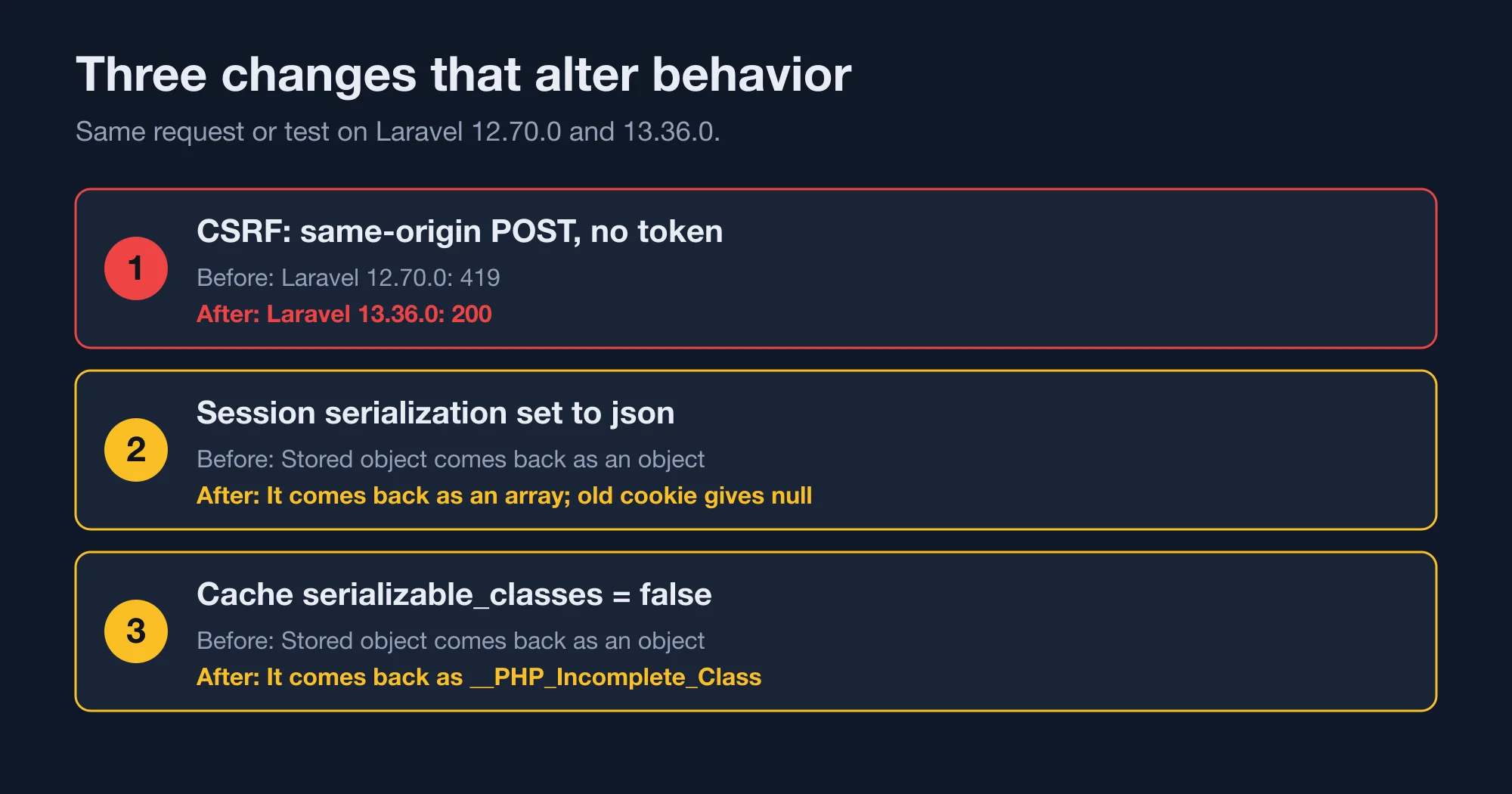
Three changes alter behaviour that a normal app can see. We tested each one by running the same request or test on 12.70.0 and on 13.36.0. The rest of the official list is real but mostly touches custom contracts and rare edge cases.
Advertisement
The three changes, ranked by how likely they are to surprise you:
- CSRF middleware accepts same-origin requests. It was renamed
PreventRequestForgery. - Session serialization can switch to JSON. The skeleton's new default changes what comes back from the session.
- Cache unserialization can be locked down. A new
serializable_classesoption controls which objects come back.
Numbers 2 and 3 only change your app if you sync your config files with the new skeleton. Number 1 changes behaviour straight after composer update. The next three sections show each one.
How does Laravel 13 handle CSRF protection differently?
Laravel 13 renames the CSRF middleware to PreventRequestForgery and adds a check of the Sec-Fetch-Site header. A POST request with no CSRF token now succeeds when the header says same-origin. On Laravel 12.70.0, the same request failed with HTTP 419.
We posted to a simple route with no token and varied only that header. These are the status codes:
| Header sent | Laravel 12.70.0 | Laravel 13.36.0 |
|---|---|---|
| None | 419 | 419 |
Sec-Fetch-Site: same-origin |
419 | 200 |
Sec-Fetch-Site: same-site |
not tested | 419 |
Sec-Fetch-Site: cross-site |
419 | 419 |
Read the table carefully. Browsers set Sec-Fetch-Site themselves, and page scripts cannot change it, so a request from another website arrives as cross-site and is still rejected. Our curl test sent a header by hand, which a browser would never allow a web page to do. The change adds a second way for a legitimate same-origin request to pass. It does not remove protection from cross-site requests.
The middleware logic confirms this. The source runs these checks in order and lets the request through if any passes: the request is a read, the app is running unit tests, the path is excluded, the origin is valid, or the token matches. The valid-origin check returns true for same-origin, and for same-site only when a static allowSameSite setting is on. A useOriginOnly() method also exists if you want origin checks to replace tokens.
Here is what to do about it:
- Rename references.
VerifyCsrfTokenandValidateCsrfTokenstill work as deprecated aliases. Our test that calledwithoutMiddleware(VerifyCsrfToken::class)passed on 13.36.0. Update it toPreventRequestForgery::classanyway. - Review API tests. A test that expects a 419 for a same-origin post with no token will now see a 200 if it sends that header.
- Keep your tokens. Do not remove tokens from forms. Older browsers may not send the header, and the token remains the fallback.
The upgrade guide rates this change high impact because it touches a security control and a class name that many projects reference by hand. Search your code for VerifyCsrfToken, and read your middleware configuration once.
What happens to the session when you switch to JSON serialization?
Switching session serialization to JSON turns stored objects into arrays, and it logs out existing users. The Laravel 13 skeleton sets 'serialization' => 'json' in config/session.php for new apps. An existing app is not changed by Composer, but a config sync with the new skeleton would change it.
We tested both settings with the file session driver and a small Stats class stored in the session. With the default php serialization, the next request read back an object of type App\Data\Stats. With json, the next request read back an array. Any code that calls a method on a stored object will fail after the switch.
The second test was the one that matters for users. We set a session under php serialization, kept the cookie and then changed the setting to json. The old cookie then returned null for the stored value. The session did not throw an error, and the data was simply gone. In a real app, that means every logged-in user is signed out at the moment of the change.
The official guide says the same: updating the value invalidates all active sessions. Your options are:
- Keep
php. Leave the setting alone if you store objects in the session or want to avoid a mass logout. - Move to
jsonon purpose. Store plain arrays and scalars, announce the sign-out and deploy at a quiet hour.
The guide recommends json for security, because it prevents PHP deserialization gadget chains if your APP_KEY ever leaks. That is a fair reason. It is also a decision to make deliberately, not one to take by copying a config file.
What does the new serializable_classes cache option do?
The serializable_classes option controls which PHP classes the cache may rebuild from stored data. The Laravel 13 skeleton sets it to false, which means no class is rebuilt. Objects you stored in the cache come back as __PHP_Incomplete_Class, which cannot be used.
We tested it with the database cache store. We put a Stats object into the cache and read it back. With the option set to false, the type of the result was __PHP_Incomplete_Class. Our unit tests did not catch it, because Laravel's test environment uses the array cache driver, which does not serialize. A green test suite is not proof that your cache is safe.
Fix it in one of two ways. List the classes you intend to store:
// config/cache.php
'serializable_classes' => [
    App\Data\CachedDashboardStats::class,
    App\Support\CachedPricingSnapshot::class,
],
Or store arrays instead of objects, which is simpler and survives any serialization format. The guide rates this medium impact. It protects you against the same deserialization risk as the session change.
To find the problem before users do, search for Cache::put, Cache::remember and Cache::forever calls whose value is an object, such as an Eloquent model or a data class. Collections of arrays are fine. Anything with a custom class is not, for example a data transfer object or a value object.
What else in the Laravel 13 upgrade guide is worth a look?
The remaining changes are narrow, and most apps will not feel them. We list the ones with a visible effect, so you can scan your code for each.
- MySQL joined deletes.
DELETEqueries withJOIN,ORDER BYandLIMITnow include all clauses. MySQL, and MariaDB before 11.8.1, may throw aQueryExceptionwhere the old code silently ignored the limit. - Upserts. An empty
uniqueBynow throwsInvalidArgumentExceptionon MySQL and MariaDB. - Password reset mail. The default subject changed from "Reset Password Notification" to "Reset your password". A test that asserts the old string will fail.
- Cache and session names. Default prefixes use hyphens instead of underscores. Set
CACHE_PREFIX,REDIS_PREFIXandSESSION_COOKIEexplicitly if you rely on the defaults. - Queue events.
JobAttemptednow exposes$exception, andQueueBusyrenamed$connectionto$connectionName. - Polyfill helpers. Laravel 13 depends on
symfony/polyfill-php85, which definesarray_first()andarray_last()on older PHP versions.
The last item has a wrinkle. Our test called array_first([1, 2, 3, 4], fn ($v) => $v > 2) with laravel/helpers installed. The callback was ignored and the call returned 1 instead of 3, on both 12.70.0 and 13.36.0. We saw no difference between the two versions, so we cannot blame the upgrade, but we did confirm the risk the guide describes. Use Arr::first() in your own code and the problem goes away.
How to upgrade from Laravel 12 to 13 step by step
Work on a branch and follow this order, so each failure points at one change. The sequence matches the checks we ran.
- Check PHP. Run
php -v. You need 8.3 or newer. Upgrade PHP first if you are on 8.2. - Check blockers. Run
composer why-not laravel/framework 13.0. - Bump dependencies. Update
laravel/frameworkto^13.0,laravel/tinkerto^3.0andphpunit/phpunitto^12.0. Update Boost to^2.0and Pest to^4.0if you use them. - Run the test suite. Fix renamed classes first, starting with
VerifyCsrfToken. - Leave session and cache config alone. Do not sync them with the skeleton yet. Decide on each setting separately.
- Exercise real sessions and cache. Click through login, a form post and one cached page on staging.
- Search for the risky calls. Look for
Cache::putwith objects,array_first, joined deletes and$exceptionOccurred. - Deploy and watch. Check logs for 419 responses and
QueryExceptionfor a day.
There is also an assisted route. With Laravel Boost ^2.0 installed in a Laravel 12 app, the /upgrade-laravel-v13 slash command in Claude Code, Cursor or VS Code walks the AI assistant through the guide. We did not test it. If you try it, review every change against the three behaviours above, and read our note in AI Pair Programming in Laravel: A One-Line Rule Beats Boost before you trust it with a large diff.
Bottom line: when to upgrade, and what to leave for later
The bottom line is that Laravel 13 is a calm upgrade with three places to look. Upgrade within the next few months if you run 12, and straight away if you run 11. Leave the session and cache hardening for a second release, because both can sign users out or break cached objects if rushed.
If your application is business critical, the useful investment is a staging environment that mirrors production sessions and cache, so these differences show up before launch. That is the kind of upgrade planning I do for teams that cannot afford a mass logout.
Advertisement
FAQ
When does Laravel 12 stop receiving security fixes?
Laravel 12 receives security fixes until February 24, 2027, according to endoflife.date. Bug-fix support ended on August 13, 2026. Laravel 13 receives bug fixes until September 30, 2027 and security fixes until March 17, 2028.
Does Laravel 13 require PHP 8.3?
Yes. Laravel 13 supports PHP 8.3 through 8.5, and a new project's `composer.json` requires `^8.3`. Laravel 12 supports PHP 8.2 through 8.5. If you run PHP 8.2, upgrade PHP before the framework.
Why does a POST without a CSRF token return 200 in Laravel 13?
Laravel 13's `PreventRequestForgery` middleware accepts a request whose `Sec-Fetch-Site` header is `same-origin`. Browsers set that header and pages cannot forge it. Cross-site requests still need a valid token. In our test, the same request returned 419 on Laravel 12.70.0.
Will Laravel 13 log my users out?
Not by itself. Composer does not change your `config/session.php`. Users are signed out if you change `serialization` from `php` to `json`, because old sessions cannot be read. Keep the setting at `php` to preserve sessions, or move to `json` at a planned time.
How long does a Laravel 12 to 13 upgrade take?
The official guide estimates ten minutes, and a fresh app moved with one Composer command in our test. Real projects take longer because of custom packages, Guzzle 8 and test fixes, so allow extra time if you use many third-party packages.
Comments
Loading…
Sign in to join the conversation.
Related posts
Rust 1.99 breaks one thing and quietly changes your CI
Rust 1.99.0 breaking changes, tested against 1.98.1: one new hard error, three new warnings, and a CI default that cuts the cache by 62%.
Thu Oct 15 2026 · 9 min read · 0 views
Rust is dropping 32-bit Windows hosts. Your i686 builds can stay
Rust 1.100 stops installing toolchains on 32-bit Windows, but i686 binaries keep building. Check if you are affected and cross-compile in three ways.
Thu Oct 15 2026 · 9 min read · 0 views

Does your GitHub Actions cache leak secrets? A Miri audit
Rust's Miri saved CI environment variables into target/, which GitHub Actions caches. Run this four-question audit and a cache scanner to check your repo.
Thu Oct 15 2026 · 8 min read · 0 views