Your Laravel MCP Server Now Returns 400 After Upgrading
By Nihar Ranjan Das · Thu Oct 15 2026 · 10 min read · 0 views
View as a Web StorySoftware#mcp#Laravel#php#upgrade guide#laravel mcp
Why does a Laravel MCP server return 400 after the 1.0 upgrade?
A Laravel MCP server returns HTTP 400 after the 1.0 upgrade when a request uses the new 2026-07-28 protocol but omits the matching routing headers. The package now runs a middleware called ValidateMcpHeaders on every route registered with Mcp::web(). It compares three headers with the request body and answers with JSON-RPC error -32020 on any mismatch.
Laravel MCP is the first-party Laravel package for building Model Context Protocol servers, so AI clients such as Claude or Cursor can call your app's tools. Version 1.0 is the first stable release, according to Laravel News, and it targets MCP revision 2026-07-28. That revision drops sessions and makes every request self-contained.
Our test setup was a fresh Laravel 13.36 app with PHP 8.4. We registered one server with one tool at /mcp/weather. We ran the same six curl requests against laravel/mcp 0.9.6 and then against 1.0.2, the newest patch release on Packagist when we tested. Every result below comes from those runs, so each error message is the exact text you will see in your logs.
What changed between Laravel MCP 0.9.6 and 1.0.2?
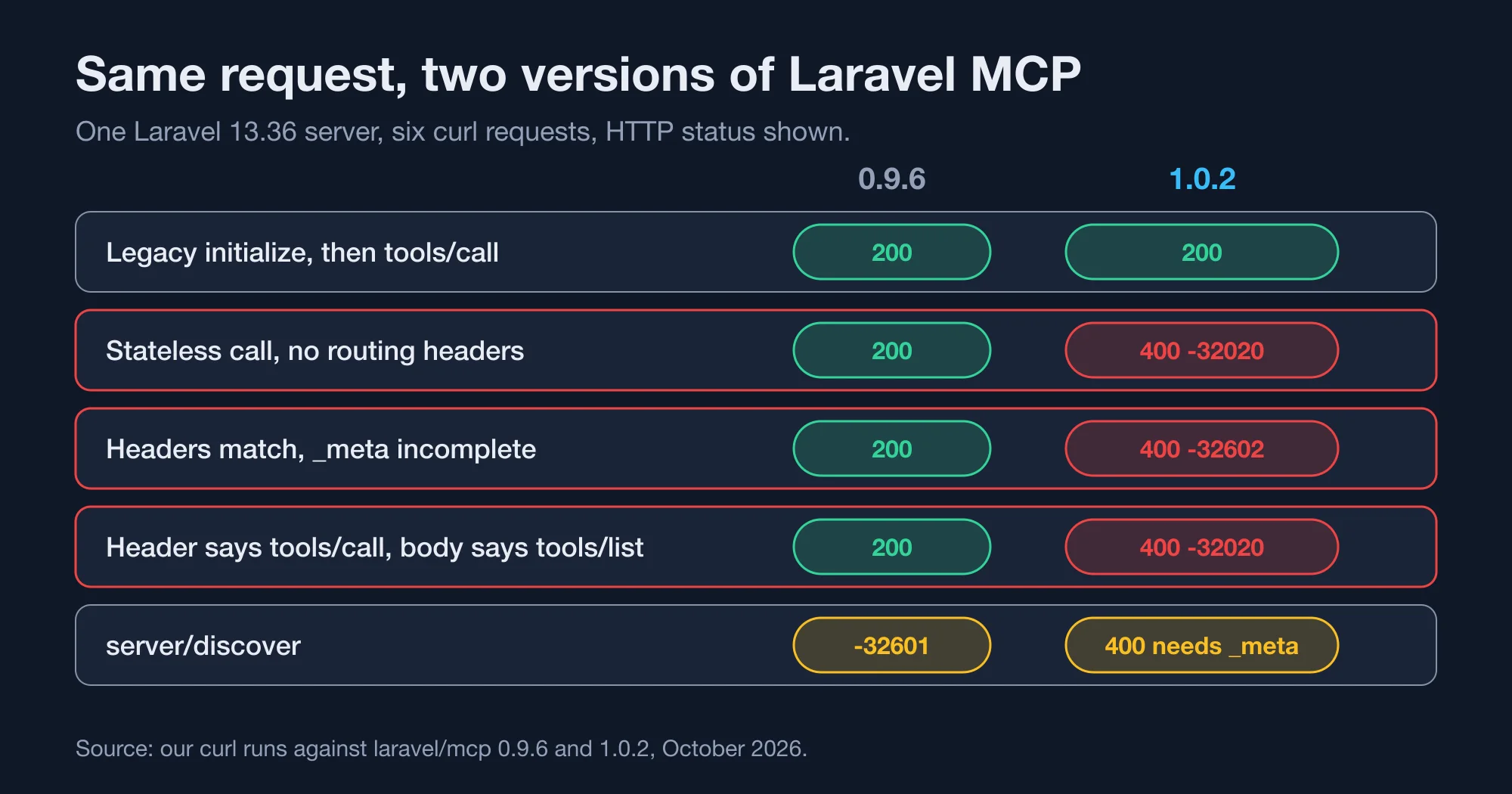
Five behaviours changed, and only one of them stops a call outright. The table lists the request, the result on 0.9.6, the result on 1.0.2 and whether you need to act. Read the last column first, because it decides how urgent the upgrade is for your server.
| Request we sent | On 0.9.6 | On 1.0.2 | Action needed |
|---|---|---|---|
Legacy initialize, then tools/call |
200, session ID header returned | 200, no session ID header | Only if your code reads the session |
| Stateless call, no routing headers | 200 | 400, error -32020 | Yes, add headers |
| Stateless call with all headers | 200 | 400, error -32602 until _meta is complete |
Yes, add _meta fields |
Header says tools/call, body says tools/list |
200, header ignored | 400, error -32020 | Yes, fix the client |
server/discover |
Error -32601, method not found | Handled, needs _meta |
No, new capability |
Two rows matter most. The first shows that old clients are safe. The second shows that a client written for the new protocol fails against a server that has not been upgraded to expect it, and the reverse is also true: a 0.9.6 server ignored the headers entirely.
Do old MCP clients still work on Laravel MCP 1.0?
Old clients that open with initialize keep working on Laravel MCP 1.0. In our run, the legacy flow returned HTTP 200 for both the handshake and the tool call, with the same tool text as before. The release notes say the same: clients that connect with initialize continue to work.
The middleware treats a request as legacy when its body carries no 2026-07-28 protocol version in params._meta. It then skips the header checks. The only extra check is on an optional MCP-Protocol-Version header: if a legacy client sends a version the package does not support, the response is HTTP 400 with a list of supported versions.
One difference is easy to miss. On 0.9.6 the initialize response carried an Mcp-Session-Id header with a UUID. On 1.0.2 that header is absent. A legacy client that stores the header and replays it will simply send nothing, and the server will not complain. That is fine for a stateless tool. It is not fine for a tool that used the session to remember something.
How do you fix the -32020 header mismatch error?
Send three headers that match the JSON body, and your request passes the new middleware. The exact error for a missing version header is "Header mismatch: The [MCP-Protocol-Version] header is required." Here is a request that passed on 1.0.2 in our test:
Advertisement
curl -s http://127.0.0.1:8102/mcp/weather \
  -H 'Content-Type: application/json' \
  -H 'Accept: application/json, text/event-stream' \
  -H 'MCP-Protocol-Version: 2026-07-28' \
  -H 'Mcp-Method: tools/call' \
  -H 'Mcp-Name: current-weather-tool' \
  -d '{"jsonrpc":"2.0","id":4,"method":"tools/call","params":{"name":"current-weather-tool","arguments":{"city":"Paris"},"_meta":{"io.modelcontextprotocol/protocolVersion":"2026-07-28","io.modelcontextprotocol/clientCapabilities":{},"io.modelcontextprotocol/clientInfo":{"name":"t","version":"1"}}}}'
The server answered with HTTP 200 and this body:
{"jsonrpc":"2.0","id":4,"result":{"resultType":"complete","content":[{"type":"text","text":"Sunny in Paris (session: REMOVED)"}],"isError":false,"_meta":{"io.modelcontextprotocol/serverInfo":{"name":"Weather Server","version":"0.0.1"}}}}The three headers have these jobs:
MCP-Protocol-Versionmust equal the version inparams._meta. It is always required for a stateless request.Mcp-Methodmust equal themethodfield in the body, such astools/callortools/list.Mcp-Namemust equal the tool name, prompt name or resource URI. Onlytools/call,prompts/getandresources/readneed it.
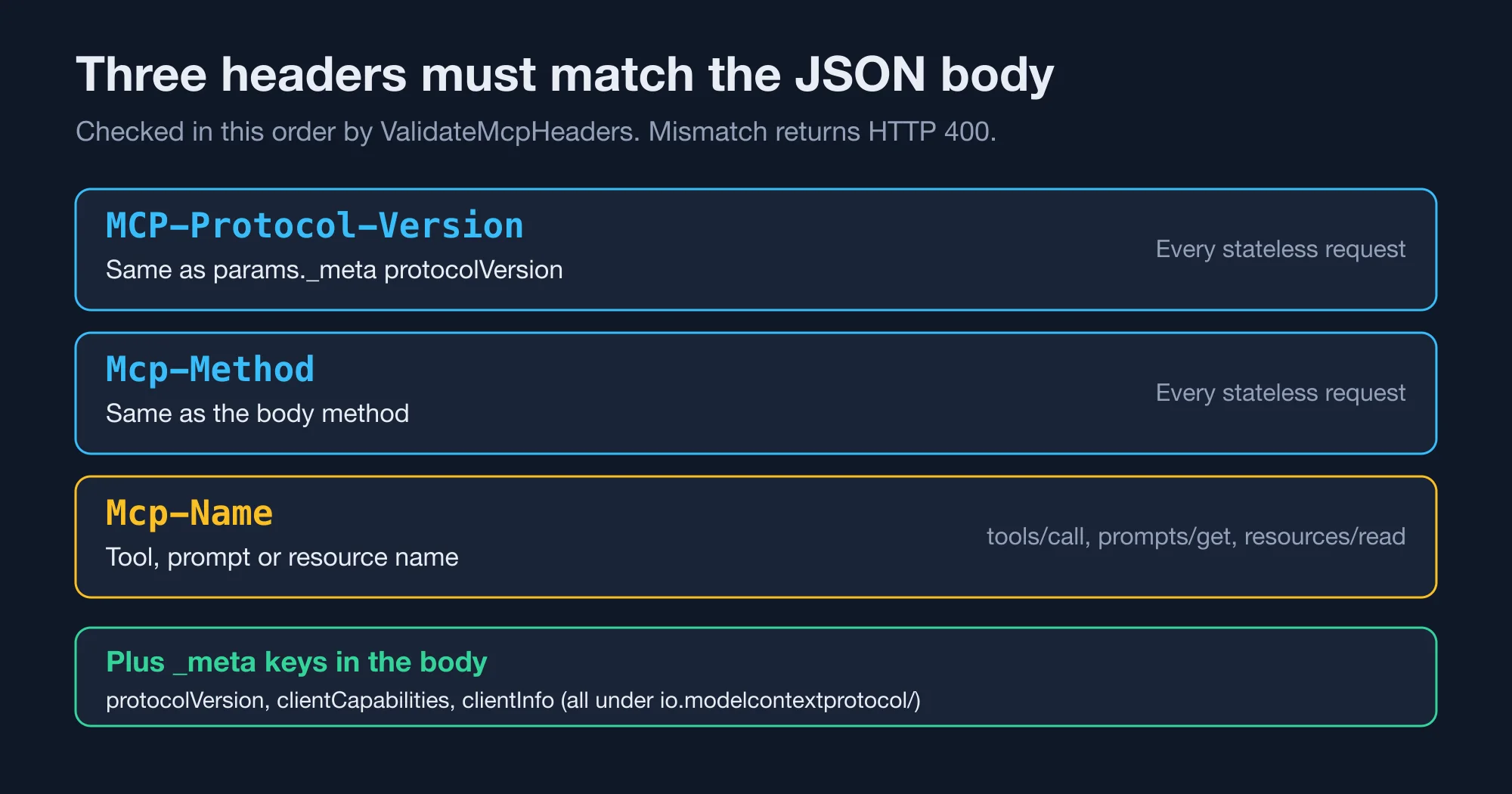
The middleware checks them in that order. A mismatch on the version header hides a mismatch on the method header, so you may fix one error and meet the next. When we sent Mcp-Method: tools/call with a tools/list body, the server said: "Header mismatch: The [Mcp-Method] header value [tools/call] does not match the request body value [tools/list]."
Why does the same request now fail with error -32602?
A stateless request that passes the header check can still fail with error -32602 if its _meta block is incomplete. In our test, a call with correct headers but no client capabilities returned HTTP 400 and this message: "Invalid params: The request [_meta] is missing the required [io.modelcontextprotocol/clientCapabilities] member."
This is the stateless design at work. Because the server no longer remembers the handshake, each request must restate what the old initialize call used to say once. The package source names three keys: io.modelcontextprotocol/protocolVersion, io.modelcontextprotocol/clientCapabilities and io.modelcontextprotocol/clientInfo. We sent all three. The error text named only the capabilities key, so it is the one clients forget.
If you maintain the client, add a small helper that builds the _meta block once and reuses it. If you do not control the client, there is nothing to fix on your side, and the client vendor needs to follow the 2026-07-28 spec. Our earlier piece, MCP Went Stateless: Your Server Still Has State, explains what the spec change means for servers in general.
What replaces Request::sessionId() in Laravel MCP 1.0?
Nothing replaces it. The package removed Request::sessionId(), Request::setSessionId(), the MCP-Session-Id header and the SessionInitialized event. Laravel MCP's release notes tell you to pass your own identifier in the request arguments or in _meta when calls need to be linked.
We proved the removal with a one-line check. Our tool called method_exists($request, 'sessionId'). On 0.9.6 it returned a real UUID. On 1.0.2 the method did not exist, and php artisan tinker confirmed it with "no sessionId". Any tool that calls $request->sessionId() directly will throw "Call to undefined method" on the first request after the upgrade.
Here is a safe replacement pattern. It reads a conversation key from the arguments and falls back to a stateless default:
public function handle(Request $request): Response
{
    $conversationId = $request->get('conversation_id');   // client-supplied
    $key = $conversationId ? "weather:{$conversationId}" : null;

    $city = $request->get('city', 'Berlin');
    $cached = $key ? Cache::get($key) : null;

    return Response::text($cached ?? "Sunny in {$city}");
}
Add conversation_id to the tool's schema() so clients know to send it. Store the state in your cache or database under that key, and give it a time limit. A client-supplied key is not secret, so never use it as proof of identity. Authorize through your normal auth middleware, and treat the key only as a label.
Will your existing Laravel MCP tests still pass?
Most existing tests pass after the upgrade, and one kind fails. We ran three PHPUnit tests on 1.0.2. The server helper WeatherServer::tool(CurrentWeatherTool::class, ['city' => 'Paris']) passed. A raw postJson with a legacy body and no _meta passed. A raw postJson with the 2026-07-28 version in _meta and no headers failed with: "Expected response status code [200] but received 400."
The result is useful for planning. Tests that use the package's helper methods go through the server directly and skip the HTTP middleware, so they keep passing. Tests that post JSON to the route are the ones that break, and only when their bodies already use the new protocol. Test the suite on a branch before you merge.
The fix for a failing raw test is to add the headers to the request:
$this->withHeaders([
    'MCP-Protocol-Version' => '2026-07-28',
    'Mcp-Method' => 'tools/call',
    'Mcp-Name' => 'current-weather-tool',
])->postJson('/mcp/weather', $body)->assertOk();
If you wrote the tests against a real client library, update the library first. It should send the headers on its own.
What else changed in Laravel MCP 1.0 besides sessions?
Laravel MCP 1.0 also adds discovery, tool search, caching hints and stricter OAuth. None of these breaks a working server, but two touch your database or your auth setup. The list below follows the release notes on Laravel News and the AlternativeTo summary.
- Discovery. A new
server/discovercall replaces theinitializeexchange. On 0.9.6 the same call returned error -32601, "The method [server/discover] was not found." - Tool search. A
ToolSearchclass addssearch_toolsandexecute_tools, so an agent can look up rarely used tools instead of loading every tool definition into its context. - Cache hints. A
Cacheableattribute sets how long a client may reuse a response. A response with a missing or zerottlMsis not cached, and tool calls are never cacheable. - PKCE. OAuth now requires PKCE.
redirect()throwsOAuthExceptionwhen the authorization server omitscode_challenge_methods_supported. - Client secrets. With client ID metadata documents,
$token->clientSecretisnull. If you store it, the column must be nullable.
The last two need a check. Run php artisan migrate:status and look at the column that stores the client secret. If it is NOT NULL, new metadata-document clients will fail on insert. Also confirm that your authorization server advertises PKCE support, because the older, looser check is gone.
Laravel also ships MCP tooling elsewhere in its stack. The framework's AI agents can act as MCP clients, as the Laravel blog describes. If you use that client, test it against your own upgraded server before you ship, since both ends now speak the stateless protocol.
How to upgrade Laravel MCP from 0.9 to 1.0
Upgrade in this order, and each step has a cheap check. A one-tool server needs little more than the test fixes. A server with several tools and a real client library will take longer.
- Search for session use. Run
grep -rn "sessionId\|SessionInitialized\|MCP-Session-Id" app tests. Every hit needs a replacement. - Bump the package. Run
composer require laravel/mcp:^1.0 -W. We landed on 1.0.2. - Run the suite. Look for HTTP 400 in raw
postJsontests and add the three headers. - Replay your real client. Point your actual MCP client at a staging copy and confirm that tool calls return 200.
- Check the database. Make the client secret column nullable if you use metadata documents.
- Check OAuth. Confirm that the authorization server supports PKCE and lists
S256. - Watch the logs. Search for
-32020and-32602for a day after release.
The pattern to watch for is a split between clients. Some of your users may run clients that send the new metadata, and others may send the old handshake. Because 1.0 accepts both, you can upgrade the server first and let clients move at their own pace. That order is safer than the reverse.
Should you upgrade Laravel MCP to 1.0 now?
Upgrade now if you control both the server and the clients, or if your clients already follow the 2026-07-28 spec. The change is small, the failure messages are clear and the old handshake still works. Wait if a client you do not control sends unusual headers, and test it on a staging server before you decide.
The bottom line is that 1.0 is a safe upgrade for most servers and a loud one for a few. The loud failures are good news. A 400 with a named header tells you exactly what to fix, which beats a silent behaviour change. The one silent change is the missing session ID, so search your code for it first.
For teams that build agents on top of MCP, the pattern is worth copying in your own services: validate routing metadata at the edge, return a specific error code and keep state out of the transport. Those rules will save you more time than any single feature in the release. If you want help applying them to a production Laravel service, that is the kind of work I take on.
We also covered the approval flow in the sibling package in Laravel AI SDK Tool Approval: Edit Works, Fakes Skip It. It is worth reading before you let an agent call tools on your new MCP server.
Advertisement
FAQ
Why does my Laravel MCP server return 400 with error -32020?
The `ValidateMcpHeaders` middleware found a missing or mismatched routing header on a stateless request. Send `MCP-Protocol-Version`, `Mcp-Method` and, for tool, prompt or resource calls, `Mcp-Name`. Each value must match the request body. Legacy clients that send `initialize` are exempt from this check.
Does Laravel MCP 1.0 still support the initialize handshake?
Yes. In our test, a legacy `initialize` followed by `tools/call` returned HTTP 200 on version 1.0.2. The server simply stops returning an `Mcp-Session-Id` header. Clients that never relied on that header will not notice a difference.
What replaced Request::sessionId() in Laravel MCP?
Nothing replaced it. The method, the `MCP-Session-Id` header and the `SessionInitialized` event were removed. Pass your own identifier, such as a `conversation_id` argument or a `_meta` field, and store state under that key in your cache or database.
Which Laravel and PHP versions does Laravel MCP 1.0 need?
We tested on Laravel 13.36 with PHP 8.4, and Composer resolved version 1.0.2 without changes to other packages. The release notes we read do not state a minimum version, so check the package's `composer.json` for your project before you upgrade.
How do I fix the missing clientCapabilities error?
Add the `io.modelcontextprotocol/clientCapabilities` key to `params._meta` in every stateless request, even if the value is an empty object. The server returns error -32602 with the message "The request [_meta] is missing the required [io.modelcontextprotocol/clientCapabilities] member" until it is present.
Comments
Loading…
Sign in to join the conversation.
Related posts
Rust 1.99 breaks one thing and quietly changes your CI
Rust 1.99.0 breaking changes, tested against 1.98.1: one new hard error, three new warnings, and a CI default that cuts the cache by 62%.
Thu Oct 15 2026 · 9 min read · 0 views
Rust is dropping 32-bit Windows hosts. Your i686 builds can stay
Rust 1.100 stops installing toolchains on 32-bit Windows, but i686 binaries keep building. Check if you are affected and cross-compile in three ways.
Thu Oct 15 2026 · 9 min read · 0 views
Does your GitHub Actions cache leak secrets? A Miri audit
Rust's Miri saved CI environment variables into target/, which GitHub Actions caches. Run this four-question audit and a cache scanner to check your repo.
Thu Oct 15 2026 · 8 min read · 0 views