Best Cloud Database for Security and Scalability
By Nihar Ranjan Das · Fri Oct 09 2026 · 7 min read · 0 views
View as a Web StorySoftware#postgresql#cloud-database#aurora#mongodb-atlas#database-pricing
The best cloud database is the one that matches your data model first and your growth curve second. For most new web apps that means managed PostgreSQL (Supabase, Neon or PlanetScale), for document-heavy products it means MongoDB Atlas, for global writes it means CockroachDB, and for teams already deep in AWS it means Aurora. Security and scalability are then settings you verify on the pricing and security pages, not brand names you trust.
We read the current pricing pages of six providers in October 2026 and compared what each one lists. This post gives the entry costs, a security checklist you can run against any vendor, and one worked cost calculation most comparisons skip: when Aurora's I/O-Optimized option pays for itself.
What "best cloud database" really means
A cloud database is a database you rent as a managed service. The provider runs the servers, patches, backups and failover. You pay for compute, storage and sometimes requests. "Best" depends on four things.
- Data model. Relational tables, documents or globally distributed SQL.
- Entry cost. What a real production setup costs per month, not the free tier.
- Security controls. Encryption, network isolation, access control, backups and compliance.
- Scaling path. What you do when one server stops being enough.
Rank those in that order. A cheap database with the wrong model costs more to migrate off than any monthly bill.
Entry price, side by side
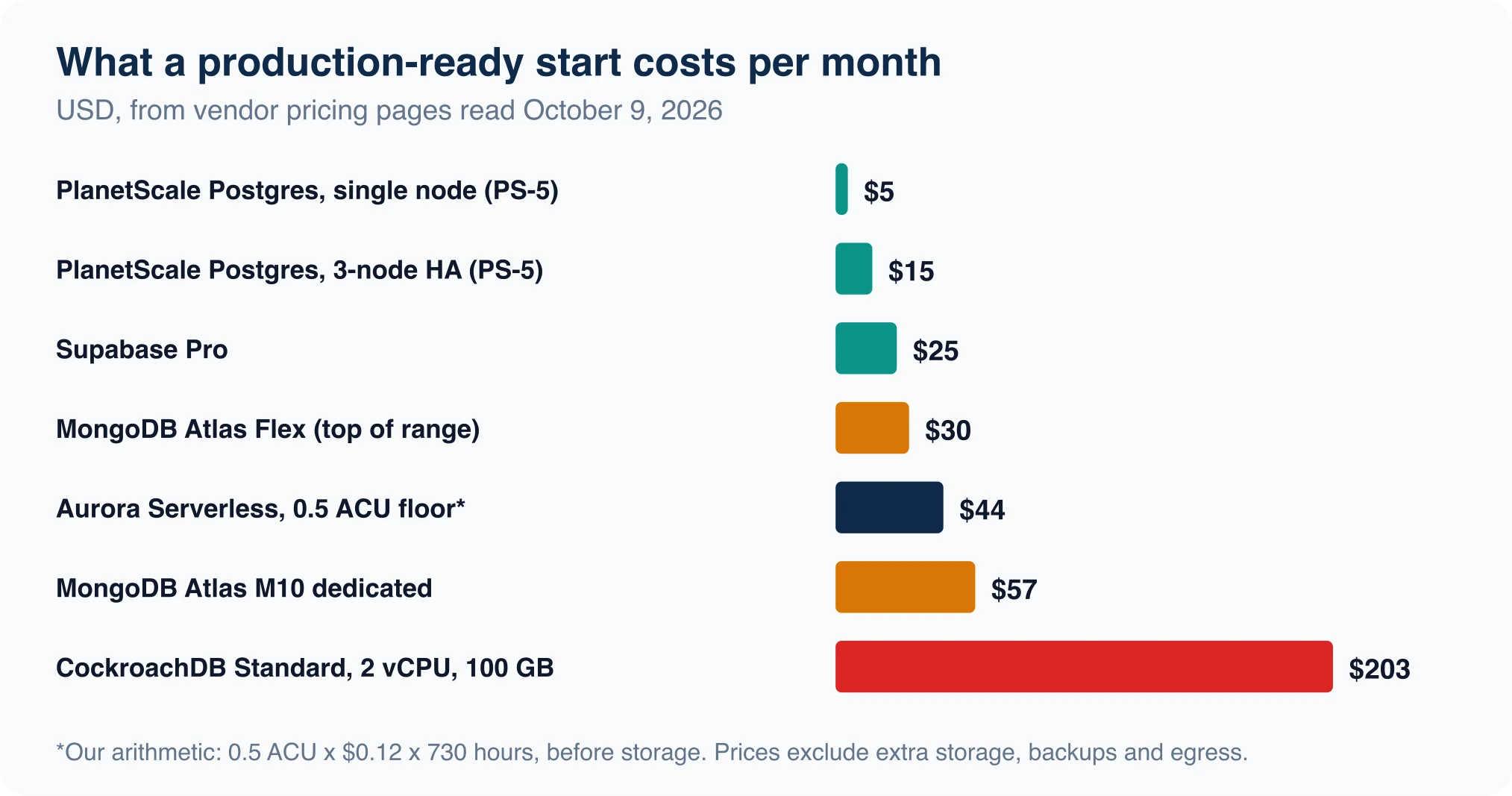
All figures come from each vendor's public pricing page as read on October 9, 2026. Prices change often, so confirm before you commit.
| Provider | Engine | Smallest paid option listed | Free tier |
|---|---|---|---|
| PlanetScale | PostgreSQL, Vitess | $5 single node (PS-5), $15 three-node HA | Not listed |
| MongoDB Atlas | MongoDB | Flex $8 to $30 per month, 5 GB; M10 $56.94 | M0, 512 MB |
| Supabase | PostgreSQL | Pro from $25 per month, 8 GB per project | 500 MB, paused after 1 week idle |
| Neon | PostgreSQL | Pay-as-you-go: $0.106 per compute-unit hour, $0.35 per GB-month | 100 CU-hours, 1 GB per project |
| Aurora | PostgreSQL, MySQL | $0.12 per ACU-hour, minimum 0.5 ACU | None on this page |
| CockroachDB | Distributed SQL | Standard, about $203 per month for 2 vCPUs and 100 GB | 30-day trial with $400 credit |
Two entries are our arithmetic, not the vendor's headline. Aurora's minimum comes from 0.5 ACU × $0.12 × 730 hours, about $44 per month before storage. Treat that as a floor. PlanetScale's $5 and $15 prices exclude extra storage, backups and egress, according to the page.
Read the table for patterns. Managed PostgreSQL starts cheapest, document databases cost a little more at the dedicated tier, and distributed SQL costs the most because you are paying for multi-region machinery.
The security checklist
"Secure" is a list of controls, and you can check each against a vendor in about ten minutes. Run these seven.
| # | Check | What to look for |
|---|---|---|
| 1 | Encryption in transit | TLS enforced, not optional |
| 2 | Encryption at rest | On by default, with an option for your own keys |
| 3 | Network isolation | Private networking or IP allow rules |
| 4 | Access control | Role-based access, SSO, audit logs |
| 5 | Backups and recovery | Retention window, point-in-time recovery |
| 6 | Compliance | SOC 2, HIPAA if you need it, listed by plan |
| 7 | Data location | Choose your region, and know where replicas live |
Pricing pages show the plan tier where each control appears, and that is the useful part. On Neon, private networking, IP allow rules, log export, an uptime SLA, and HIPAA and SOC 2 availability are all listed as Scale-plan features. Backups follow the same tier pattern. Supabase lists no backups on Free, 7 days on Pro and 14 days on Team, and Nhost lists none on its free plan. Neon's history window grows from 6 hours on Free to 7 days on Launch and 30 days on Scale.
Advertisement
The pattern to remember: security features are plan-gated. A database that is secure on the Scale plan can be missing network isolation on the plan you actually buy. Check the plan, not the logo.
Scalability: what each provider lets you do
Scaling means one of two things. Scaling up means a bigger machine. Scaling out means more machines. Providers differ most in how far each can go before you re-architect.
- Neon autoscales up to 16 compute units on Launch, or fixed sizes up to 56 CU on Scale, and scales to zero after five minutes of idleness. Good for spiky or dev workloads.
- MongoDB Atlas Dedicated runs from M10 (2 vCPUs, 2 GB RAM) up to M700 (96 vCPUs, 768 GB RAM, 4 TB storage) at $33.26 per hour. MongoDB also shards collections across servers.
- CockroachDB distributes data across nodes by design, so adding vCPUs or regions scales both reads and writes.
- Aurora scales compute in ACU steps and separates compute from storage.
- Supabase and PlanetScale scale vertically and with read replicas and, in PlanetScale's case, Vitess sharding.
The honest scaling advice is the opposite of what vendors say: most apps never outgrow a single well-indexed PostgreSQL server. In our own test a laptop answered a million-row join in 53 ms, as shown in our PostgreSQL vs MySQL benchmark. Fix queries before buying shards.
The hidden cost: Aurora's I/O math
Aurora has two billing modes, and the choice can swing your bill by double digits. The Aurora pricing page lists these US East rates:
| Item | Standard | I/O-Optimized |
|---|---|---|
| Serverless compute | $0.12 per ACU-hour | $0.156 per ACU-hour |
| Storage | $0.10 per GB-month | $0.225 per GB-month |
| I/O | $0.20 per million requests | $0 |
AWS says that if I/O exceeds 25% of your database spend, I/O-Optimized can save up to 40%. We worked out the actual break-even for a concrete size so you can test your own.
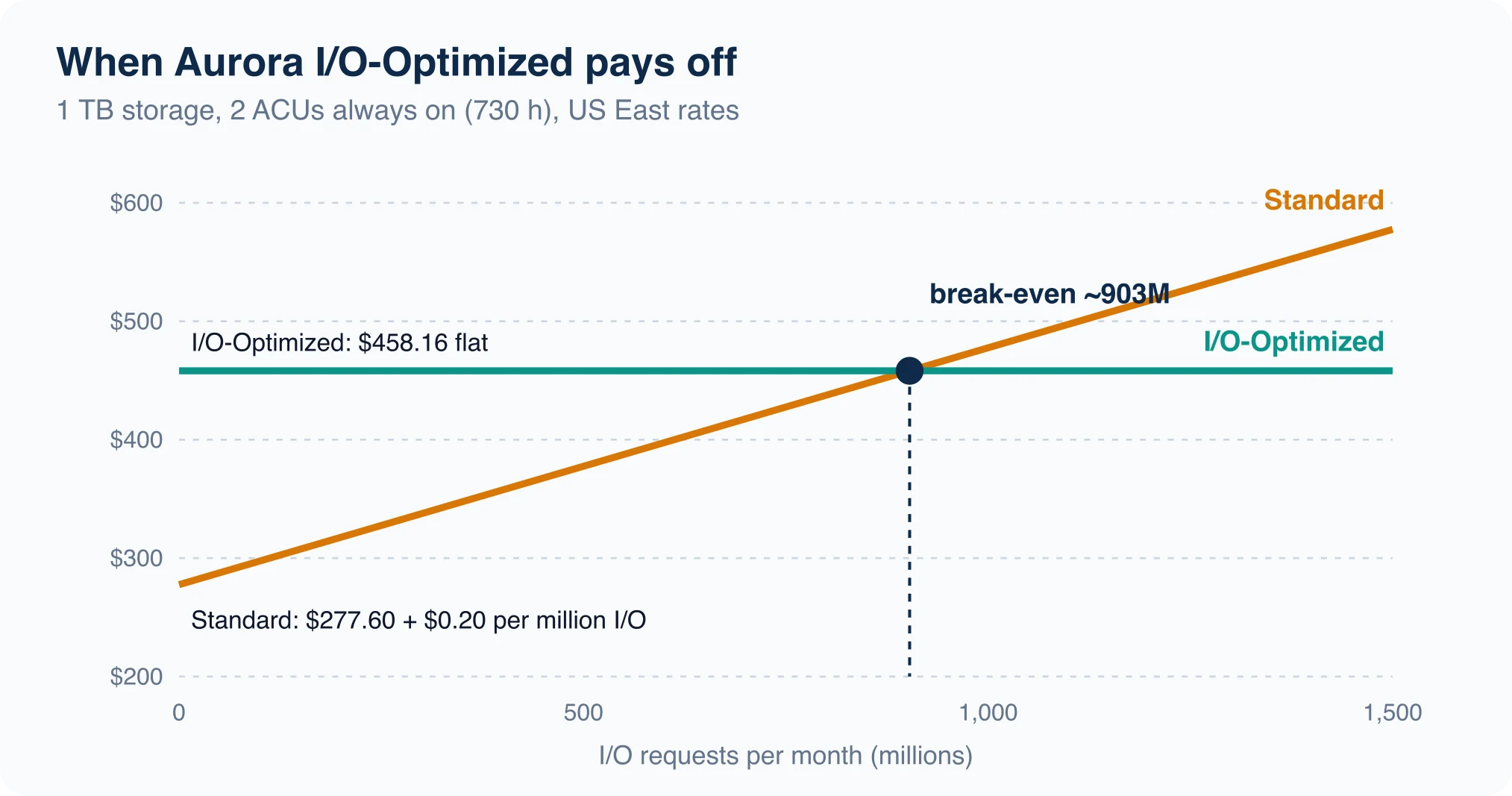
Assume 1 TB (1,024 GB) of data and 2 ACUs running all month (730 hours).
- Compute: Standard 2 × 0.12 × 730 = $175.20. I/O-Optimized 2 × 0.156 × 730 = $227.76. The difference is $52.56.
- Storage: Standard 1,024 × 0.10 = $102.40. I/O-Optimized 1,024 × 0.225 = $230.40. The difference is $128.00.
- Total extra cost of I/O-Optimized before I/O: $180.56.
- Break-even: $180.56 ÷ $0.20 per million = about 903 million I/O requests per month.
Below roughly 903 million requests, Standard is cheaper for this setup. Above it, I/O-Optimized wins. Pull your real number from CloudWatch's VolumeReadIOPs and VolumeWriteIOPs metrics before choosing. A smaller database with the same traffic breaks even sooner, because the storage penalty shrinks.
Test a vendor in one afternoon
Pricing pages tell you what a vendor claims. A short trial tells you what it does. Spend one afternoon on these five checks before you commit real data.
- Latency from your app. Run 100 simple queries from the region where your app runs and record the median and the slowest. A database in the wrong region adds a fixed cost to every request.
- Restore drill. Take a backup, restore it to a new instance and time it. A backup you have never restored is a hope, not a control.
- Connection limit. Open connections until the provider refuses. Serverless functions open many short connections, so find out whether you need a pooler.
- Cold start. If the plan scales to zero, time the first query after an idle period. Neon documents suspension after five minutes on its free plan, so a small test shows the real wake time.
- Bill rehearsal. Run a day of realistic traffic and compare the usage dashboard to the pricing page. Surprises usually come from egress, I/O or backup storage.
Write the results in a table beside the price. The cheapest option that passes all five is usually the right one.
A decision flow
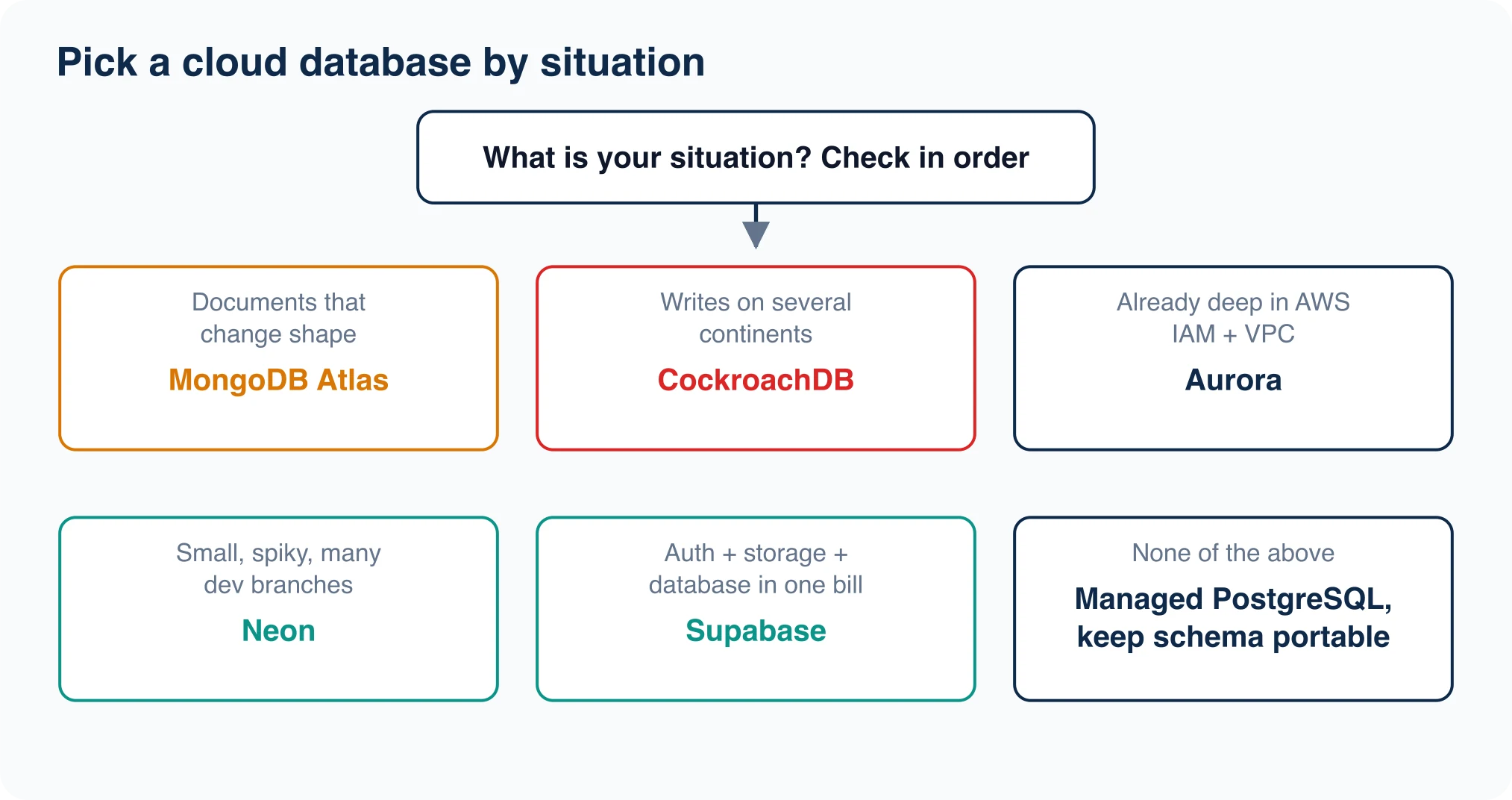
Walk the chart top to bottom.
- Documents that change shape? Use MongoDB Atlas. See our PostgreSQL vs MongoDB comparison before you decide, since
jsonbmay be enough. - Writes in several continents at once? Use CockroachDB, and budget for it.
- Already on AWS with IAM, VPC and a security team? Use Aurora, and run the I/O math above.
- Small app with idle hours or many dev branches? Use Neon, whose scale-to-zero means suspended compute costs nothing.
- Need auth, storage and a database in one bill? Use Supabase, and read our Supabase alternatives guide before you lock in.
- Otherwise: pick managed PostgreSQL from any of the above and keep your schema portable.
Portability is the real insurance. Keep migrations in version control, avoid vendor-only features until they pay for themselves, and rehearse an export. Our database migration tools guide covers the tools that make a move boring.
Advertisement
FAQ
What is the best cloud database for a startup?
Managed PostgreSQL. Supabase Pro starts at $25 per month with 8 GB, Neon bills by usage with a free plan, and PlanetScale lists single nodes from $5. All three keep you on standard SQL, so you can move later.
Which cloud database is the most secure?
None wins by name. Security depends on the plan: private networking, SOC 2 and HIPAA are often gated to higher tiers, as on Neon's Scale plan. Run the seven-check list against the plan you will actually buy.
Which cloud database scales best?
For raw single-cluster size, MongoDB Atlas lists up to 4 TB and 768 GB of RAM on M700. For multi-region writes, CockroachDB is designed for it. For most apps, a single PostgreSQL server with good indexes scales further than expected.
Is Aurora cheaper than RDS?
It depends on I/O. At 1 TB and 2 ACUs, Aurora's Standard mode is cheaper until about 903 million I/O requests per month, and I/O-Optimized wins above that. Measure your I/O first.
Are free cloud database tiers safe for production?
Usually not. Supabase pauses free projects after a week of inactivity and lists no backups on Free. Use free tiers for prototypes and move to a paid plan before real users arrive.
Comments
Loading…
Sign in to join the conversation.
Related posts
Relational Databases: Top 10 Ranked and How They Work
Oracle still leads the October 2026 DB-Engines list of relational databases, but PostgreSQL is the only top-four system that gained ground this year. PostgreSQL scored 688.75, up 45.56 points from
Fri Oct 09 2026 · 9 min read · 1 views
What Is PostgreSQL? A Plain-English Guide With Real Tests
PostgreSQL is a free, open-source relational database that stores data in tables and answers questions written in SQL. It began in 1986 as the POSTGRES project at the University of California,
Fri Oct 09 2026 · 8 min read · 0 views
Serverless Databases Compared: What They Cost in 2026
A serverless database costs the least when your app sits idle, and the most when it runs all day. That single fact decides most purchases. A hobby app can run free on Neon, Turso or Cloudflare D1. An
Fri Oct 09 2026 · 9 min read · 0 views