Can You Store Images in PostgreSQL? Tested
By Nihar Ranjan Das · Fri Oct 09 2026 · 7 min read · 0 views
View as a Web StorySoftware#postgresql#Databases#bytea#Storage
Yes, PostgreSQL can store images. You have three ways to do it: a bytea column, large objects, or a path or URL pointing at a file kept elsewhere. For most apps, storing small images in bytea is fine and storing big or popular ones in object storage is better. I measured all three on PostgreSQL 18.1 with 1,000 images of 300 KB each, and the numbers below show where each choice starts to hurt.
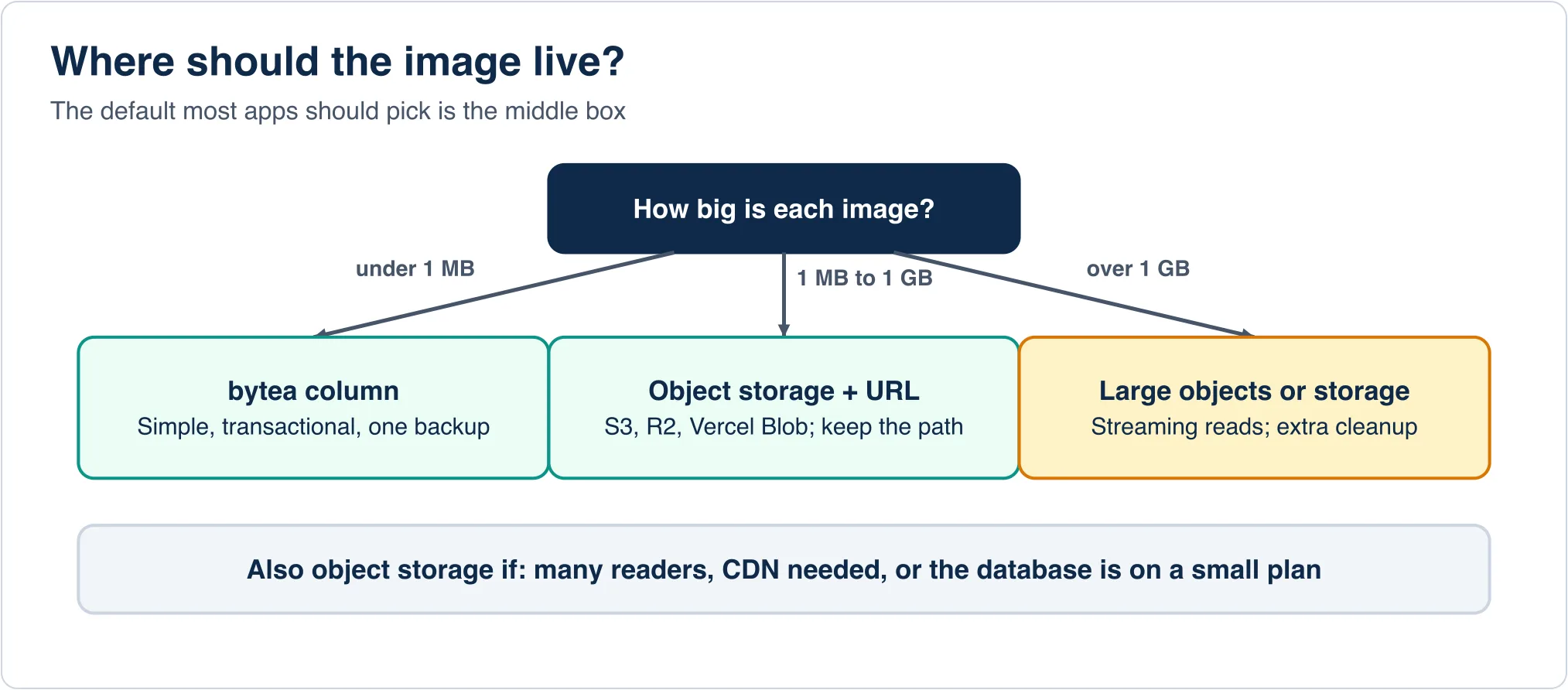
The short rule: under about 1 MB per image and low traffic, use bytea. Above that, or when images are served to many readers, store the file in object storage such as S3, Cloudflare R2 or Vercel Blob and keep only its URL in the table.
The three ways to store an image in PostgreSQL
1. bytea column. The image bytes sit in a normal column of type bytea. The official docs describe it as a binary string that holds raw bytes. PostgreSQL moves values larger than about 2 KB out of the main table into a hidden TOAST table automatically, so your table stays small and fast to scan.
CREATE TABLE avatars (
  id         bigserial PRIMARY KEY,
  user_id    bigint NOT NULL,
  mime_type  text   NOT NULL,
  data       bytea  NOT NULL
);
2. Large objects. You store a reference (an oid) in your table, and the bytes live in the system table pg_largeobject. You read and write through special functions such as lo_import, lo_export and lo_from_bytea, or a streaming API that supports seek. Each object can be up to 4 TB.
CREATE TABLE photos (
  id    bigserial PRIMARY KEY,
  name  text NOT NULL,
  data  oid  NOT NULL
);
-- store: INSERT INTO photos (name, data) VALUES ('a.jpg', lo_from_bytea(0, $1));
-- read:  SELECT lo_get(data) FROM photos WHERE id = 1;
3. A path or URL. The database stores text such as https://cdn.example.com/avatars/42.jpg. The file lives on disk, in S3-compatible storage, or on a CDN.
CREATE TABLE posts_images (
  id   bigserial PRIMARY KEY,
  name text NOT NULL,
  url  text NOT NULL
);
What I measured
I loaded 1,000 images of 300,000 bytes each into each design. I used random bytes, because real JPEG and WebP files are already compressed and PostgreSQL's TOAST compression cannot shrink them. Text-like data would look better than this. Photos will not.
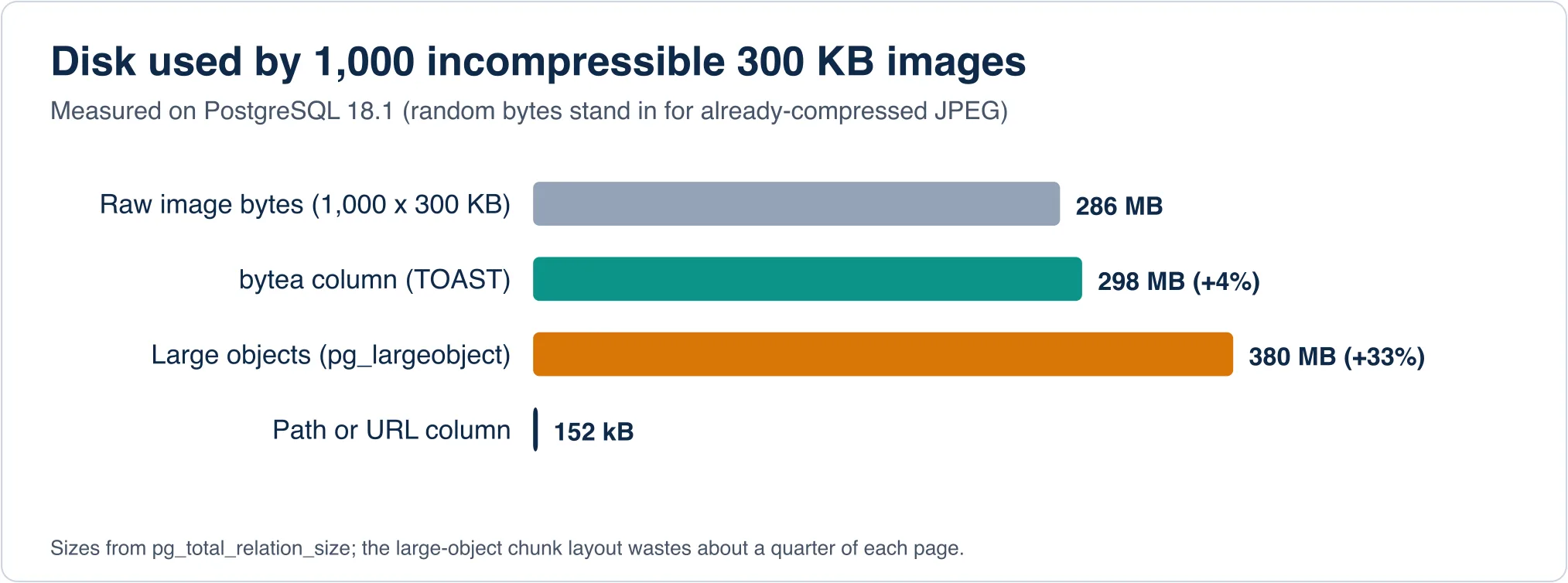
byteaused 298 MB for 286 MB of data. That is 4% overhead, and almost all of it lives in the TOAST table.- Large objects used 380 MB for the same data, 33% more. The
pg_largeobjecttable splits each object into 2 KB chunks and the layout leaves about a quarter of every page unused. - A path column used 152 kB. The files themselves cost the same space on whatever storage holds them, but PostgreSQL does not carry them.
The bytea result surprised me. Large objects are the older, more "serious" mechanism, but in this test the plain column was both smaller and simpler.
Reads are fast. Backups are the cost.
Fetching one image by primary key took 0.15 ms in EXPLAIN ANALYZE, with every page already in cache. A scan that counts rows or filters on name ran in about 4 ms across the 1,000 rows, because the heavy bytes sit in TOAST and are not touched unless you select the column. So the claim that images "make queries slow" is mostly wrong, provided you never write SELECT * on a list page.
The real cost shows up when you copy the database. I ran pg_dump -Fc on each table:
Advertisement
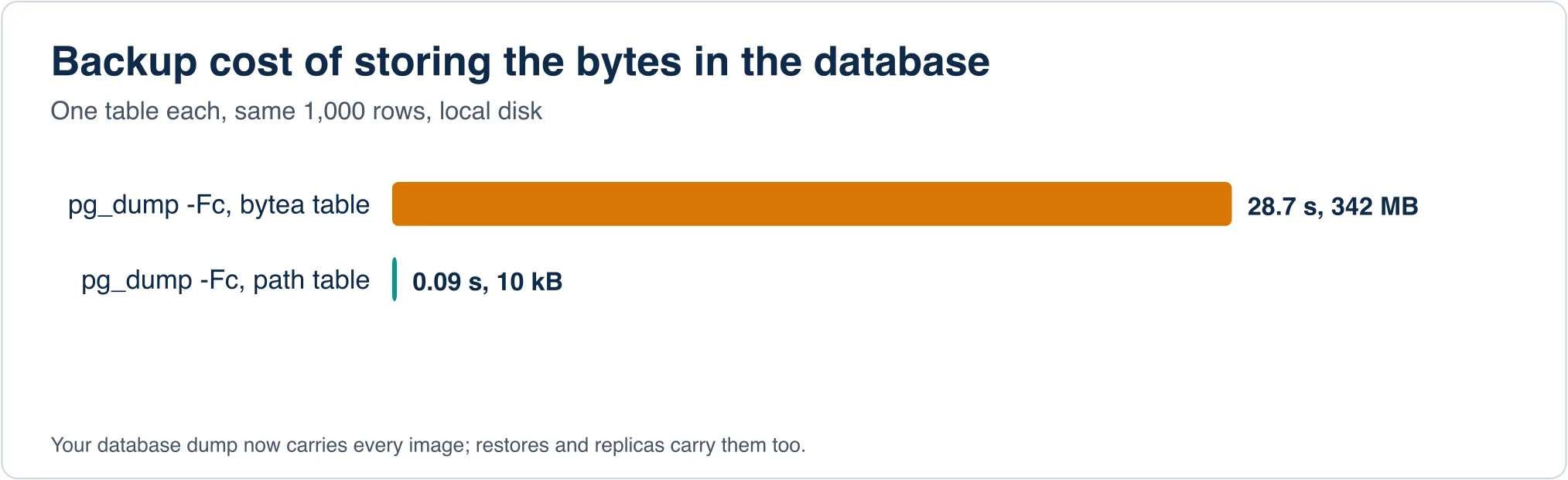
The bytea table dumped in 28.7 seconds to a 342 MB file. The path table dumped in 0.09 seconds to 10 kB. Every nightly backup, every restore into staging and every replica now carries every image. Compression makes no difference for already-compressed formats, and the dump file ends up larger than the table because the custom format adds its own framing.
Scale that up and the problem gets clear. Ten thousand 2 MB photos is 20 GB. A restore that takes minutes becomes a restore that takes an hour, and a managed-database plan that bills by storage bills you for it at database prices.
When storing images in PostgreSQL is a good idea
The benefits are real and they are not small.
- One transaction. Insert the row and the image together, and either both exist or neither does. With separate storage you must handle the case where the upload succeeded and the insert failed, or the reverse.
- One backup. Point-in-time recovery restores your images to the same moment as your data. File storage and a database snapshot rarely line up.
- No extra service. A small app, an internal tool or a prototype gains nothing from adding a bucket, credentials and a CDN.
- Access control in SQL. Row-level security rules guard the image the same way they guard the row.
I would store images in bytea for avatars, thumbnails, signatures, QR codes and scanned receipts, under 1 MB and read mostly by the owner.
When to use object storage instead
- Many readers. A public product photo gets requested thousands of times. Serving it from PostgreSQL ties up a connection and a worker for each request. A CDN serves the same file for almost nothing.
- Large files.
byteavalues are read into memory in full. A single query returns the whole value, and the protocol limit is 1 GB per field, but long before that you hit memory pressure. Large objects stream, but you accept the 33% overhead and a cleanup chore. - A small database plan. Many hosted tiers cap storage at a few gigabytes, and a few thousand photos can fill it.
- Image processing. Resizing, format conversion and signed URLs are all easier next to a file store.
The hybrid most apps end up with
The safest pattern keeps the original in object storage and the metadata in PostgreSQL. A table like the one below also makes it painless to move later.
CREATE TABLE images (
  id           bigserial PRIMARY KEY,
  owner_id     bigint      NOT NULL,
  storage_key  text        NOT NULL UNIQUE,  -- e.g. 'u/42/9f3c.webp'
  mime_type    text        NOT NULL,
  bytes        integer     NOT NULL,
  width        integer,
  height       integer,
  sha256       bytea       NOT NULL,
  created_at   timestamptz NOT NULL DEFAULT now()
);
The sha256 column deserves a mention, because it gives you free deduplication: look up the hash before uploading and reuse the existing file. The storage_key is a key, not a full URL, so a CDN change or a bucket rename is one config line rather than a migration over every row.
Gotchas I hit
Deleting a row does not delete a large object. The oid in your table is only a pointer. Delete the row and the object stays in pg_largeobject, taking up space forever. Use the lo_manage trigger from the lo extension, or call lo_unlink yourself. I confirmed this directly: after DELETE FROM photos removed all 1,000 rows, pg_largeobject_metadata still counted 1,000 objects and pg_largeobject still held 383 MB.
SELECT * drags the bytes. TOAST values are only fetched when you ask for the column, so name your columns on list queries and fetch the image in a separate request.
Drivers return different shapes. node-postgres gives you a Buffer, psycopg gives bytes, and some ORMs return base64 strings that are a third larger. Check what yours does before you size anything.
Do not store base64 text. Encoding an image as base64 and saving it in a text column wastes a third of the space and makes every read a decode. Use bytea or a file.
Replication copies everything. Logical and physical replicas receive every image byte. Streaming a 20 GB photo table to a read replica is the same cost as streaming 20 GB of any other data.
A worked example: when the numbers flip
Take a small SaaS with 5,000 users, each with one 200 KB avatar. That is 1 GB, which fits any database plan and backs up in seconds, so bytea costs nothing you will notice. Now take a marketplace with 50,000 listings and eight 2 MB photos each. That is 800 GB, every photo is public, and a dump takes hours. The first app should skip the extra service. The second should have used object storage from day one. The threshold is rarely one image. It is images multiplied by readers multiplied by how often you copy the database.
If you already have images in the database
Moving them out is a normal migration, and a sound plan has four steps: copy the bytes to object storage in batches, write the storage_key back to each row, switch reads to the new path with a fallback to the old column, and drop the bytea column once nothing reads it. The database migration process guide explains the stages, and the data migration strategy post shows why a trickle migration suits this case better than a big-bang cutover. If you are weighing a managed host for the result, see the best cloud database comparison.
For binary types, read the official binary data types page. For streaming and seeking, read large objects.
Advertisement
FAQ
Can PostgreSQL store images?
Yes. Use a bytea column for small images, large objects for streaming big files, or store a URL and keep the file in object storage.
Should I store images in the database or the file system?
Store small, private images in the database for one transaction and one backup. Store large or widely served images in object storage and keep the URL in the table.
What is the difference between bytea and large objects?
bytea is an ordinary column moved to TOAST automatically. Large objects live in pg_largeobject, support streaming and seeking, but need manual cleanup and used 33% more space in my test.
How big can a bytea image be?
A bytea value can be up to 1 GB, but it is read into memory whole, so keep images far smaller.
Does storing images slow PostgreSQL down?
Not for queries that skip the image column, since the bytes sit in TOAST. Backups, restores and replicas do get slower and larger.
Comments
Loading…
Sign in to join the conversation.
Related posts
Relational Databases: Top 10 Ranked and How They Work
Oracle still leads the October 2026 DB-Engines list of relational databases, but PostgreSQL is the only top-four system that gained ground this year. PostgreSQL scored 688.75, up 45.56 points from
Fri Oct 09 2026 · 9 min read · 1 views
What Is PostgreSQL? A Plain-English Guide With Real Tests
PostgreSQL is a free, open-source relational database that stores data in tables and answers questions written in SQL. It began in 1986 as the POSTGRES project at the University of California,
Fri Oct 09 2026 · 8 min read · 0 views
Serverless Databases Compared: What They Cost in 2026
A serverless database costs the least when your app sits idle, and the most when it runs all day. That single fact decides most purchases. A hobby app can run free on Neon, Turso or Cloudflare D1. An
Fri Oct 09 2026 · 9 min read · 0 views