Laravel AI SDK Upgrade Fails on a Missing Steps Column
By Nihar Ranjan Das · Thu Oct 15 2026 · 9 min read · 0 views
View as a Web StorySoftware#ai agents#Laravel AI SDK#Laravel#php#upgrade guide
Why does the Laravel AI SDK 1.0 upgrade fail with a missing steps column?
The upgrade fails because version 1.0 writes a column your table does not have. The package now stores each model round trip in a JSON column named steps, and it no longer uses tool_calls or tool_results. On the first message after the upgrade, the insert fails with this error:
SQLSTATE[HY000]: General error: 1 table agent_conversation_messages has no column named stepsThe Laravel AI SDK is Laravel's first-party package for talking to AI providers through one API, with agents, tools and stored conversations. Version 1.0 is the first stable release. Laravel News dated the announcement September 23, 2026, and it lists the conversation storage change as high impact.
Our test setup was a fresh Laravel 13.36 project with SQLite and PHP 8.4. We installed laravel/ai 0.11.2, published its migration, created a conversation with a fake gateway, then moved to 1.0.1 and finally to 1.2.2. The fake gateway returns canned replies, so no provider key and no spend was involved. Every message and column list below is real output.
What changed in the agent_conversation_messages table?
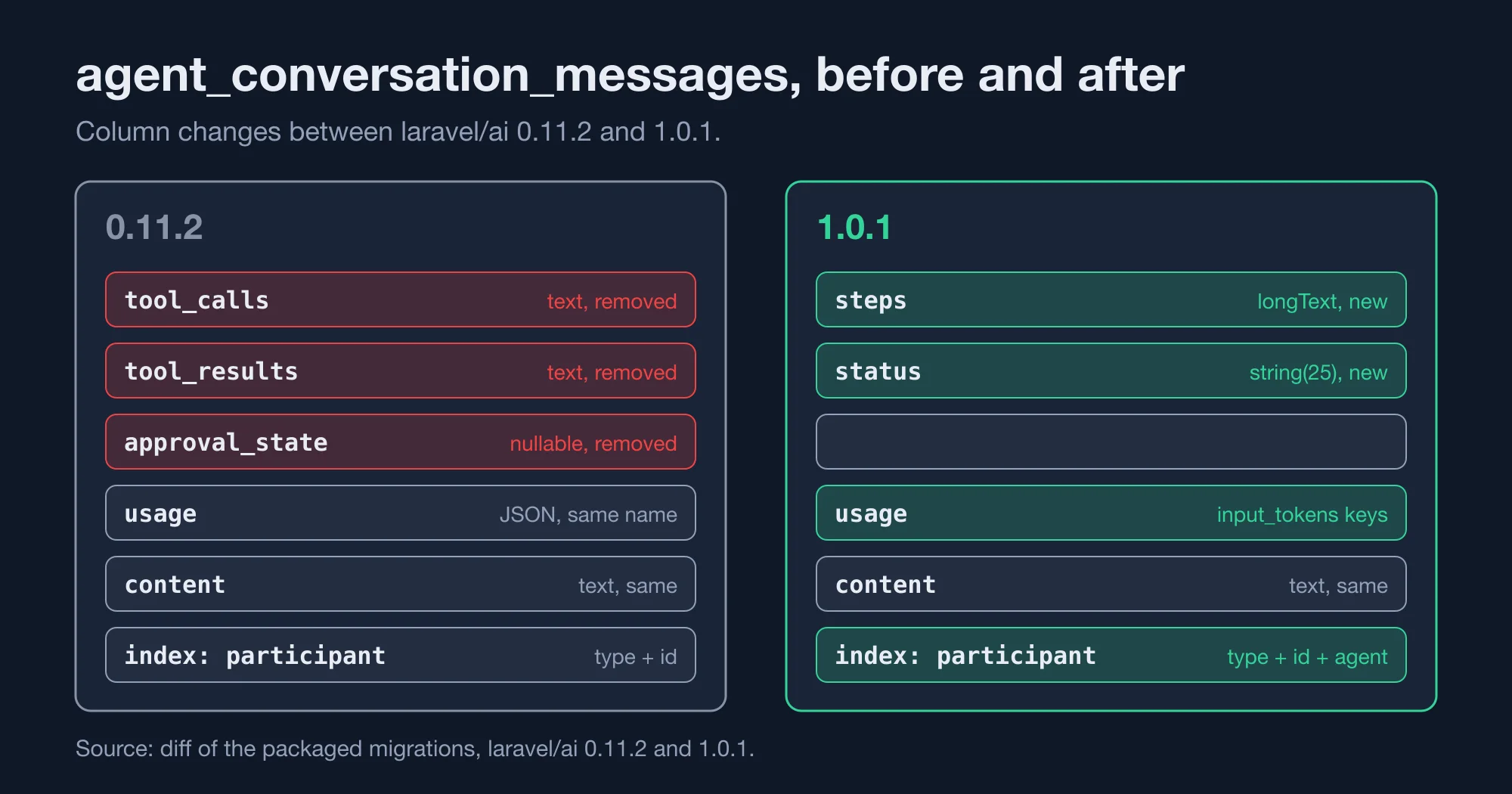
Three things changed in the table, and one of them is easy to miss. The table below compares the migration shipped with 0.11.2 and the one shipped with 1.0.1. We diffed the two files directly, so these are the exact differences.
| Column or index | In 0.11.2 | In 1.0.1 |
|---|---|---|
tool_calls |
text, required |
Removed |
tool_results |
text, required |
Removed |
steps |
Not present | longText, required |
approval_state |
text, nullable |
Removed |
status |
Not present | string(25), required |
participant_index |
participant type, participant ID | participant type, participant ID, agent |
The new status column replaces approval_state and records how a turn ended, such as completed or paused for approval. The index gained the agent column, which speeds up lookups when several agents share one participant. If you query the table by hand, rewrite those queries against the new columns.
Here is the part people miss. The migration inside the package is dated 2026_01_11 and begins with a create-table statement. When we ran php artisan vendor:publish --tag=ai-migrations on 1.0.1, Artisan answered "No publishable resources for tag". The stub lives in the vendor folder and runs only for new installs. An existing table is not touched, and no upgrade migration ships with the package.
How do you write the migration for an existing conversation table?
Write a migration that adds the two new columns, converts the old data into steps and drops the old columns. The version below worked in our test on SQLite. It keeps tool calls from existing rows by wrapping them in a single step, so conversations that already used tools remain readable.
<?php

use Illuminate\Database\Migrations\Migration;
use Illuminate\Database\Schema\Blueprint;
use Illuminate\Support\Facades\DB;
use Illuminate\Support\Facades\Schema;

return new class extends Migration
{
    public function up(): void
    {
        Schema::table('agent_conversation_messages', function (Blueprint $table) {
            $table->longText('steps')->default('[]');
            $table->string('status', 25)->default('completed');
        });

        DB::table('agent_conversation_messages')->orderBy('id')->each(function ($row) {
            $calls = json_decode($row->tool_calls, true) ?: [];
            $results = json_decode($row->tool_results, true) ?: [];
            $steps = ($calls || $results)
                ? [[
                    'text' => $row->content, 'tool_calls' => $calls, 'tool_results' => $results,
                    'finish_reason' => 'stop', 'usage' => json_decode($row->usage, true) ?: [],
                    'meta' => [], 'reasoning' => '', 'replay_blocks' => [], 'provider_tool_calls' => [],
                ]]
                : [];
            DB::table('agent_conversation_messages')->where('id', $row->id)
                ->update(['steps' => json_encode($steps), 'status' => 'completed']);
        });

        Schema::table('agent_conversation_messages', function (Blueprint $table) {
            $table->dropColumn(['tool_calls', 'tool_results', 'approval_state']);
        });
    }
};
The keys inside each step come from the package's own Step class: text, tool_calls, tool_results, finish_reason, usage, meta, reasoning, replay_blocks and provider_tool_calls. We copied them from the 1.0.1 source, so a conversation written by the new code and one converted by this migration share one shape.
We seeded one assistant row with a tool call and a tool result before the upgrade. After the migration, that row showed the call inside steps, and its status read completed. The next prompt through the fake gateway inserted without error.
Advertisement
Test it on a copy of production data first, and compare row counts before and after, so you know no conversation was lost. Treat the code as a starting point, not a drop-in. Three cautions apply:
- Defaults on SQLite. SQLite refuses to add a required column without a default, so we set one. On MySQL or PostgreSQL you may prefer to add the column as nullable, backfill, then tighten it.
- Large tables. The
each()loop updates one row at a time. For millions of rows, usechunkByIdand run it off-peak. - No down migration. We did not write one. Back up the table before you run this in production.
The Laravel team's own advice is to run the backfill migration from the upgrade guide once, before you deploy 1.0, per the Laravel News write-up. Our version is a stand-in for people whose guide copy does not match their schema. Compare it with the official guide first.
What happened to promptTokens and completionTokens?
They were renamed to inputTokens and outputTokens, and your stored data now holds both names. On 0.11.2 the response usage object exposed promptTokens and completionTokens. On 1.0.1 it exposes inputTokens, outputTokens, cacheReadInputTokens, cacheWriteInputTokens and reasoningTokens.
The stored usage column shows the change. We read two assistant rows from the same table. The row written before the upgrade held this JSON:
{"prompt_tokens":0,"completion_tokens":0,"cache_write_input_tokens":0,"cache_read_input_tokens":0,"reasoning_tokens":0}The row written after the upgrade held this:
{"input_tokens":0,"output_tokens":0,"cache_read_input_tokens":null,"cache_write_input_tokens":null,"reasoning_tokens":null}Two differences stand out. The key names changed, and the cache and reasoning fields went from 0 to null when a provider reports nothing. Our counts are zero because the fake gateway makes no real call. The shape is what matters.
Any report, billing job or dashboard that sums prompt_tokens will silently ignore every new row. Fix it at read time, which is safer than rewriting history:
$in  = $usage['input_tokens']  ?? $usage['prompt_tokens']     ?? 0;
$out = $usage['output_tokens'] ?? $usage['completion_tokens'] ?? 0;
Search your codebase for promptTokens, completionTokens, prompt_tokens and completion_tokens before you deploy. Rename the property reads, and keep the fallback above wherever you aggregate stored JSON.
Which default models changed between 0.11.2 and 1.2.2?
Every provider except Groq got a new default text model across the three versions we tested. This matters if your config/ai.php does not set a model, because then a composer update changes which model answers your users. We read each provider class in vendor/laravel/ai/src/Providers for all three versions.
| Provider | 0.11.2 | 1.0.1 | 1.2.2 |
|---|---|---|---|
| OpenAI | gpt-5.6-terra |
gpt-6-sol |
gpt-6.1-sol |
| Anthropic | claude-sonnet-5 |
claude-sonnet-5 |
claude-sonnet-5-5 |
| Gemini | gemini-3.6-flash |
gemini-3.6-flash |
gemini-3.8-flash |
| xAI | grok-4.20-non-reasoning |
grok-4.20-non-reasoning |
grok-4.7 |
| DeepSeek | deepseek-v4-flash |
deepseek-v4-flash |
deepseek-flash |
| Groq | openai/gpt-oss-120b |
openai/gpt-oss-120b |
openai/gpt-oss-120b |
| Cohere | No text default | No text default | command-a-03-2025 |
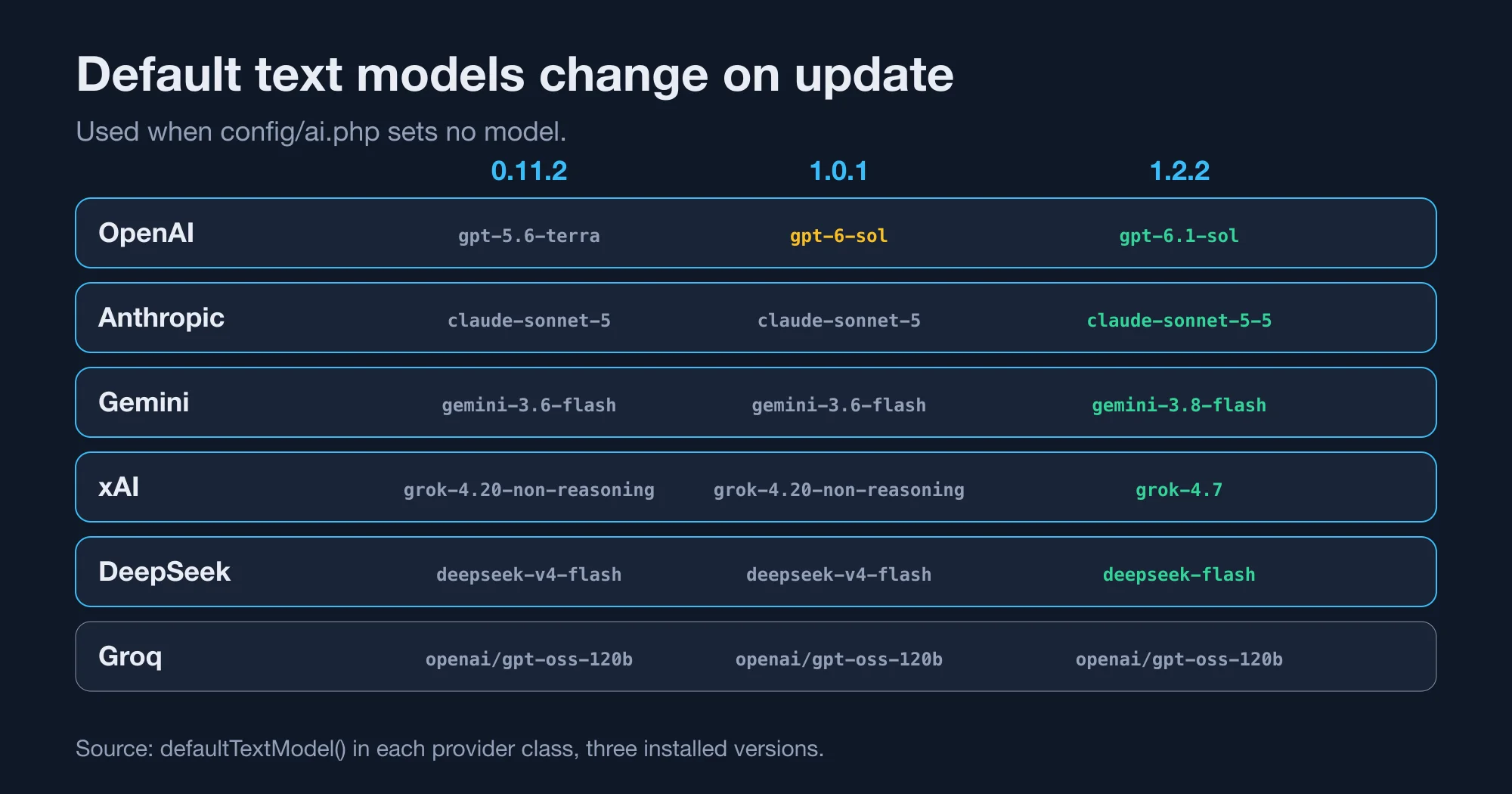
The 1.1 release post says the same about the fallback models: if you rely on defaults, "your app will use the newer models after you upgrade." Its example is Anthropic moving to claude-sonnet-5-5, which matches our table. Cohere arrived in 1.1 as a text provider.
The cost impact depends on your provider's price list, which we did not test, so check it for each model you rely on. A newer model can be faster, slower, cheaper or dearer. Our advice is to pin the model in config before the upgrade and change it on purpose afterwards:
// config/ai.php
'providers' => [
    'anthropic' => [
        'driver' => 'anthropic',
        'key' => env('ANTHROPIC_API_KEY'),
        'models' => ['text' => ['default' => 'claude-sonnet-5']],
    ],
],
The models.text.default path is the one the provider classes read. We confirmed it in the source: each provider returns $this->config['models']['text']['default'] before its built-in fallback.
What other breaking changes does Laravel AI SDK 1.0 bring?
Two more high-impact changes affect running code. Agent middleware now runs on every generation step instead of once per prompt, and the stream protocols changed. Laravel News lists both, though it gives no detail on the streaming change, so test your frontend against a staging server.
Per-step middleware is the one most likely to surprise you. A middleware that logged a prompt once will now log it for each model round trip, including each tool call. Count your log lines after the upgrade. A rate limiter or a cost counter written in middleware may now count several times per user message.
Version 1.0 also adds features you can adopt later:
- Approvable tools. A tool that implements
Approvablepauses until a person approves, rejects or edits the call. See Laravel AI SDK Tool Approval: Edit Works, Fakes Skip It for how it behaves in tests. - Tool search. Rarely used tools load only when needed, on OpenAI and Anthropic.
- Classification. A new capability for quick decisions, such as routing a support ticket.
- Code execution. A provider tool that runs code in the provider's sandbox.
- Chat protocols. The SDK can read and stream the Vercel AI chat and AG-UI protocols.
Version 1.1, released October 7, 2026, added Agent Skills through a HasSkills contract and a LoadSkill tool, and it changed failover so that a provider without a requested tool is skipped rather than ending the run. If an agent lists LoadSkill in tools() and also has a skills() method, the SDK merges them and logs a warning.
What is the safest order to upgrade the Laravel AI SDK?
Upgrade in two hops and test between them. Moving 0.11 to 1.0 changes your database and your usage fields. Moving 1.0 to 1.2 changes default models. Doing them separately tells you which change caused a problem.
- Back up the table. Dump
agent_conversation_messagesbefore anything else. - Pin your models. Set
models.text.defaultfor every provider you use. - Search for old names. Grep for
promptTokens,completionTokens,tool_callsandtool_results. - Require 1.0. Run
composer require laravel/ai:^1.0. - Run the migration. Use the official backfill or the one above, in staging first.
- Test one conversation. Send a prompt, then reopen the conversation and confirm the history loads.
- Move to 1.2. Run
composer require laravel/ai:^1.1and check that nothing depends on a default model. - Check middleware counts. Compare log lines or cost counters with the old numbers.
Laravel also offers an assisted route. Install Laravel Boost as a dev dependency, run php artisan boost:install, then call the /upgrade-ai-sdk-v1 slash command in your AI editor. We did not test that route, so review every change it proposes against the table above.
Should you upgrade the Laravel AI SDK to 1.x now?
Upgrade now if you start a new project, or if your conversations hold little data. Plan a staged upgrade if you have a large conversation table, a billing job that reads usage JSON or middleware that counts calls. The migration is the real work, and the rest is a search and replace.
The bottom line is that 1.0 is a good release with a database step the package leaves to you. The error message tells you what is wrong, which is the good part. The bad part is the quiet changes: the usage keys in old rows and the default models. Neither raises an exception, and both can change numbers on a dashboard.
If you run agents in production, that is the right place to be careful. I help teams plan upgrades like this one, with a staging run and a rollback plan, so the first real user message is not the first test. Our post on Tool Calling in Laravel: Why Agents Quit After One Retry covers a related failure that shows up once steps are stored.
Advertisement
FAQ
Why does Laravel AI SDK 1.0 say there is no column named steps?
Version 1.0 inserts a `steps` JSON column into `agent_conversation_messages`, and your table still has the older `tool_calls` and `tool_results` columns. The package ships a create-table migration, not an alter. Write an upgrade migration that adds `steps` and `status`, converts the data and drops the old columns.
Does vendor:publish update my existing conversation table?
No. The migration in the package is a create-table file dated 2026_01_11, and publishing copies it into your project. Running it changes nothing if the table already exists. You need your own migration to alter the existing table, then a backup first.
What replaced promptTokens in the Laravel AI SDK?
`inputTokens` replaced `promptTokens`, and `outputTokens` replaced `completionTokens`. Stored JSON keys changed from `prompt_tokens` and `completion_tokens` to `input_tokens` and `output_tokens`. Old rows keep the old keys, so read both when you aggregate usage.
Which default model does the Laravel AI SDK use for Anthropic?
Version 1.2.2 defaults to `claude-sonnet-5-5` for Anthropic. Versions 0.11.2 and 1.0.1 default to `claude-sonnet-5`. Set `models.text.default` in `config/ai.php` to pin a model so a package update never changes it for you.
Is it safe to upgrade straight from Laravel AI SDK 0.11 to 1.2?
It works, but a two-step upgrade is easier to debug. Move to 1.0 first and fix the database and usage fields. Then move to 1.2 and check default models and middleware behaviour. Back up the conversation table before the first step.
Comments
Loading…
Sign in to join the conversation.
Related posts
Rust 1.99 breaks one thing and quietly changes your CI
Rust 1.99.0 breaking changes, tested against 1.98.1: one new hard error, three new warnings, and a CI default that cuts the cache by 62%.
Thu Oct 15 2026 · 9 min read · 0 views
Rust is dropping 32-bit Windows hosts. Your i686 builds can stay
Rust 1.100 stops installing toolchains on 32-bit Windows, but i686 binaries keep building. Check if you are affected and cross-compile in three ways.
Thu Oct 15 2026 · 9 min read · 0 views
Does your GitHub Actions cache leak secrets? A Miri audit
Rust's Miri saved CI environment variables into target/, which GitHub Actions caches. Run this four-question audit and a cache scanner to check your repo.
Thu Oct 15 2026 · 8 min read · 0 views