PostgreSQL List Databases: \l, SQL and GUI
By Nihar Ranjan Das · Fri Oct 09 2026 · 7 min read · 0 views
View as a Web StorySoftware#developer tools#postgresql#psql#Databases
To list databases in PostgreSQL, connect with psql and type \l. That prints every database on the server with its owner, encoding and access privileges. If you would rather use SQL, SELECT datname FROM pg_database WHERE NOT datistemplate; returns the same names without the template databases. Both work on every supported version, and I ran every command in this post against a real PostgreSQL 18.1 server.
The short answer covers most visits. The rest of this post covers what the short answer hides: why a database you know exists is missing, why \l+ shows "No Access" for the size, and how to list databases without a terminal.
The fastest way: \l and \list in psql
Open a session and run the meta-command. \l and \list are the same command.
$ psql -U postgres
postgres=# \l
                                          List of databases
   Name    |  Owner   | Encoding | Locale Provider | Collate |  Ctype  | ... | Access privileges
-----------+----------+----------+-----------------+---------+---------+-----+-----------------------
 analytics | postgres | UTF8     | libc            | C.UTF-8 | C.UTF-8 | ... |
 blog_dev  | postgres | UTF8     | libc            | C.UTF-8 | C.UTF-8 | ... |
 postgres  | postgres | UTF8     | libc            | C.UTF-8 | C.UTF-8 | ... |
 shop      | postgres | UTF8     | libc            | C.UTF-8 | C.UTF-8 | ... |
 template0 | postgres | UTF8     | libc            | C.UTF-8 | C.UTF-8 | ... | =c/postgres          +
 template1 | postgres | UTF8     | libc            | C.UTF-8 | C.UTF-8 | ... | =c/postgres          +
(6 rows)
My test server has four databases of my own and the two templates. template0 and template1 are not yours: template1 is the blueprint copied into every new database, and template0 is a pristine backup of it. Leave both alone unless you know why you are editing them.
Three variants are worth memorising:
\l+adds the size, tablespace and description columns.\l shopfilters by name. It accepts patterns, so\l prod*lists every database starting withprod.psql -lruns the same listing from the shell and exits, with no interactive session. This is the one to use in scripts.
You do not need a database name to run psql -l. It connects to the default postgres database, which exists on a standard install, to fetch the list.
List databases with SQL
Meta-commands only work in psql. Any other client, whether a Python script, a Node app or a SQL console in your cloud dashboard, needs a query. The list lives in the system catalog pg_database:
SELECT datname
FROM pg_database
WHERE NOT datistemplate
ORDER BY datname;
datname
-----------
analytics
blog_dev
postgres
shopdatistemplate is true for template0 and template1, so filtering on it drops both. Two other columns matter later in this post: datallowconn says whether anyone may connect at all, and datdba is the owner's role id.
To see sizes, sorted largest first:
SELECT datname,
       pg_size_pretty(pg_database_size(datname)) AS size
FROM pg_database
WHERE NOT datistemplate
ORDER BY pg_database_size(datname) DESC;
datname | size
-----------+---------
shop | 689 MB
postgres | 7766 kB
analytics | 7609 kB
blog_dev | 7609 kBThe empty databases come in at about 7.6 MB each. That is the cost of a fresh database copied from template1, so do not read it as data.
Advertisement
Which method should you pick?
The methods differ in what they show and where they run. The table below shows the result of each, tested on the same four-database cluster.
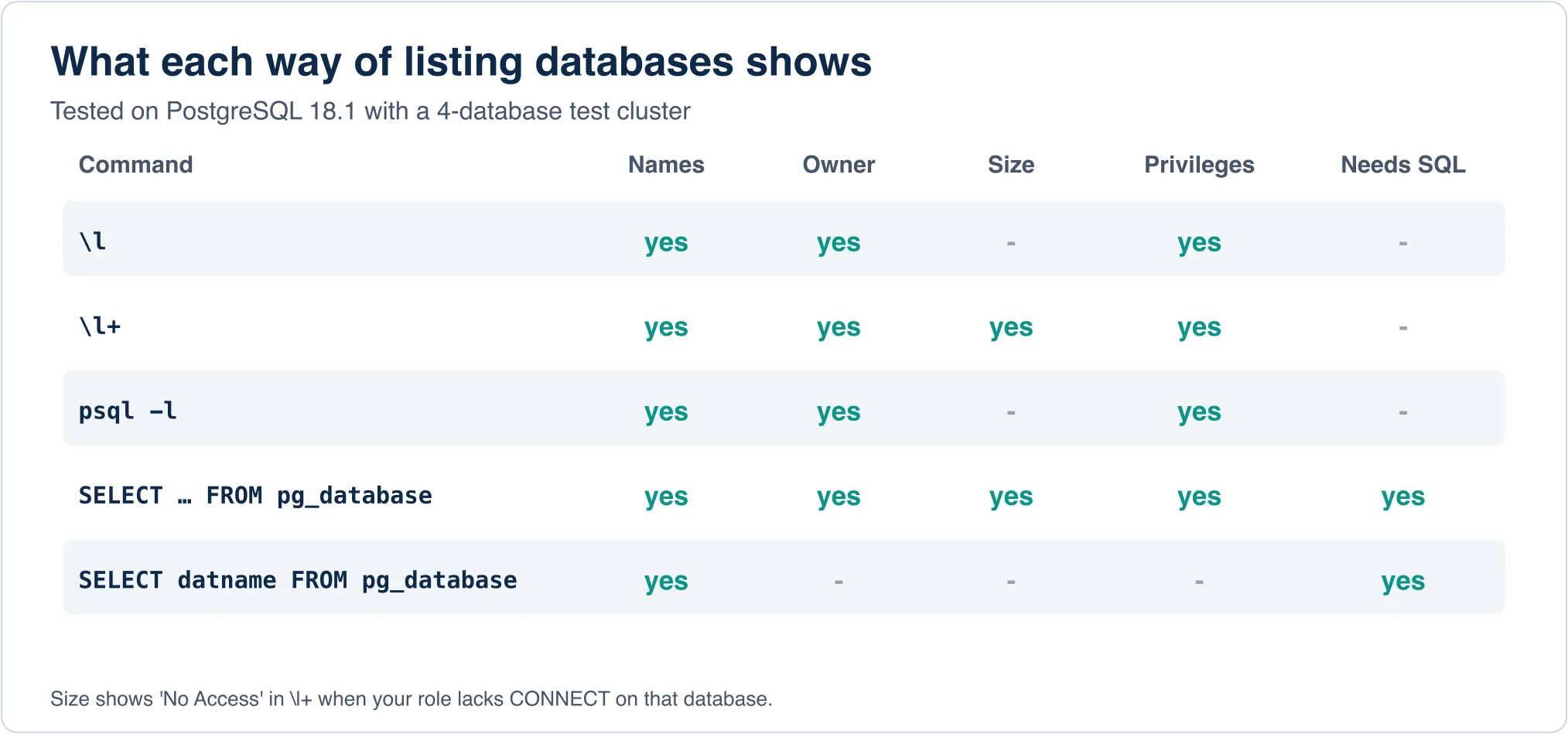
Use \l for a quick look, \l+ when you want sizes, psql -l from scripts and cron jobs, and pg_database when you are inside an application or need to filter and join the result. For scripting, add -t -A to drop headers and alignment:
$ psql -l -t -A | cut -d'|' -f1
analytics
blog_dev
postgres
shop
template0
postgres=CTc/postgres
template1
postgres=CTc/postgres
Notice the stray postgres=CTc/postgres lines. Those are the second rows of the multi-line privilege cells leaking through cut. If you parse psql -l, the SQL query is safer. This one bites people who copy a shell one-liner from a forum and then loop over the output.
Check which database you are connected to
A different question hides behind the same keywords: "check database name postgresql". People searching for that usually want the database they are in right now, not the whole list.
SELECT current_database(), current_user; current_database | current_user
------------------+--------------
shop | postgresInside psql, \conninfo prints the database, user, host and port in one line, and \c dbname switches to another database. A switch closes the current connection and opens a new one, so session settings and temporary tables do not follow you.
Why a database is missing from the list
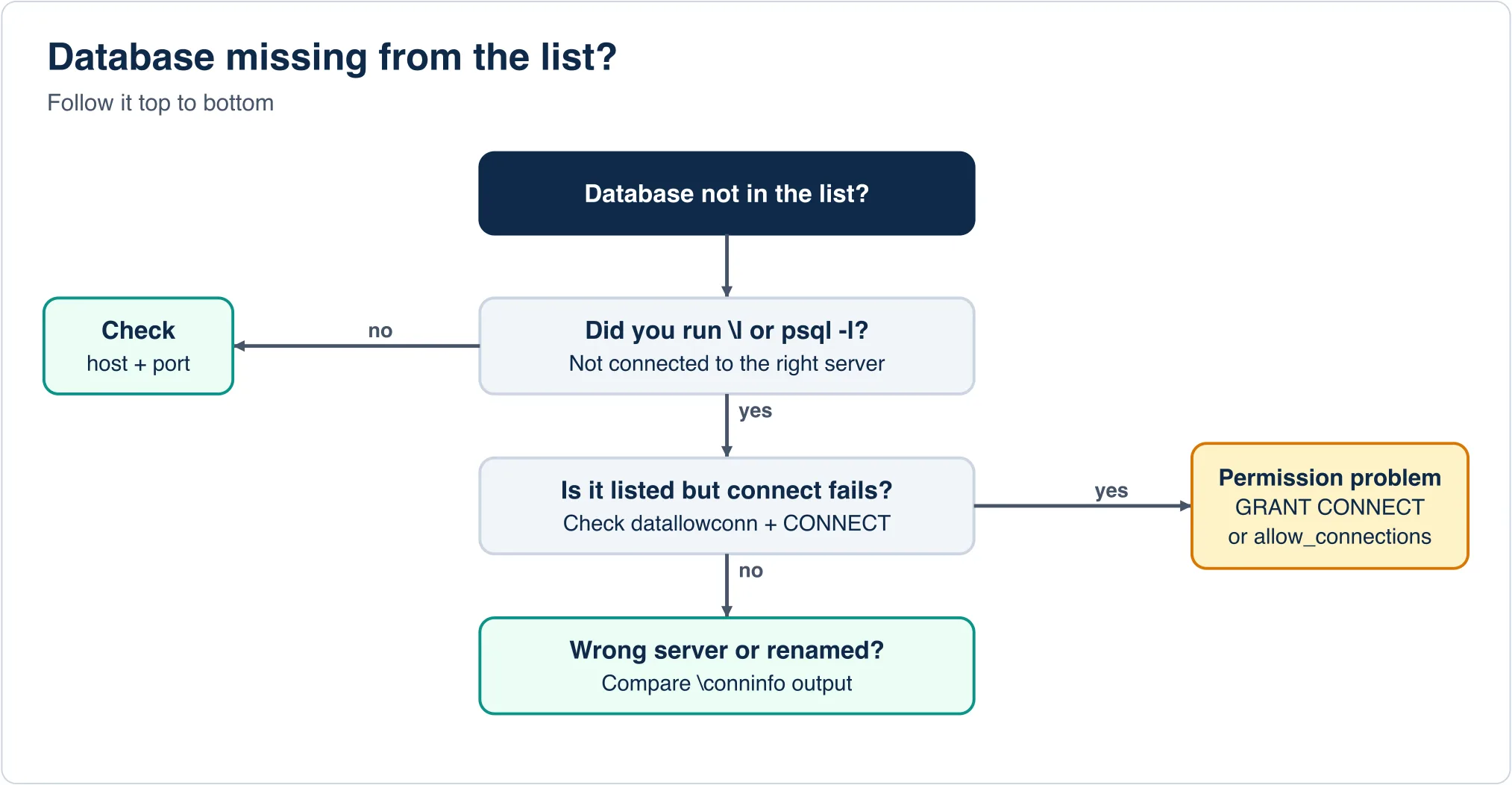
Here is the part most guides skip. A database can fail to show up, or show up and still refuse you, for four distinct reasons. I set up each one to see what PostgreSQL says.
1. You are on the wrong server. The most common cause by far. A laptop with a Homebrew Postgres, a Docker Postgres and an app-bundled Postgres can have three servers on three ports. Run \conninfo and compare the host and port with where you think the data is. A database that does not exist fails with a clear message:
psql: error: connection to server on socket "/tmp/pgs/.s.PGSQL.55432" failed:
FATAL:  database "nosuch" does not exist
2. Your role lacks CONNECT. The database is listed, but you cannot enter. I revoked the default public connect privilege on analytics and logged in as a plain role:
SELECT datname,
       has_database_privilege(datname, 'CONNECT') AS can_connect,
       datallowconn
FROM pg_database
WHERE NOT datistemplate
ORDER BY 1;
datname | can_connect | datallowconn
-----------+-------------+--------------
analytics | f | t
blog_dev | t | f
postgres | t | t
shop | t | tThe analytics row shows can_connect = f. The listing still includes it, but \l+ prints "No Access" in the size column and pg_database_size('analytics') fails with ERROR: permission denied for database analytics. If you are building a dashboard that lists database sizes, this error will break the whole query when one database is off limits. Filter with has_database_privilege(datname, 'CONNECT') first.
3. Connections are switched off for the database. The blog_dev row shows datallowconn = f. That happens after ALTER DATABASE blog_dev ALLOW_CONNECTIONS false, which maintenance scripts use to lock a database during a restore. Nobody can connect, including superusers, until it goes back to true. If a database "disappeared" for your app right after a restore, check this column first.
4. The database lives on another cluster. PostgreSQL has no cross-server catalog. Two replicas are the same cluster, but a staging server and a production server are not, and each has its own list.
List databases with a GUI
If you prefer a point-and-click view, the same list is one click away in the usual clients.
- pgAdmin: expand the server in the tree. Databases appear under a "Databases" node.
- DBeaver: connect, then enable "Show all databases" in the connection's PostgreSQL settings. Without it, DBeaver only shows the database in your connection string, which confuses people into thinking the rest are gone.
- DataGrip and Beekeeper Studio: both show databases as top-level items once connected, with a setting to include system and template databases.
Every GUI runs the same pg_database query under the hood. If a GUI shows fewer databases than \l, it is filtering. If it shows more, it is including templates.
Databases are not schemas
Developers coming from MySQL stumble here. In MySQL, "database" and "schema" are the same word. In PostgreSQL they are different layers: a server holds databases, a database holds schemas, a schema holds tables. \dn lists schemas inside the current database. \dt lists tables. If you ran \l looking for your tables, you were one level too high.
postgres=# \dn
  List of schemas
  Name  |       Owner
--------+-------------------
 public | pg_database_owner
You also cannot run a query across two databases in one statement. A SELECT sees only the database you connected to. Cross-database access needs the postgres_fdw or dblink extensions, so keep related tables in one database with separate schemas.
Quick reference
| You want | Run |
|---|---|
| All databases, in psql | \l |
| With sizes | \l+ |
| From a shell script | psql -l |
| Names only, in SQL | SELECT datname FROM pg_database WHERE NOT datistemplate; |
| Current database | SELECT current_database(); |
| Switch database | \c dbname |
| Is it connectable? | SELECT has_database_privilege('dbname','CONNECT'); |
Keep the version of the server in mind as well. The columns \l prints changed over the years, and recent releases add "Locale Provider" and "ICU Rules" columns. If your output looks different from the example above, find out which server you are running with the guide to checking your PostgreSQL version. Before an upgrade, read the list of PostgreSQL 19 breaking changes.
If you are still choosing a database engine rather than operating one, the PostgreSQL vs MySQL decision table and the PostgreSQL vs MongoDB comparison cover that choice. And if you are moving a database between servers, start with the database migration process.
For the full syntax of every meta-command, see the official psql reference and the pg_database catalog page.
Advertisement
FAQ
How do I list databases in PostgreSQL?
Connect with psql and run \l or \list. From a shell, psql -l prints the same list. In any SQL client use SELECT datname FROM pg_database WHERE NOT datistemplate;.
How do I check which database I am connected to?
Run SELECT current_database(); or use \conninfo in psql, which also prints the user, host and port.
Why is my PostgreSQL database not showing in \l?
Most often you are connected to a different server or port. Check \conninfo. If it is listed but you cannot enter, check has_database_privilege and the datallowconn column.
What are template0 and template1?
template1 is the blueprint copied into every new database, and template0 is a pristine backup of it. Filter them out with WHERE NOT datistemplate.
How do I see database sizes in PostgreSQL?
Use \l+ in psql, or SELECT datname, pg_size_pretty(pg_database_size(datname)) FROM pg_database;. Both need CONNECT privilege on each database.
Comments
Loading…
Sign in to join the conversation.
Related posts
Relational Databases: Top 10 Ranked and How They Work
Oracle still leads the October 2026 DB-Engines list of relational databases, but PostgreSQL is the only top-four system that gained ground this year. PostgreSQL scored 688.75, up 45.56 points from
Fri Oct 09 2026 · 9 min read · 1 views
What Is PostgreSQL? A Plain-English Guide With Real Tests
PostgreSQL is a free, open-source relational database that stores data in tables and answers questions written in SQL. It began in 1986 as the POSTGRES project at the University of California,
Fri Oct 09 2026 · 8 min read · 0 views
Serverless Databases Compared: What They Cost in 2026
A serverless database costs the least when your app sits idle, and the most when it runs all day. That single fact decides most purchases. A hobby app can run free on Neon, Turso or Cloudflare D1. An
Fri Oct 09 2026 · 9 min read · 0 views