SQLite CREATE TABLE IF NOT EXISTS: What It Skips
By Nihar Ranjan Das · Fri Oct 09 2026 · 7 min read · 0 views
View as a Web StorySoftware#sqlite#sql#Databases#Migrations
CREATE TABLE IF NOT EXISTS in SQLite creates the table only when no table of that name exists, and does nothing, with no error, when one does. That makes it safe to run on every app start. It also hides a trap: it checks the name and nothing else, so if you edit the column list later, the statement silently skips and your change never happens.
This post gives you the syntax, a complete working example, and the cases I tested on SQLite 3.51.0 where IF NOT EXISTS behaves differently from what most tutorials imply.
The syntax
CREATE TABLE IF NOT EXISTS users (
  id         INTEGER PRIMARY KEY,
  email      TEXT NOT NULL UNIQUE,
  created_at TEXT NOT NULL DEFAULT (datetime('now'))
);
Run it once and the table appears. Run it again and SQLite returns immediately without a message. Drop the IF NOT EXISTS and the second run fails with table users already exists.
The same clause works on CREATE INDEX, CREATE VIEW and CREATE TRIGGER. It does not exist for ALTER TABLE, which is why migrations need more than this one statement.
Create a database and a table from scratch
You do not need a "create database" command in SQLite. A database is a single file, and the command line tool creates it the first time you write to it:
$ sqlite3 shop.db
sqlite> CREATE TABLE IF NOT EXISTS users (
   ...>   id INTEGER PRIMARY KEY,
   ...>   email TEXT NOT NULL UNIQUE
   ...> );
sqlite> .tables
users
sqlite> .schema users
CREATE TABLE users (id INTEGER PRIMARY KEY, email TEXT NOT NULL UNIQUE);
sqlite> .quit
One detail I checked: opening sqlite3 lazy.db and quitting creates no file. Running select 1 creates an empty file of 0 bytes. The file reaches 8,192 bytes only after the first statement that writes, here a CREATE TABLE. A zero-byte .db file is therefore a valid, empty database, not a corrupt one.
To run a whole script, use sqlite3 shop.db < schema.sql or, inside the shell, .read schema.sql.
The trap: it never updates an existing table
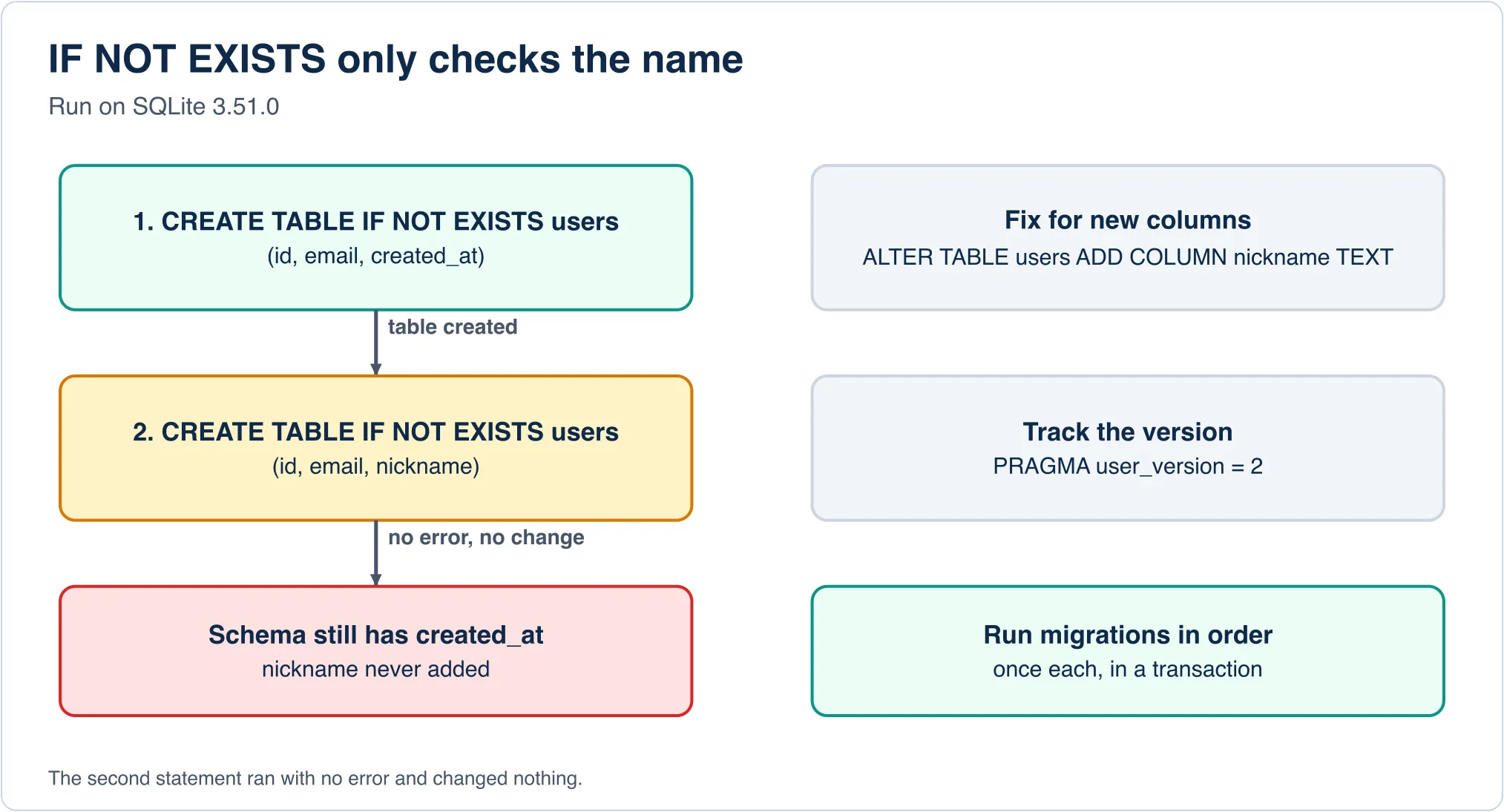
This is the behaviour that costs people an afternoon. I created users with a created_at column, then ran a second statement that listed a different column set, nickname instead of created_at:
CREATE TABLE IF NOT EXISTS users (id INTEGER PRIMARY KEY, email TEXT NOT NULL UNIQUE, created_at TEXT NOT NULL DEFAULT (datetime('now')));
CREATE TABLE IF NOT EXISTS users (id INTEGER PRIMARY KEY, email TEXT NOT NULL UNIQUE, nickname TEXT);
.schema users
CREATE TABLE users (id INTEGER PRIMARY KEY, email TEXT NOT NULL UNIQUE, created_at TEXT NOT NULL DEFAULT (datetime('now')));The second statement returned no error and changed nothing. The schema still has created_at and has no nickname. Your code then runs INSERT ... (nickname) and fails with no such column, far from the line you edited.
Advertisement
The same applies to indexes. I ran CREATE INDEX IF NOT EXISTS idx_users_nick ON users(nickname) and then again with ON users(email). The stored definition stayed on nickname. If you want to change an index, drop it first.
So treat IF NOT EXISTS as "make sure this table exists", never as "make the table look like this".
How to change a table that already exists
Use ALTER TABLE. SQLite supports a short list of changes, and each has a limit I ran into:
ALTER TABLE users ADD COLUMN nickname TEXT;
ALTER TABLE users RENAME COLUMN nickname TO handle;
ALTER TABLE users DROP COLUMN stamp;- Adding a
NOT NULLcolumn needs a default when the table has rows. On a table with one row,ALTER TABLE users ADD COLUMN score INTEGER NOT NULL;failed withCannot add a NOT NULL column with default value NULL. On an empty table the same statement succeeded, so a test on an empty database can pass and the real migration fail. AddDEFAULT 0. - There is no
ALTER COLUMN. TryingALTER TABLE users ALTER COLUMN age TEXTgives a syntax error. To change a column's type or constraints, create a new table, copy the data across, drop the old one and rename the new one. - Duplicate adds fail loudly. Running
ADD COLUMN agetwice returnsduplicate column name: age. UnlikeCREATE TABLE,ALTERhas noIF NOT EXISTS, so a migration that runs twice breaks.
Run migrations once, in order
The fix for "it runs on every start but changes must apply once" is a version number. SQLite keeps a free integer in the database header called user_version, and your app can use it as a migration counter:
PRAGMA user_version;          -- 0 on a new database

BEGIN;
CREATE TABLE IF NOT EXISTS users (
  id INTEGER PRIMARY KEY,
  email TEXT NOT NULL UNIQUE
) STRICT;
PRAGMA user_version = 1;
COMMIT;
After the commit, PRAGMA user_version; returns 1. Your startup code reads the number, runs every migration above it in a transaction, and sets the new number inside the same transaction. A migration that fails rolls back along with its version bump, so you never end up half-migrated. The database migration process guide covers the general method, and the data migration strategy post explains how to choose between one big change and many small ones.
If you use an ORM or a tool such as Flyway, Liquibase or Atlas, they keep an equivalent table for you. The comparison in database migration tools shows what each costs.
Two defaults that surprise people
CREATE TABLE IF NOT EXISTS is often the first table people make, which is also when SQLite's loose defaults catch them.
Types are suggestions unless you say STRICT
In a normal table, a column's declared type is a hint. I created ns(a INTEGER) and inserted the text 'abc':
INSERT INTO ns VALUES('abc'); SELECT a, typeof(a) FROM ns;
abc|text
The insert succeeded and the integer column now holds text. Add the STRICT keyword after the closing parenthesis and the same insert fails:
CREATE TABLE s(a INTEGER) STRICT; INSERT INTO s VALUES('abc');
Runtime error: cannot store TEXT value in INTEGER column s.a (19)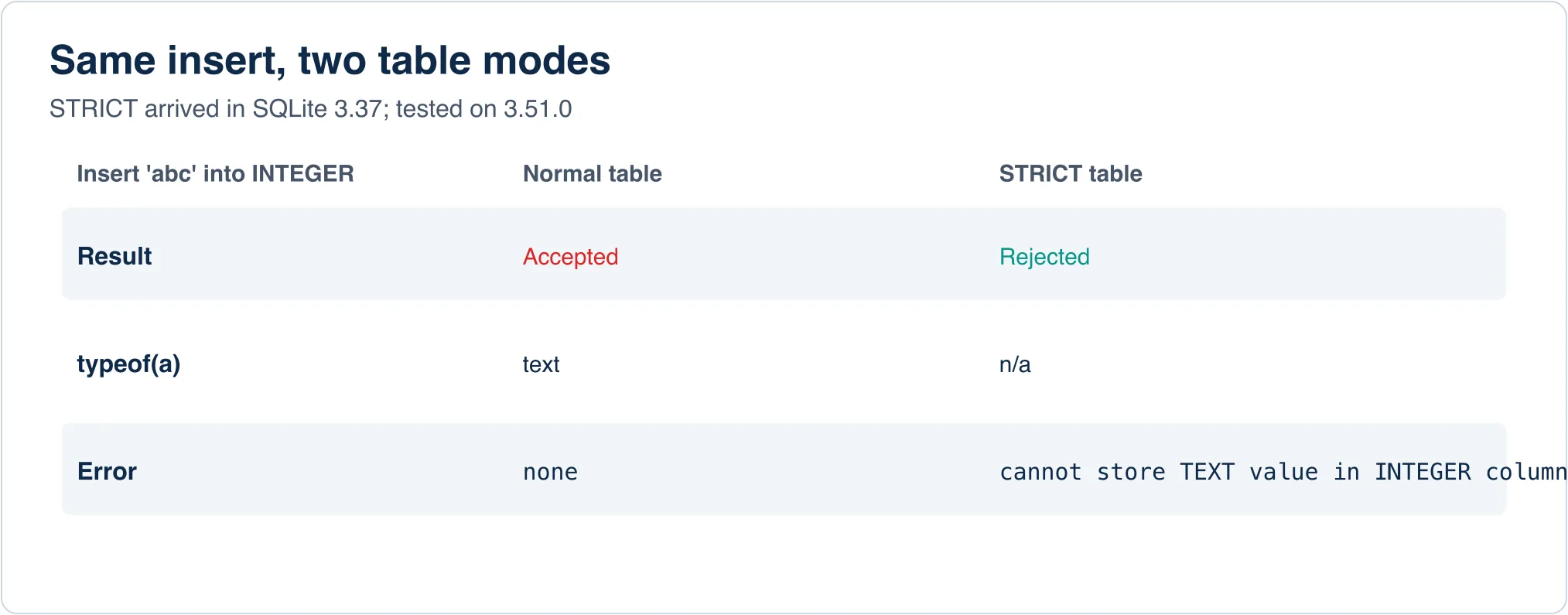
STRICT tables arrived in SQLite 3.37, released in late 2021, so any current version supports them. The cost is that you must use the allowed types (INT, INTEGER, REAL, TEXT, BLOB, ANY), and a few conveniences of loose typing go away. For a new table, I would turn it on by default.
Foreign keys are off until you turn them on
I made a posts table with user_id ... REFERENCES users(id), then inserted a post for user 99, who does not exist. The insert worked, because PRAGMA foreign_keys; returned 0. After PRAGMA foreign_keys=ON; the same insert failed with FOREIGN KEY constraint failed. The setting is per connection, not stored in the file, so every connection your app opens must set it. A CHECK constraint, by contrast, is always enforced: inserting status = 'bogus' against CHECK (status IN ('draft','published')) failed on the first try.
A complete schema you can copy
PRAGMA foreign_keys = ON;

CREATE TABLE IF NOT EXISTS users (
  id         INTEGER PRIMARY KEY,
  email      TEXT NOT NULL UNIQUE,
  created_at TEXT NOT NULL DEFAULT (datetime('now'))
) STRICT;

CREATE TABLE IF NOT EXISTS posts (
  id      INTEGER PRIMARY KEY,
  user_id INTEGER NOT NULL REFERENCES users(id) ON DELETE CASCADE,
  title   TEXT NOT NULL,
  status  TEXT NOT NULL DEFAULT 'draft'
          CHECK (status IN ('draft', 'published'))
) STRICT;

CREATE INDEX IF NOT EXISTS idx_posts_user ON posts(user_id);
INTEGER PRIMARY KEY makes id an alias for SQLite's internal row id, so it auto-assigns. You rarely need AUTOINCREMENT, which adds bookkeeping and is rejected on WITHOUT ROWID tables (the error is AUTOINCREMENT not allowed on WITHOUT ROWID tables). The text timestamps are a SQLite convention, since the engine has no date type of its own.
Related behaviours to know
CREATE TABLE ... AS SELECTcopies data but not constraints. I copiedusersthis way, and the new table lostPRIMARY KEY,UNIQUEandNOT NULL, with types flattened toINTandTEXT.IF NOT EXISTSalso skips on a name clash with a view. Tables and views share a namespace. With a view namedvw,CREATE TABLE IF NOT EXISTS vw(y)returned no error and created nothing, while plainCREATE TABLE vw(y)failed withview vw already exists.- Temporary tables live apart.
CREATE TEMP TABLEputs the table in thetempschema, so it can share a name with a main table and vanishes when the connection closes.
If you are looking at a .db file and want to see these tables without a terminal, open it with a SQLite viewer. If you are deciding whether SQLite fits at all, the PostgreSQL vs MySQL decision table shows the server side of that choice, and the database types guide shows where an embedded database sits.
The official reference is the SQLite CREATE TABLE page, and the STRICT tables page lists every allowed type.
Advertisement
FAQ
How do I create a table in SQLite only if it does not exist?
Use CREATE TABLE IF NOT EXISTS name (columns). SQLite creates the table when missing and does nothing, with no error, when it exists.
Does IF NOT EXISTS update an existing table?
No. It never alters columns. If you change the column list, the statement is skipped. Use ALTER TABLE ... ADD COLUMN instead.
How do I create a database in SQLite?
Run sqlite3 name.db and execute a statement that writes, such as CREATE TABLE. The file is created on first use.
Why can I not add a NOT NULL column in SQLite?
On a table with rows, ADD COLUMN ... NOT NULL needs a non-null DEFAULT, otherwise SQLite reports: Cannot add a NOT NULL column with default value NULL.
What is a STRICT table in SQLite?
A table created with the STRICT keyword rejects values of the wrong type, for example text into an INTEGER column. It needs SQLite 3.37 or later.
Comments
Loading…
Sign in to join the conversation.
Related posts
Relational Databases: Top 10 Ranked and How They Work
Oracle still leads the October 2026 DB-Engines list of relational databases, but PostgreSQL is the only top-four system that gained ground this year. PostgreSQL scored 688.75, up 45.56 points from
Fri Oct 09 2026 · 9 min read · 1 views
What Is PostgreSQL? A Plain-English Guide With Real Tests
PostgreSQL is a free, open-source relational database that stores data in tables and answers questions written in SQL. It began in 1986 as the POSTGRES project at the University of California,
Fri Oct 09 2026 · 8 min read · 0 views
Serverless Databases Compared: What They Cost in 2026
A serverless database costs the least when your app sits idle, and the most when it runs all day. That single fact decides most purchases. A hobby app can run free on Neon, Turso or Cloudflare D1. An
Fri Oct 09 2026 · 9 min read · 0 views